




victorkh52
WRobot user
-
Joined
-
Last visited
Everything posted by victorkh52
-
[D] 13:48:06 - [Info] Log file created: 22 Feb 2021 13H48.log.html [D] 13:48:06 - [Info] WRobot Version: 2.7.0 (27120) for wow: 5.4.7_18019 [D] 13:48:06 - [Info] Offical website: https://wrobot.eu/ [D] 13:48:06 - [Info] Operating System Details: Windows 10 Home [D] 13:48:06 - [Info] Lang: English (United Kingdom) [F] 13:48:16 - [Memory] D3D9 found: 6A 14 B8 A0 1A 4C 69 E8 2A 9D [F] 13:48:16 - [Memory] D3D11 found: 8B FF 55 8B EC 83 E4 F8 83 EC [F] 13:48:16 - [Memory] D3D11 used [F] 13:48:21 - HWBP hook [E] 13:48:22 - It is not recommended to run game with administrator rights. [D] 13:48:23 - [PatherServer] Select server 1 (115ms) [D] 13:48:23 - [Blacklist] Added, 0 uniques Npcs, 0 Blackspots and 0 Npcs types (Training dummy ignored = True). 13:48:24 - [Memory] Select game process: 5196 - Ple... I've also tried no dx hook etc. and without administrator rights.
-
I've been trying to make Wrobot work on PandaWoW, but every time i start the bot, it immediately crashes the game for me. If i delete the dll files in the PandaWoW folder, the game becomes unplayable as i can't login. Does anyone have a solution for this? Any way to login without the launcher or dll files?
-
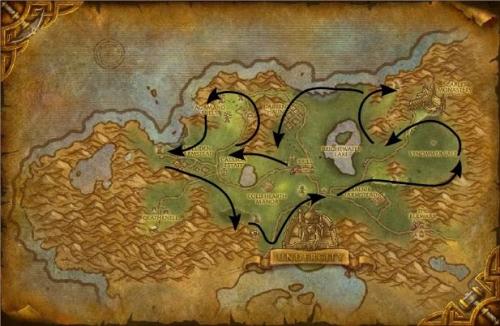 Simple gatherer for herbing and mining in Tirisfal Glades.
