

⎝͠҉̭̫͖̗͇ͅTraWin ̍̍̍̍̍̍̍̍̍
Members
-
Joined
-
Last visited
Everything posted by ⎝͠҉̭̫͖̗͇ͅTraWin ̍̍̍̍̍̍̍̍̍
-
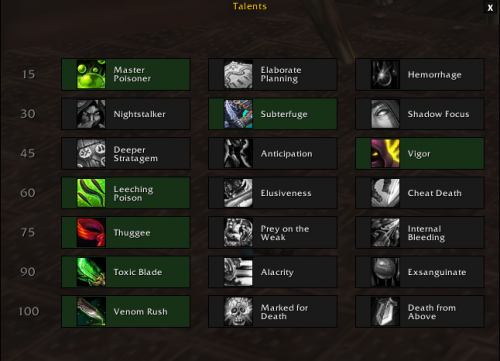 Use talents (1,2,3,1,1,1,1) Check screenshot. Great profile for PVE, in the future I will post with improvements for PVP. CHECK THE OPTIONS ON FIGHTCLASS, see screenshot 2 !!! Auto Stealth Auto Interrupt (KICK for spells can interrupt and Kidney Shot for all Spells) RECOMMEND DISABLE *Kidney Shot* in PVE, to save combo points. Auto apply Deadly Poison and Leech Poison In your build stats use: Mastery > Critical > Haste ( focus in Mastery ) Tell me what you think, did you find any fault? Say it ! I accept rotations and suggestions for improvements.
- 1 comment
-
-

- 1
-
-
- rogue
- poison
- 7.3.5
- rogue fightclass
-
Tagged with:
-
First the Bot is not a 100% functional and safe program, as already described in the sale, do not want to be banned or at risk? Do not use. But you are using and paying for it, do not complain about banishment in this case, you have full right to ask for a "assistance", but no offense, wrobot support to your customers is great. summarizing: No need to offend.
-
T_T ~help~
-
UP
-
This plugin dont worked for me >;C
-
yeah ;/
-
Did not work
-
Same problem here...