




Uzi
Members
-
Joined
-
Last visited
-
-
If you mean the "Automaton" it's located in the "Main" tab, which is the same location as the grinder/quester etc.
-
I have tested this with 3 profiles so far and every time my bot needs to complete the jasperolde mine quest it just accepts the quest and stands there trying to acquire the quest "westbrook garrison needs help" despite needing to complete jasperolde mine quest first.
-
There is a plugin called avoidit you can find in the plugins section which lets you customize this sort of behavior. I see you posted this 7 days ago but if you are still around and need assistance let me know.
-
I have the settings marked to gather herbs and skin mobs and I have the requisite skill level for the nodes/mobs in my area but after killing a mob the bot just ignores it and it also doesn't seek out herbs to harvest. I have no addons running and I tried setting the latency setting to 500 as i saw in another post. edit: I've managed to get skinning to work by setting it to 800-1000 latency. Herb not working
-
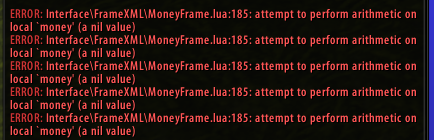
It happens even when they aren't activated.
-
See Attached How do I fix this?
-
This is a new fight class. (This one is for warrior, not the iMage)
-
While fighting the bot randomly is un-targeting the mob in-between attacks. Any idea how to fix this?
-
-
That worked for the fps. I'll see if it fixes the turning issue just by noting if it comes up again (it's random).
-
Nvidia Inspector didn't work. I capped fps at 60 but it was still going over when I used ctrl + R. I have a GeForce Graphics Card, does that have anything to do with it? Tried both. Didn't work.
-
This only happens occasionally but it makes it obvious im botting when my character is clearly struggling to turn around and face an enemy. I'm using iMage fight class profile.
