




420xygen
Members
-
Joined
-
Last visited
Everything posted by 420xygen
-
Hi, Sorry to get back to you, I don't see any improvement after doing the update.. still the same problem when I hover over the options, instant crash.. Thanks you in advice
-
I also have this same problem when hovering in the menu of a fightclass
-
up ?
-
Hi Droidz, i have disable all, and i put my mouse on the button i get crash... the log are "useless" then not looking for my crash
-
There must be a conflict with Win 11 14 févr. 2023 11H52.log.html
-
Good morning, I am writing these lines to you because despite a complete reinstallation WRobot crashes as soon as I pass the mouse over a button where a popup appears (play button, pause button) and suddenly it crashes enormously randomly, if I stagnate on the WRobot window with the mouse I can be sure it will crash.. Windows 11, Wrobot /WoW3.3.5 Wholesome Plugins + Product (autoquester) I'm sure I didn't have this problem before... 😕
-
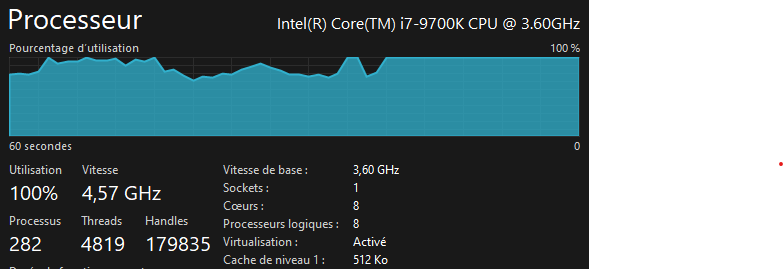
Hi all! I have a problem with WRobot, I use it on 2 pcs, on one equipped with an i7 10700h + rtx3080 (I don't know if it has something to do with the GPU?) I manage to launch 15 sessions and find myself at 70% of the processor, I even had the opportunity to run 20 sessions simultaneously with high processor usage (90-100%), another equipped with an i7-9700K+rtx2060 I arrive at 70- 80% with barely 6 sessions. it even very regularly reaches 100% even though it is really not as much in demand as the other..... The same parameters are used, the same plugins (WholesomePlugins + Whatgoingon), the same product (Wholesome Autoquester), the same fightclass (AIO.dll) Do you have a clue for a solution? I also often crash the bot, I don't know why but I have the impression that it's because of the popups (The text of the play button when I leave the mouse too long on the button), as soon as I let my mouse drag too long on the bot I crash the bot + the game.. Does anyone have a solution for this as well? Thanks you very much for your return and sorry for my "Google traduction english" lol ^^' Have a good day ! 420xygen
-
Hello everyone! I have a problem with the Wholesome vendor plugin... as soon as I activate it, it will put the WHOLE bag in the list of things not to sell / not to send by email ... suddenly the bot finds itself bugging in front of the mailbox without succeeding in sending the email , when I deactivate the plugin, I get sent the mail. as soon as I activate it, it puts everything directly in the list NOT to be sent.... Do you have a solution for this????
-
Same for me... 😕
-
 I can't get the bot online on my discord server.... anyone have a track?? Thanks in advance ! 😄
- 11 comments
- 10 reviews
