



Skip to content
View in the app

A better way to browse. Learn more.

WRobot

A full-screen app on your home screen with push notifications, badges and more.

To install this app on iOS and iPadOS
  1. Tap the Share icon in Safari
  2. Scroll the menu and tap Add to Home Screen.
  3. Tap Add in the top-right corner.
To install this app on Android
  1. Tap the 3-dot menu (⋮) in the top-right corner of the browser.
  2. Tap Add to Home screen or Install app.
  3. Confirm by tapping Install.

3d Search Radius Mobs or Objects

  • Version: All
  • Product: WRobot General
  • Type: Suggestion
  • Status: Not a Bug

 @Droidz, It would be very good to add a setting to change the 2d radius of the search mobs (or objects) to 3d. Often there are situations when bot need to kill mobs in a cave, but these caves are 2 or 3-storey, or just mobs with the same entry are above the cave, and they can not be attacked. In order to complete such tasks, you have to add a lot of black lists, restrictions, etc. All this could be avoided by turning on the 3d search radius mobs (or objects) tincture, thus eliminating the ability of the bot to attack targets that are too high or too low.
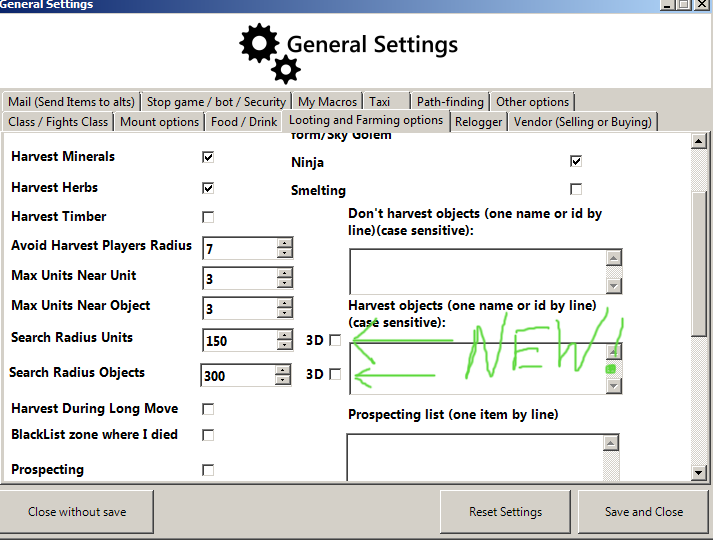
image_2021-02-16_15-35-29.png

User Feedback

Recommended Comments

Create an account or sign in to comment

Account

Navigation

Search

Search

Configure browser push notifications

Chrome (Android)
  1. Tap the lock icon next to the address bar.
  2. Tap Permissions → Notifications.
  3. Adjust your preference.
Chrome (Desktop)
  1. Click the padlock icon in the address bar.
  2. Select Site settings.
  3. Find Notifications and adjust your preference.