



Skip to content
View in the app

A better way to browse. Learn more.

WRobot

A full-screen app on your home screen with push notifications, badges and more.

To install this app on iOS and iPadOS
  1. Tap the Share icon in Safari
  2. Scroll the menu and tap Add to Home Screen.
  3. Tap Add in the top-right corner.
To install this app on Android
  1. Tap the 3-dot menu (⋮) in the top-right corner of the browser.
  2. Tap Add to Home screen or Install app.
  3. Confirm by tapping Install.

Pathfinder wrong path

  • Product: WRobot General
  • Type: Bug
  • Status: Unconfirmed

Pathfinder seems to think there is a path here.
 

[N] 07:04:47 - [Path-Finding] Path Count: 53 (4214,631y, 679ms) (resultPartial=True, resultSuccess=True (more info with server log option))
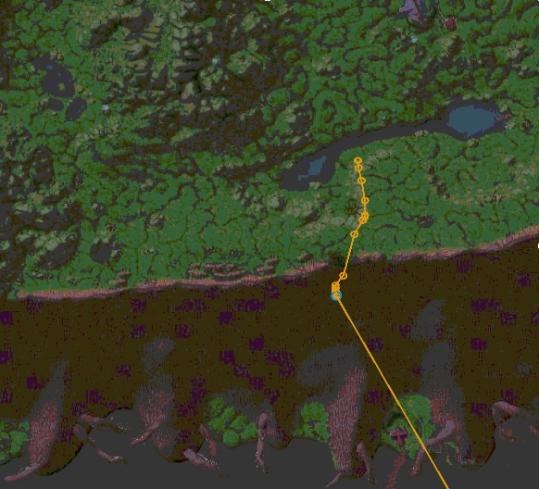
16d740da0f79385ec7b7b257e334c554-png.jpg

I added offmeshes to go through the portal in darnassus (even with useifcanmakepath) and they are ignored unless I am already close to that route.
Even with blacklisting this area:
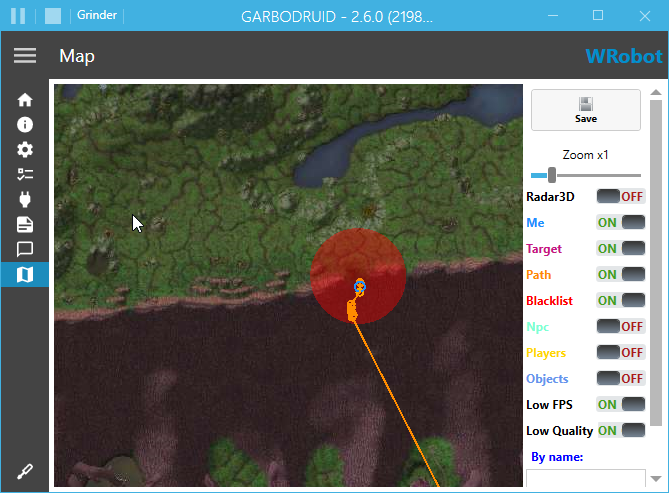
image.png.a47fd349f5bae1f88b744a39af3dba48.png


Can I somehow remove any vectors from that path and make it unusable for wrobot? It simply DOES NOT exist.

User Feedback

Recommended Comments

hi. You have try to increment settings "OffMeshConnectionsSearchDistance" ?

Wrobot can use only one offmeshconnection per path, if path need several offmeshconnections you need to combine them. For your problem, you need to create one offmeshconnection "Rut'Theran to Auberdine", one to "Darnassus Portal Down to Rut'Theran" and one "Darnassus Portal Down to Auberdine" ("A to B", "B to C" and "A to C")).

(if I understood the problem correctly.)

Matenia

Elite user

In my case, I have 6 offmeshes.
Darnassus Portal Down
Darnassus Portal Down and Auberdine
Ruth'eran to Auberdine

So depending on where the bot is, it should always find the correct connection, I think. 
I will try incrementing search distance.

Matenia

Elite user

Can you remove the path I have shown anyway?
It is wrong. The bot falls down a wall. There is no valid path down there. 

Matenia

Elite user

Even with offmesh distance 1000+ it does not work.
I PM'd you the code, you can take a look. It's 6 different offmeshes for all directions.

Create an account or sign in to comment

Account

Navigation

Search

Search

Configure browser push notifications

Chrome (Android)
  1. Tap the lock icon next to the address bar.
  2. Tap Permissions → Notifications.
  3. Adjust your preference.
Chrome (Desktop)
  1. Click the padlock icon in the address bar.
  2. Select Site settings.
  3. Find Notifications and adjust your preference.