



Skip to content
View in the app

A better way to browse. Learn more.

WRobot

A full-screen app on your home screen with push notifications, badges and more.

To install this app on iOS and iPadOS
  1. Tap the Share icon in Safari
  2. Scroll the menu and tap Add to Home Screen.
  3. Tap Add in the top-right corner.
To install this app on Android
  1. Tap the 3-dot menu (⋮) in the top-right corner of the browser.
  2. Tap Add to Home screen or Install app.
  3. Confirm by tapping Install.

1 Screenshot

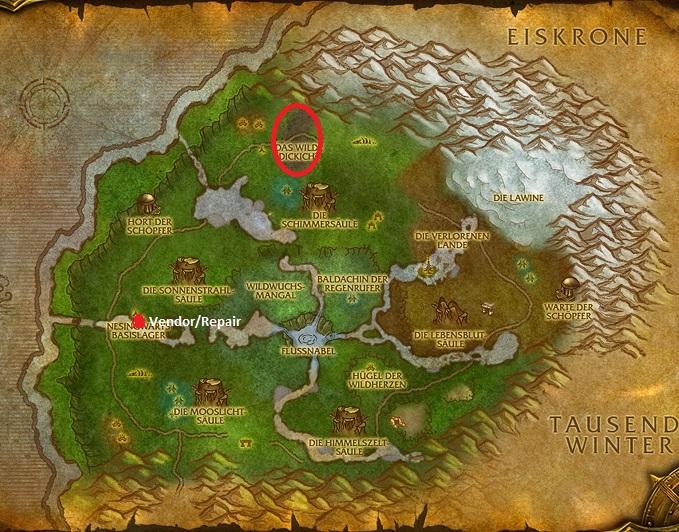
This is a profile for farming Icy Dragonscale, an item mostly used for leatherworking.

DETAILS

***********


Zone: Sholazar Basin

Min-Level: ~75

Mobs:  Primordial Drake

Mail/Repair/Vendor: No/Yes/Yes

Fraction: Alliance & Horde

Created on: Rising-Gods 3.3.5a

Other: Will also farm a lot of Borean Leather

Feel free to edit my profile.


User Feedback

You may only provide a review once you have downloaded the file.


Seems to work ok, guy with other review probably didnt run it as Grinder and maybe thats why it didnt work for him?

Working ok for me 🙂 Thanks

   2 of 4 members found this review helpful 2 / 4 members

Its not even working.

Account

Navigation

Search

Search

Configure browser push notifications

Chrome (Android)
  1. Tap the lock icon next to the address bar.
  2. Tap Permissions → Notifications.
  3. Adjust your preference.
Chrome (Desktop)
  1. Click the padlock icon in the address bar.
  2. Select Site settings.
  3. Find Notifications and adjust your preference.