



Skip to content
View in the app

A better way to browse. Learn more.

WRobot

A full-screen app on your home screen with push notifications, badges and more.

To install this app on iOS and iPadOS
  1. Tap the Share icon in Safari
  2. Scroll the menu and tap Add to Home Screen.
  3. Tap Add in the top-right corner.
To install this app on Android
  1. Tap the 3-dot menu (⋮) in the top-right corner of the browser.
  2. Tap Add to Home screen or Install app.
  3. Confirm by tapping Install.

[Playingnaked] - Frost Mage - PEW PEW V1.0

(0 reviews)

3 Screenshots

This was created mostly for BG/Honor grind farms.

  • Able to interupt casters/healers with 2 skills.
  • Able to USE - Frost nova if mele target's are close and Blinks
  • Able to Blink if stunned
  • Able to burst most dps
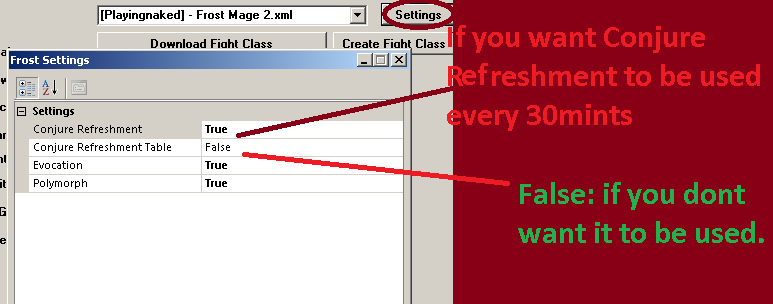
  • Able to make conjured food for any lvl every 30mints so you don't have to buy ( make sure you add the food name in your bot settings.) Also if some
  • Able to make conjured food table when joins a BG ( Currently not working right due to update - will fix this asap, make sure you disable it from setting as shown in the pictures

Please leave feedback so that it will help me

Improve it in the future with your comments!

What's New in Version V1.0

Released

No changelog available for this version.

User Feedback

Recommended Comments

da8ball

Elite user

<p>I never rolled a Mage, but I got a friend's account with one today and tried your profile. The mage is 85 ilvl 388 equiped from LFR Dragon Soul.<br />
<br />
&lt;p&gt;It cant kill the Phyton Elites on the regular Jade Forest 85-90 grinder (which I think it's really bad for leveling anyway), keeps dying and it stays too close from the targets. Once again, never played a Mage before, but I think he's supposed to stay away from targets because of cloth, right?<br />
<br />
Tried another profile for 85 available here, grinding tigers and prcupines (lvl 84-85) It does a lil better, but It died a bit also.</p>

<br />
Overall it seems to cast everything you need, but the short distance is killing him ASAP.<br />
Thanks for all your efforts !</p>

Pasterke

Members

Load the profile. Then click on create figfht class. Then load FightClass and load the xml file.

Once loaded, click on convert to C#.

When done save the file with extension .cs instedad of .xml.


Open the saved file in Notepad. On top you see

public float Range { get { return 5; } }

Change the 5 in 40. Save the file. Start bot and load the just saved .cs file. The range will now be 40.

Account

Navigation

Search

Search

Configure browser push notifications

Chrome (Android)
  1. Tap the lock icon next to the address bar.
  2. Tap Permissions → Notifications.
  3. Adjust your preference.
Chrome (Desktop)
  1. Click the padlock icon in the address bar.
  2. Select Site settings.
  3. Find Notifications and adjust your preference.