




Skip to content
View in the app

A better way to browse. Learn more.

WRobot

A full-screen app on your home screen with push notifications, badges and more.

To install this app on iOS and iPadOS
  1. Tap the Share icon in Safari
  2. Scroll the menu and tap Add to Home Screen.
  3. Tap Add in the top-right corner.
To install this app on Android
  1. Tap the 3-dot menu (⋮) in the top-right corner of the browser.
  2. Tap Add to Home screen or Install app.
  3. Confirm by tapping Install.

SmoothMove 18.2.6.40273

(5 reviews)

SmoothMove

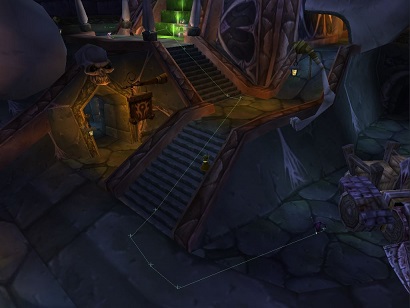
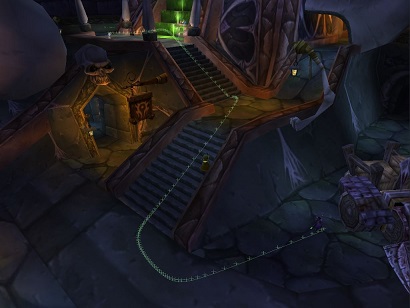
unaltered1_.jpg.7591e9a34c91c9f53d2e496cf5646c52.jpg   To  smoothed1_.jpg.256123026ef4be96fb1c27840f435215.jpg

This plugin offers smoothed paths with manual key input in order to achieve

a natural movement with strafe and facing like from a player.


Settings can be changed via a simple gui
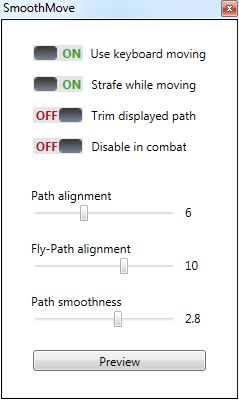
gui.JPG.373850ebbc63cf7b8acc5cb54b9bf559.JPG


Note:                                                                                      

- keyboard moving / strafing is not available for flying

- fully supported versions with keyboard moving         

and strafing are available on 1.12.1, 2.4.3, 3.3.5a,    

above it supports only smoothed paths                     

- this plugin may not work correctly with custom          

fightclasses or plugins with movement                      

affecting behavior                                                           

- side project, new versions / fixes may to be delayed 


Feedback, suggestions or problems?

Please leave your feedback here.


Would you like to report a bug?

At first please disable all other plugins & use not a custom fightclass.

If you can still reproduce the bug, a detailed list of steps and a log would be helpful.

If you notice it's a bug with another plugin or fightclass you

may also describe the problem here(not guaranteed it can be fixed).


Project is currently discontinued

Source: SmoothMove.rar

Someone has been already found to continue the project in the future.

New updates will be noticed here.


What's New in Version 18.2.6.40273

Released

- option "Disable in combat" was added,

  allows the user to disable keyboard moving while in combat(uses ctm instead)

User Feedback

Recommended Comments

Grizzler

Members

1 hour ago, pqs said:

Any updates on this? I really want to use this bot for gathering, but at the moment it looks WAY too bottish when taking turns (while flying). I tried this plugin but when it finds a nodes somtimes it flies in the opposite direction and stops working. Looks very bottish. I tried different settings but to no avail. Any help? Maybe someone can tell me what to put the settings at?
Thanks in advance.

Try this updated version, I've never tried it with flying so I wouldn't know what settings to use!


pqs

Members

7 hours ago, Grizzler said:

Try this updated version, I've never tried it with flying so I wouldn't know what settings to use!


Tried it but no good ? it stutters a lot while flying (which is what I need it for).

deelag

Members

How do I install this plugin? The plugin is not available in Wrobot after I unzipped the .rar in the plugins folder.

11.png

22.png

simuno

Members

Any updates to this?


GTXMike

Members

Any chance of this being updated to support fully 4.3.4?

Create an account or sign in to comment

Account

Navigation

Search

Search

Configure browser push notifications

Chrome (Android)
  1. Tap the lock icon next to the address bar.
  2. Tap Permissions → Notifications.
  3. Adjust your preference.
Chrome (Desktop)
  1. Click the padlock icon in the address bar.
  2. Select Site settings.
  3. Find Notifications and adjust your preference.
