



Skip to content
View in the app

A better way to browse. Learn more.

WRobot

A full-screen app on your home screen with push notifications, badges and more.

To install this app on iOS and iPadOS
  1. Tap the Share icon in Safari
  2. Scroll the menu and tap Add to Home Screen.
  3. Tap Add in the top-right corner.
To install this app on Android
  1. Tap the 3-dot menu (⋮) in the top-right corner of the browser.
  2. Tap Add to Home screen or Install app.
  3. Confirm by tapping Install.

[FREE] Weapon Upgrade Plugin 1.1.1

(2 reviews)

2 Screenshots

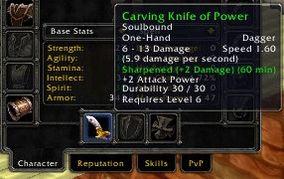
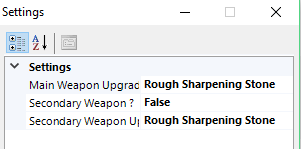
This plug-in allow you to specify which upgrade the bot should apply on your weapon by using Plug-in Settings. 

The bot will then check if you are not in combat or dead and if you don't already have a buff on your weapon, and then it will apply the specified upgrade like Sharpening Stone. 

Only tested on Wow Vanilla Serveur 1.12.1

This plug-in is based on @Skalikas Fishing Lure plug-in with few adjustments. 

Of course you will need to have the necessary upgrade item in your inventory. Bot will scan your inventory to check and apply the upgrade

What's New in Version 1.1.1

Released

Fixed dual weapon upgrade

User Feedback

Recommended Comments

PapaGeek

Members

Good job Soshius !!! Thanks

sequoia93

Members

Works well! Any chance of making if apply to off hand weapon as well? Its handy for rogue poisons.

Soshius

Members

33 minutes ago, sequoia93 said:

Works well! Any chance of making if apply to off hand weapon as well? Its handy for rogue poisons.

I will try to do something 

Soshius

Members

1 hour ago, sequoia93 said:

Works well! Any chance of making if apply to off hand weapon as well? Its handy for rogue poisons.

Can you try the new version ?

sequoia93

Members

17 minutes ago, Soshius said:

Can you try the new version ?

Just tried, I set offhand to True but it is still only applying to the main hand weapon.

Soshius

Members

4 hours ago, sequoia93 said:

Just tried, I set offhand to True but it is still only applying to the main hand weapon.

Should be fixed

sequoia93

Members

19 hours ago, Soshius said:

Should be fixed

Works great, thanks!

saleh

Members

is that work for worrior ?

Create an account or sign in to comment

Account

Navigation

Search

Search

Configure browser push notifications

Chrome (Android)
  1. Tap the lock icon next to the address bar.
  2. Tap Permissions → Notifications.
  3. Adjust your preference.
Chrome (Desktop)
  1. Click the padlock icon in the address bar.
  2. Select Site settings.
  3. Find Notifications and adjust your preference.
