




Skip to content
View in the app

A better way to browse. Learn more.

WRobot

A full-screen app on your home screen with push notifications, badges and more.

To install this app on iOS and iPadOS
  1. Tap the Share icon in Safari
  2. Scroll the menu and tap Add to Home Screen.
  3. Tap Add in the top-right corner.
To install this app on Android
  1. Tap the 3-dot menu (⋮) in the top-right corner of the browser.
  2. Tap Add to Home screen or Install app.
  3. Confirm by tapping Install.

Shaman Enhancement Mythic+ Rotation 8.3.7 - PVE 35662

  • shaman1.png.0369fd0377c3f5849faa3b832863c89a.png
  • SHAMAN2.png.ad7c18b0fbc440f07a86fe8e04f57017.png
  • Auto rotation AOE and Single target, this fightclass will recognize when it is fighting a BOSS, and will start doing the single rotation.
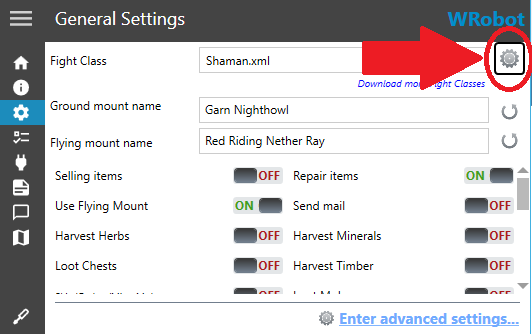
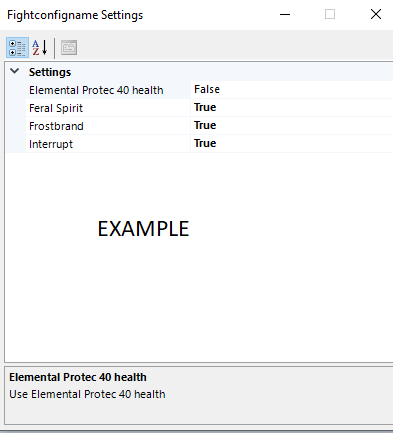
  • Auto Wind Shear (Interrupt), click on the gear next to the fightclass profile and activate
  • Auto Capacitor Totem, Hostile unit near to target, click on the gear next to the fightclass profile and activate
  • Astral Shift -40% HP
  • Auto Lightning Shield
  • Auto Earth Elemental -45% HP, click on the gear next to the fightclass profile and activate
  • In your build stats use:    1º Haste  -   2º Critical  -   3º Versatility         ( focus in Haste )

Rotation MDI for DMG and much more !

I didn't add "Tremor-Earthbind Totem or BL / HERO", as they would do more harm than good in the rotations.

Suggestions for changes are welcome, I will add future updates if necessary

This fighting class was done with these talents in mind, so use the same talents, see the image.

Tell me what you think, did you find any fault ?
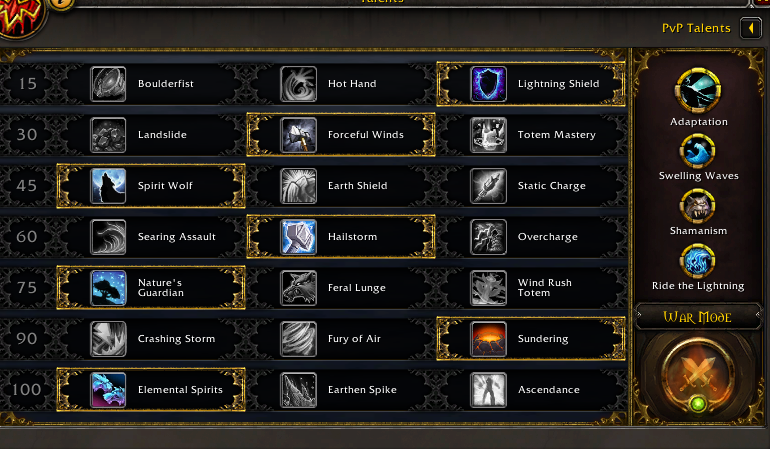
bUILD.png.cc2a59e587fb4865f5fa86df8961b2fd.png

What's New in Version 35662

Released

No changelog available for this version.

User Feedback

Recommended Comments

Marvelino123

Members

Great to see someone working on BFA Content for wRobot! Keep up the work! ?

Account

Navigation

Search

Search

Configure browser push notifications

Chrome (Android)
  1. Tap the lock icon next to the address bar.
  2. Tap Permissions → Notifications.
  3. Adjust your preference.
Chrome (Desktop)
  1. Click the padlock icon in the address bar.
  2. Select Site settings.
  3. Find Notifications and adjust your preference.