Skip to content
View in the app

A better way to browse. Learn more.

WRobot

A full-screen app on your home screen with push notifications, badges and more.

To install this app on iOS and iPadOS
  1. Tap the Share icon in Safari
  2. Scroll the menu and tap Add to Home Screen.
  3. Tap Add in the top-right corner.
To install this app on Android
  1. Tap the 3-dot menu (⋮) in the top-right corner of the browser.
  2. Tap Add to Home screen or Install app.
  3. Confirm by tapping Install.

Protection Warrior - PVE - Mythic+ 8.2.0 31478

  • Auto spell reflection if pummel is not available for use
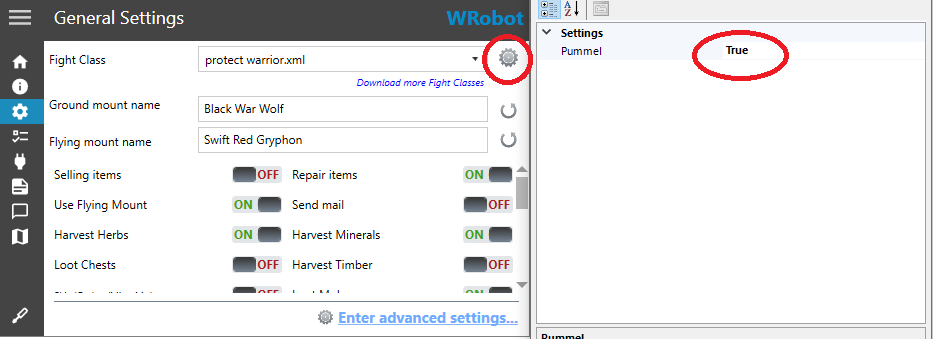
  • Auto Pummel (Interrupt), click on the gear next to the wrobot profile and activate
  • Victory Rush -75% HP
  • Victory Rush auto use if buff time left -5s. [2ª secondary Victory]
  • Auto Shield Block  80% HP
  • [Optional]Auto Taunt if the target is not focusing on you, click on the gear next to the wrobot profile and activate
  • In your build stats use:    1º Haste  -   2º Versatility  -   3º Critical/Mastery         ( focus in Haste )

Rotation MDI for DMG and much more !

I didn't add "charge / intercept / heroic leap / berserker rage", as they would do more harm than good

Suggestions for changes are welcome, I will add future updates if necessary

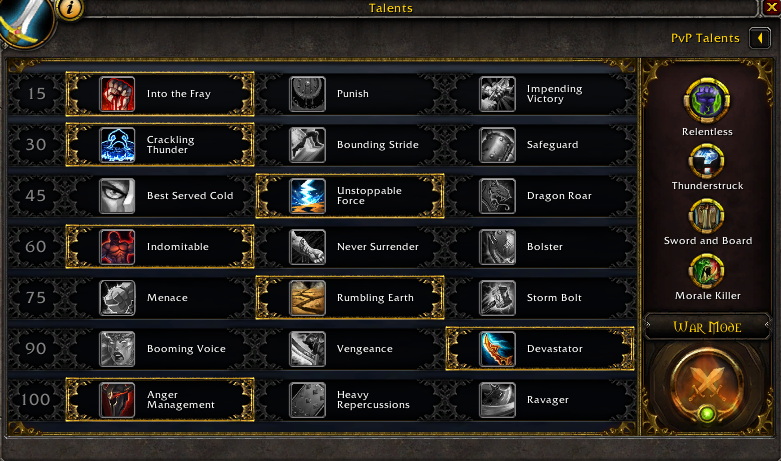
This fighting class was done with these talents in mind, so use the same talents, see the image.

Tell me what you think, did you find any fault ?
as.png

unknown.png

What's New in Version 31478

Released

No changelog available for this version.

User Feedback

Recommended Comments

Lemke

Members

Using this for leveling for now,when i reach the cap i will update this rotation.
Working so well!

shagwells

Members

Thanks for the upload. Some reason It keeps spamming demo shout every 2 - 3 seconds. How do I fix this?

Account

Navigation

Search

Search

Configure browser push notifications

Chrome (Android)
  1. Tap the lock icon next to the address bar.
  2. Tap Permissions → Notifications.
  3. Adjust your preference.
Chrome (Desktop)
  1. Click the padlock icon in the address bar.
  2. Select Site settings.
  3. Find Notifications and adjust your preference.