




Skip to content
View in the app

A better way to browse. Learn more.

WRobot

A full-screen app on your home screen with push notifications, badges and more.

To install this app on iOS and iPadOS
  1. Tap the Share icon in Safari
  2. Scroll the menu and tap Add to Home Screen.
  3. Tap Add in the top-right corner.
To install this app on Android
  1. Tap the 3-dot menu (⋮) in the top-right corner of the browser.
  2. Tap Add to Home screen or Install app.
  3. Confirm by tapping Install.

98-100 Meatgut Needs Bones (repeatable quest) (Nagrand)

(1 review)

1 Screenshot

User Feedback

Recommended Comments

Reaper666

Members

Does this cover all of Nagrand or a specific area?

hansungkim

Members

Product settings


Grinder?

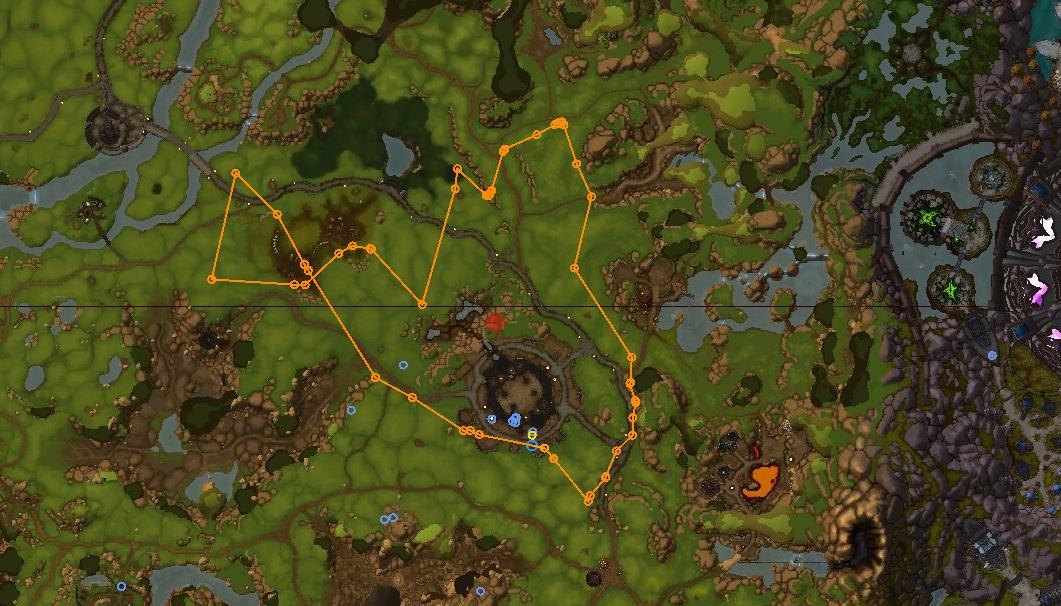
@Reaper666: I have added screenshot of the path, it cover east of Negrand (you can add hotspot in profile for cover all).


@hansungkim: It is quest profile, you need to use Quester bot (and move this profile in the folder "\WRobot\Profiles\Quester\").

Dynasty

Members

how much gold/hr you estimate? or better way of putting it. how many times does it turn in the 240 bones per hr?

Flawlesszvk

Members

Is it possible to not have him dismount? I have the Telaari Talbuk the base mount that doesn't need to be dismounted before combat. I'm wondering if there is an option to prevent char from dismounting when it isn't necessary.

zadman

Members

Hi,


The bot won't turn in the bones, just stands next to Meatgut.

Weird thig is this only happens on my desktop, when I tried it on my laptop while I was on vacation it worked fine.


Any help?

chapperz

Members

I am using this profile atm and as yet i'm yet to see any bones are we sure this profile collects them? or am i missing something?

eeny

Elite user

You need to do your factions nagrand starter quest before meat gut will show the repeatable quest.


If he doesn't have the blue icon you ain't getting the bone... (Dirty joke in there somewhere..)

chapperz

Members

kk thanks


Account

Navigation

Search

Search

Configure browser push notifications

Chrome (Android)
  1. Tap the lock icon next to the address bar.
  2. Tap Permissions → Notifications.
  3. Adjust your preference.
Chrome (Desktop)
  1. Click the padlock icon in the address bar.
  2. Select Site settings.
  3. Find Notifications and adjust your preference.
