




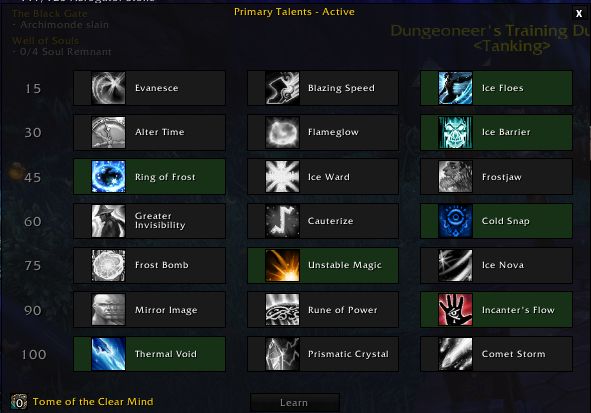
This profile is for characters on level 100.
Screenshot of required talents is provided for maximum compatibility.
Glyphs that i recommend are: Water Elemental, Icy Veins and Splitting Ice.
1. Summon Water Elemental when dismissed or dead. Water elemental should be set as follows:
Behavior -> Assist
Waterbolt -> Auto
Water Jet -> Manual
You can set it by right clicking the skill on the pet bar, if there is an golden aura on the skill it means it's on Auto.
2. Cast Arcane Brilliance - it will always sustain this buff and rebuff it on the dungeon entry.
3. Cast Invisibility when HP is equal or below 20%.
4. Cast Ice Block when HP is equal or below 30%.
5. Cast Cold Snap when HP is equal or below 40%.
6. Cast Ice Floes, Icy Veins and Frozen Orb when available.
7. Main damage skill is Frostbolt but bot will use Ice Lance when Fingers of Frost are available and Frostfire Bolt when Brain Freeze is available. Icy Veins only used in Frozen Orb and Fingers of Frost present, because of Thermal Void talent that extends Icy Veins when Ice Lance used.
8. Cast Frost Nova when 2 or more enemies within 12yd range.
9. Cast Water Jet (Pet Skill) when available together with Frostbolt only to receive additional Finger of Frost for maximum damage. Water Jet is triggered when character is casting Frostbolt. Water Jet will be only used if Fingers of Frost are not available (avoiding wasting FoF).
What's New in Version 2.2
Released
- Added Ice Barrier into rotation. Please make sure you have correct talents.

You may only provide a review once you have downloaded the file.