




Droidz
Administrators
-
Joined
-
Last visited
Everything posted by Droidz
-
Hello, Can you share your log file please ( https://wrobot.eu/forums/topic/1779-how-to-post-your-log-file-with-your-topic/ ). Do you have activate option "Use drink" in advanced general settings tab "Food/Drink"?
-
Je pense que vous n'avez pas ajouter de vendeur dans votre profil ou base de donnée WRobot, vous pouvez en ajouter un avec l'outil "NPC DB" onglet "Tools"
-
Hello, no you cannot change that
-
Hello, Can you share your log file please ( https://wrobot.eu/forums/topic/1779-how-to-post-your-log-file-with-your-topic/ ). Try to install SlimDX (4.0 X86), Redistributable Visual C + + 2010 (X86) and to disable your antivirus.
-
Hello, increment your min/max latency in advanced general settings
-
-
Others sample: static Main() { wManager.Events.FightEvents.OnFightStart += (unit, cancelable) => { robotManager.Helpful.Var.SetVar("CanBack", true); }; wManager.Events.FightEvents.OnFightLoop += (unit, cancelable) => { if (robotManager.Helpful.Var.Exist("CanBack") && robotManager.Helpful.Var.GetVar<bool>("CanBack") && unit.IsValid && !ObjectManager.Me.IsCast && unit.GetDistance < 15 && !TraceLine.TraceLineGo(unit.Position)) { var startPos = new Vector3(ObjectManager.Me.Position); var timer = new robotManager.Helpful.Timer(5 * 1000); try { wManager.Wow.Helpers.Move.Backward(Move.MoveAction.DownKey); while (!timer.IsReady && Conditions.InGameAndConnectedAndAliveAndProductStartedNotInPause && !TraceLine.TraceLineGo(unit.Position) && unit.GetDistance < 30) { Thread.Sleep(10); } } catch { } finally { wManager.Wow.Helpers.Move.Backward(Move.MoveAction.UpKey); } if (TraceLine.TraceLineGo(unit.Position)) // if your target is now not in line of sight after back, disable this option for current combat robotManager.Helpful.Var.SetVar("CanBack", false); if (ObjectManager.Me.Position.DistanceTo(startPos) < 10 && unit.GetDistance < 30 && timer.IsReady) // if seem stuck (wall?) robotManager.Helpful.Var.SetVar("CanBack", false); } }; } (not tested)
-
Not sure but try that: WoWGameObject Fire() { var skyfire = Skyfire(); if (skyfire == null) return null; var fires = ObjectManager.GetWoWGameObjectByEntry(243244); var i = 0; foreach (var f in fires) { var l = f.Position; var g = GetWorldPosition(l); Logging.Write(" FIRE: " + f.Name + " local=" + l + " global=" + g + " dist=" + ObjectManager.Me.Position.DistanceTo(g) + " distZ=" + ObjectManager.Me.Position.DistanceZ(g)); i += 1; } Thread.Sleep(60 * 1000); return null; var fire = fires.OrderBy(f => (GetWorldPosition(f.Position)).DistanceTo(ObjectManager.Me.Position)).FirstOrDefault(); if (fire != null && fire.IsValid) // && fire.GetDistance < 10) { return fire; } return null; } WoWGameObject Skyfire() { var skyfire = Questing.FindObject(241630); if (skyfire != null && skyfire.IsValid) { return skyfire; } return null; } Vector3 GetWorldPosition(Vector3 position) { if (position == Vector3.Zero || !ObjectManager.Me.IsValid || !ObjectManager.Me.InTransport) return position; return position + (ObjectManager.Me.PositionWithoutType - ObjectManager.Me.PositionRelativeWithoutType); } After you need to interact manually like that: if (fire != null && fire.IsValid) { if (GoToTask.ToPosition(GetWorldPosition(fire.Position))) { Interact.InteractGameObject(fire.GetBaseAddress); Usefuls.WaitIsCastingAndLooting(); } }
-
Changed Status to Confirmed Changed Version to All
-
Hello, Can you share your log file please ( https://wrobot.eu/forums/topic/1779-how-to-post-your-log-file-with-your-topic/ ).
-
Hello, Can you share your log file please ( https://wrobot.eu/forums/topic/1779-how-to-post-your-log-file-with-your-topic/ ).
-
Hello, Can you share your log file please ( https://wrobot.eu/forums/topic/1779-how-to-post-your-log-file-with-your-topic/ ).
-
return new Vector3(-1791.935f, 3050.169f, 8.208141f).DistanceTo(ObjectManager.Me.Position) < 500; And yes 500 it is yards, you can change this value
-
Hello, not tested: wManager.Events.FightEvents.OnFightLoop += (unit, cancelable) => { var newTarget = new WoWUnit(0); // your code to found new mobs if (newTarget.IsValid && !newTarget.IsMyTarget) { Fight.StartFight(newTarget.Guid); cancelable.Cancel = true; } }; or wManager.Events.FightEvents.OnFightLoop += (unit, cancelable) => { var newTarget = new WoWUnit(0); // your code to found new mobs if (newTarget.IsValid) { if (!newTarget.IsMyTarget) Interact.InteractGameObject(newTarget.GetBaseAddress); // your code here .... SpellManager.CastSpellByIdLUA(123); } };
-
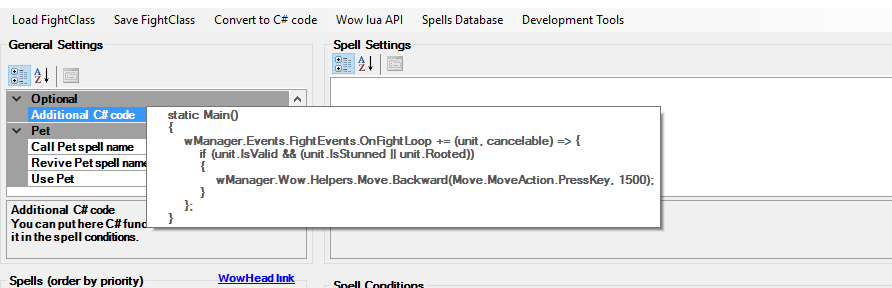
Hello, In fightclass general settings, in option "Additional C# code" add code like: static Main() { wManager.Events.FightEvents.OnFightLoop += (unit, cancelable) => { if (unit.IsValid && !ObjectManager.Me.IsCast && (unit.IsStunned || unit.Rooted)) { wManager.Wow.Helpers.Move.Backward(Move.MoveAction.PressKey, 1500); } }; } (code not tested)
-
Hello, Can you share your log file please ( https://wrobot.eu/forums/topic/1779-how-to-post-your-log-file-with-your-topic/ ).
-
Do you have try to clear blacklist (when mobs are lootables)? Try also to increment option "max unit near..."
-
-
I cannot reproduct, this problem is probably caused by your fightclass, and in drink % try to put value like 60
-
Hello, I comeback here when I have check
-
Hello, no, check your wrobot settings, and try to disable you wow addons
-
Try to put value like 300-500
-
Hello, normally it is automatic. But you can blacklists nodes in advanced general settings tab "Lootings..."
-
Hello, i'll not add this option, but you can run this code for that: robotManager.Helpful.Others.ShutDownPc(); (run this code in quester or custom profile)

