




Droidz
Administrators
-
Joined
-
Last visited
Everything posted by Droidz
-
Hello, Do you use druid form? If yes you can activate option "Ignore fight during farm if druid form" tab "Looting.." in advanced general settings. You can also put 0 at option "Max Units Near" tab "General Settings". But it is hard to detect if farming has finish or not, it is for this reason that WRobot dismount if attacked. I'll try to improve this in the next update. If you can wait the next WRobot update and tell me if problem is resolved (or improved or not).
-
-
-
-
Hallo. Gut Gemacht. Zögern Sie nicht es in "Downloads-Sitzung" (http://wrobot.eu/files/category/1-translations/) zu senden. Über Bouttons/Texte-Größen ist das beste warten verkürzen Ihre übersetzten Text, wenn Sie nicht ich kann versuchen, einigeButton Text zu vergrößern (mir sagen). ________________________ Hello. Good job. Do not hesitate to post it in "downloads session" (http://wrobot.eu/files/category/1-translations/ ). About bouttons/texts sizes the best wait is to shorten your translated text, if you cannot I can try to increment size of some text/button (tell me).
-
Apexis Crystal Daily Quests Alliance: http://www.wowhead.com/quest=36679 http://www.wowhead.com/quest=36678 http://www.wowhead.com/quest=36682 http://www.wowhead.com/quest=36649 http://www.wowhead.com/quest=36648 http://www.wowhead.com/quest=36677 http://www.wowhead.com/quest=36676 http://www.wowhead.com/quest=36674 http://www.wowhead.com/quest=36686 http://www.wowhead.com/quest=36685 http://www.wowhead.com/quest=36681 http://www.wowhead.com/quest=36675http://www.wowhead.com/quest=36683 http://www.wowhead.com/quest=36680 (Not Completed) Horde: http://www.wowhead.com/quest=36667 http://www.wowhead.com/quest=36696 http://www.wowhead.com/quest=36689 http://www.wowhead.com/quest=36669 http://www.wowhead.com/quest=36692 http://www.wowhead.com/quest=36694 http://www.wowhead.com/quest=36695 http://www.wowhead.com/quest=36693 http://www.wowhead.com/quest=36701 http://www.wowhead.com/quest=36699 http://www.wowhead.com/quest=36690 http://www.wowhead.com/quest=36697http://www.wowhead.com/quest=36688 http://www.wowhead.com/quest=36691 (Not Completed)
-
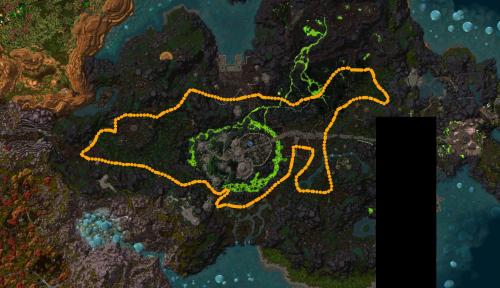 Thank you, I have blacklisted "Ironmonger's Hold" zone in the profile (download it again).
- 14 comments
- 2 reviews
-
Level 92 to 94 Gorgond Alliance ps: I recommand to use potion http://www.wowhead.com/item=120182
-
Hello, can you try to, In "General Settings" > "Enter advanced settings...": - Activate option "Start fighting with Elite". - Tab "Looting and Farming" > "Max Units Near" put 999.
-
-
Bonjour, Pouvez vous partager le fichier journal d'un session de WRobot ou vous avez rencontré ce problème ( http://wrobot.eu/forums/topic/1779-how-to-post-your-log-file-with-your-topic/ ). Essayer également de réinstaller WRobot (essayé avec la version préinstallé: http://download.wrobot.eu/wrobot/tmp/WRobotPack.zip )
-
-
Bonjour, Sauf erreur de ma part vous avez créer plusieurs comptes, je peux voir que l'un de vos compte (Dreep) à un abonnement actif. Merci de me dire si je fais erreur.
-
-
Hello, Sorry, I don't refund subscription, you can try WRobot with trial version before buy it. If you want I can pause your subscription and you will reactivate it when you need it. Regards, Droidz.
-
-
-
Hello, Sorry, no API documentations yet. To get list of classes/methods add wManager.dll and robotManger.dll in your project reference on visual studio (or use software like https://www.jetbrains.com/decompiler/ ).
-
Hello, This problem can be caused by programs like teamspeak, mumble, AMD Gaming Evolved, open broadcaster, xsplit, fraps ,... (programs that record/drawing in game). Do you have installed new softwares recently? You can also try to (re)install SlimDX . If you can also give me log file of session where wow crash: http://wrobot.eu/forums/topic/1779-how-to-post-your-log-file-with-your-topic/
-
I have modified your license key, if you can tell me if your problem is resolved. If your problem is resolved, don't forget to say me when you buy new subscription to avoid to get this problem again (I need to edit your subscription manually).
-
Hello, Where do you want add this? (Quest profile, grinder or gatherer profile?)
-
Hello, Can you try to disable your antivirus / firewall. Can you give me full log file.
-
Hello, I'll reply here: http://wrobot.eu/forums/topic/2371-bot-keeps-crashing/
-
Hello, Can you try to activate setting "Use lua to move".
-
Hello, in tab "Tools" you can add zone to blacklist (you can check if blacklisted zone is good in tab "Map"). If you can also give me position where you getting problems, I'll blacklist it in the profile for the futur users.
- 14 comments
- 2 reviews


