




Droidz
Administrators
-
Joined
-
Last visited
Everything posted by Droidz
-
Hello, Quest bot is available (Quester product). Tuto for good start: Tuto for create quest profile:
-
 Hello, Quest bot is available (Quester product). Tuto for good start: Tuto for create quest profile:
 -
I'll add an option to follow an player of the group from its name.
-
Hi, I'll watch it
-
Look this video: https://www.youtube.com/watch?v=0Ny72xhLUIE
-
No because checking of all spell conditions and launching spell takes time (use lua conditions (injection), take more time than reading health (memory reading only)). More you have spells and conditions in your fightclass, more you need big fps.
-
Hi, I have added option, wait new update.
-
Hi, Thanks, problem fixed wait next update
-
Hi, Good settings for quester (or grinder bot). Wow addon: For filtre loot: http://www.curse.com/addons/wow/bw-loot-filter For auto equip best item: http://www.zygorguides.com/ (for setting auto equip go to Zygor settings > "Extra features" > uncheck "Confirm gear suggestions" and check "Equip gear automatically". For sell (wrobot have settings for this, but you can use addon also): http://www.curse.com/addons/wow/sell-o-matic-2 WRobot settings: Go to "General Settings" Tab "Class/Fight Class": > Select an Fight Class for your character ( without fight class your character only auto attack, you can download fight classes here: http://wrobot.eu/files/category/9-fight-class/ (you can also use pqrotation)). Tab "Food / Dink": > Put your food name (case sensitive). Tab "Mount options": > Put your mounts names Tab "Vendor": > Put "Food Amount" at 5. > Check "Repair". > Check "Selling". > Edit list of "Do not sell list" items. You need vendor in your quest/grinder profile. Your are now ready
-
Hi, It is very easy. Go to WRobot tab "Tools" and click on button "Translation". New window appear, you have two columns, at the left (Original text...) the text used in the bot, at the right (Translation) the text at translate in your language (don't edit left columns). Don't forget to save (file saved in "Base Folder\Data\Lang\") and you can share your translation here: http://wrobot.eu/files/category/1-translations/ (you can select language in login window)
-
You can also try to setting in General Settings > tab Looting and ... > Max Units Near at 0
-
What is current state when wrobot bug? I have tried your profile during 40 minutes and no problem. Try to leave empty Fly mount name in general setting.
-
Hi, With the new update it is possible that wrobot skip spell (this can cause problem is spell use timer). And for fps it is the pause time when you have launched a spell or when wrobot has finish to read spells list. The time is in ms, is 1000/fps = pauseTime. For a fps of 30 the time of pause is 1000/30 = 33 ms
-
Hi, Sorry, update again bot, normally problem fixed.
-
Reserved
-
Reserved
-
Sorry for my bad English, I will correct later.
-
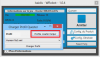
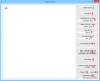
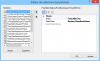
Quest profile Quest profile contain two files: Quests.cs > C# code - What the bot should do for completed the objectives of the quest, one class per quest. (I recommend for edit this file to use visual studio and add for reference wManager.dll at the project, this file) Profile.xml > Xml code – In this file is defined: The order of quest step (sample: quest1>PickUp ; quest2>PickUp ; quest2>Pulse ; quest2>TurnIn ; …) List of Npc quest giver (starts and ends quests list id) List of Npc (vendor, repair, mailbox)(You can use editor (You can found it in “Profile creator helper”) or block note)Useful tools: Select product « Quester », Click on button “Start”, new window appear, click on button “Profile creator helper”. Quest Tools Return entry id and position of your current target (text formatted to c# syntax for Quest.cs).Return your position (text formatted to c# syntax for Quest.cs).Return game objects information (game object is Mailbox, chest, mine, herb, …), entry id and position of all objects loaded in wow memory (position order by player distance) (replace “GameObject Name” by object name (case sensitive)) (text formatted to c# syntax for Quest.cs).Return unit information (uint is player, pet, creature, Npc, …), entry id and position of all unit loaded in wow memory (position order by player distance) (replace “Creature Name” by unit name (case sensitive)) (text formatted to c# syntax for Quest.cs).Create base quest class (information extracted of wowhead, it is recommended to manually check if they are correct) (replace “Quest ID” by your quest entry id”) (text formatted to c# syntax for Quest.cs).Create Npc quest giver, prefilled PickUp, TurnIn quests and position (information extracted of wowhead, it is recommended to manually check if they are correct) (replace “Npc ID” by your unit entry id”) (text formatted to xml syntax for Profile.xml).Return information about your current quests, this return quest entry id, stat of objectives 1, 2, 3, 4 and time left.Convert Zygor guide to WRobot quest profile (it don’t convert all, this can help you to gain time because you need to fix errors and bad information manually) (you can found guide in “ZygorGuidesViewer\Guides\Leveling”) (copy text of guide in textbox (14) for convert it) (return xml and C# code).Quest Profile Editor (for Profile.xml).This extract all quests classes name of c# (Quests.cs) file.Open Windows Notepad.Open Windows Calculator.Open Development tools (very useful tools for extract wow memory information).Textbox where are returned values.To get entry id of a unit, quest or object go to wowhead, on this URL wowhead.com/quest=26378 entry id of this quest is 26378. Download this file for get positions of NPC (extract it in wrobot folder): http://download.wrobot.eu/wrobot/Data_creature.csv.zip Profile.xml For edit this file you can use “Profile Editor” (9) or notepad. QuestFile: Path to c# file. QuestsSorted: Action of quests (WRobot reading this list in order)NameClass: The C# class name of the quest selected (case sensitive) (class name is in Quests.cs). Actions: · Pulse: Execute objective of the quest. · TurnIn: Return to Npc for complete the quest. · PickUp: Go to Npc for accept the quest. · PulseAllInOne: Execute PickUp > Pulse > TurnIn. NpcQuest: List of Npc and Game Object quest giver. Don’t forget to complete PickUpQuests and TurnInQuests (list of quest id), you can use Quest Tools (6) for gain time. Npc: List of mailbox, Npc vendor, repair… I recommend to edit existing quest profile to better understand. Quest.cs For edit Quest.cs you need base know of c#.net and POO. You need also Visual Studio 2010 (or 2012). Editor: You can use notepad, but I recommend: · Open Visual Studio · Create new project Class Library. · Add reference at your project wManager.dll and robotManager.dll. · When you create project with visual studio a .cs file is created, remove all text of it (Quest.cs don’t use namespace). Quest.cs don’t use namespace, you need one class by quest (it is possible to use two classes per quest if necessary). I use quest name for naming class (no compulsory), don't forget to use public class and inheritance of Quest.....Class. Quest simple, without objective, just pickup, turnin: public class ReportToGoldshire : QuestClass // inheritance of QuestClass { public ReportToGoldshire() { QuestId.Add (54); // Add quest id } } Quest type kills or get items find on creature:public sealed class BeatingThemBack : QuestGrinderClass // Inheritance of QuestGrinderClass { public BeatingThemBack () { QuestId.Add (28757); // Add quest id Step.AddRange(new[] { 6, 0, 0, 0 }); // Objective required count, for this quest he has only one objective to kills 6 creatures, if quest need 10 items replace 6 by 10 HotSpots.Add(new Vector3(-8885.293f, -62.18237f, 85.49203f)); // Position where you can found creature at kill HotSpots.Add(new Vector3(-8850.301f, -94.07894f, 83.14889f)); // Position where you can found creature at kill EntryTarget.Add(49871); // Entry id of creature at kill } } Quest type gatherer for pick up items:public sealed class ABundleofTrouble : QuestGathererClass // Inheritance of QuestGathererClass { public ABundleofTrouble() { QuestId.Add(5545); // Add quest id Step.AddRange(new[] { 8, 0, 0, 0 }); // Objective required count EntryIdObjects.Add(176793); // Entry id of game objects at gather HotSpots.Add (new Vector3(-9364, -1274, 60)); // Position where you can found game objects HotSpots.Add (new Vector3(-9494, -1464, 60)); // Position where you can found game objects } } Quest type use item on GameObjects/Unit:public sealed class ExtinguishingHope : QuestUseItemOnClass // Inheritance of QuestUseItemOnClass { public ExtinguishingHope() { QuestId.Add(26391); // Add quest id Step.AddRange(new[] { 8, 0, 0, 0 }); // Objective required count HotSpots.Add(new Vector3(-8921, -354, 73)); // Position where you can found game objects, creatures HotSpots.Add(new Vector3(-9037, -314, 73)); // Position where you can found game objects, creatures ItemId = 58362; // Entry id of item at use Range = 5 ; // Range of item EntryIdTarget.Add(42940); // Entry id of game objects or creatures/npc whose you need use item on it } } For quest type use spell on GameObjects/Unit replace inheritance class QuestUseSpellOnClass by QuestUseSpellOnClass and ItemId by SpellId Quest type interact with Npc: public sealed class FearNoEvil : QuestInteractWithClass { public FearNoEvil() { QuestId.Add (28813); // Add quest id Step.AddRange(new[] { 4, 0, 0, 0 });// Objective required count EntryIdTarget.Add(50047); // Entry id of creature/npc at interact with GossipOptionNpcInteractWith = 0; // This options is only if npc has menu HotSpots.Add(new Vector3(-8781, -105, 83)); HotSpots.Add(new Vector3(-8783, -187, 82)); } } Override, Add condition for get if character can get this quest: public class ReportToGoldshire : QuestClass // inheritance of QuestClass { public ReportToGoldshire() { QuestId.Add (54); // Add quest id } public override bool CanConditions()// Override method CanConditions { if (ObjectManager.Me.WowClass == WoWClass.Monk) { return false; } if (ObjectManager.Me.Level > 5) { return false; } if (ObjectManager.Me.WowRace != WoWRace.Human) { return false; } return true; } } If the character is an monk, or level is bigger than 5 or not human this quest is skip Override PickUp for accep quest of item:public sealed class TheCollector : QuestClass { public TheCollector() { QuestId.AddRange(new[] { 123 }); Step.AddRange(new[] { 0, 0, 0, 0 }); } public override bool PickUp() // Override method PickUp() { ItemsManager.UseItem(ItemsManager.GetNameById(1307)); Quest.AcceptQuest(); return true; } } Quest without objective number count and with special objective:public sealed class TheJasperlodeMineQuest : QuestClass { public TheJasperlodeMineQuest() { QuestId.AddRange(new[] { 76 }); Step.AddRange(new[] { 0, 0, 0, 0 }); } private bool _step1; public override bool Pulse() // Override Pulse, special objective (need to Explore the Jasperlode Mine) { if (!_step1 && GoToTask.ToPosition(new Vector3(-9097, -565, 61))) // Go to Jasperlode Mine { Thread.Sleep(3000); _step1 = true; // character is at Jasperlode Mine, objective complete } return true; } public override bool IsComplete() // Override iscomplete for add _step1 { if (IsCompleted()) // If quest already turnin return true; if (!HasQuest()) // If character not have this quest return false; return _step1; // Return _step1 } } Multi Quest in one class:public sealed class BeatingThemBackQuest : QuestGrinderClass { public BeatingThemBackQuest() { QuestId.AddRange(new[] { 28757, 28762, 28763, 28764, 28765, 28766, 28767, 31139, 28763 }); Step.AddRange(new[] { 6, 0, 0, 0 }); HotSpots.Add(new Vector3(-8885.293f, -62.18237f, 85.49203f)); HotSpots.Add(new Vector3(-8850.301f, -94.07894f, 83.14889f)); EntryTarget.Add(49871); } }Wow have created 9 quests with same objective, one per wow class, when wrobot check if you have quest, he search if your character have one of quests of the class.
-
-
Bonjour, C’est avec plaisir que je vous poste cette annonce aujourd’hui, un site dédié à la communauté française du bot vient d’ouvrir ces portes. Il s’agit de mmorobot.eu, site français pour le bot world of warcraft WRobot ainsi que pour le bot Champions Online CRobot. Il vous permettra de mieux trouver ce que vous désirez si pour vous la barrière de la langue anglaise et un problème. Un support de qualité pour les français sera assuré. Toutes sortes de profils seront très bientôt disponible afin de pouvoir bot en toutes tranquillité et d’avoir vos ressources désiré. Des profils pourront être spécialement fait selon vos demandes. Le site mmorobot.eu cherche aussi un modérateur « Français » afin de compléter son équipe. N’attendez plus chers français, rejoignez MmoRobot.eu http://mmorobot.eu L'Équipe, MmoRobot
-
Bonjour, C’est avec plaisir que je vous poste cette annonce aujourd’hui, un site dédié à la communauté française du bot vient d’ouvrir ces portes. Il s’agit de mmorobot.eu, site français pour le bot world of warcraft WRobot ainsi que pour le bot Champions Online CRobot. Il vous permettra de mieux trouver ce que vous désirez si pour vous la barrière de la langue anglaise et un problème. Un support de qualité pour les français sera assuré. Toutes sortes de profils seront très bientôt disponible afin de pouvoir bot en toutes tranquillité et d’avoir vos ressources désiré. Des profils pourront être spécialement fait selon vos demandes. Le site mmorobot.eu cherche aussi un modérateur « Français » afin de compléter son équipe. N’attendez plus chers français, rejoignez MmoRobot.eu http://mmorobot.eu L'Équipe, MmoRobot
-
Can you share your profile please
-
Hi, You had this problem once or that's all the time?
-
Hi, Can you share your fightclass please?
-
Hi, You need only to record path that you want to wrobot will use (loop path, the end of your path is the start of you path). (pet battle path is similary at grinder path: )




