




Droidz
Administrators
-
Joined
-
Last visited
Everything posted by Droidz
-
Hello, try to disable your antivirus/firewall. This crash WRobot?
-
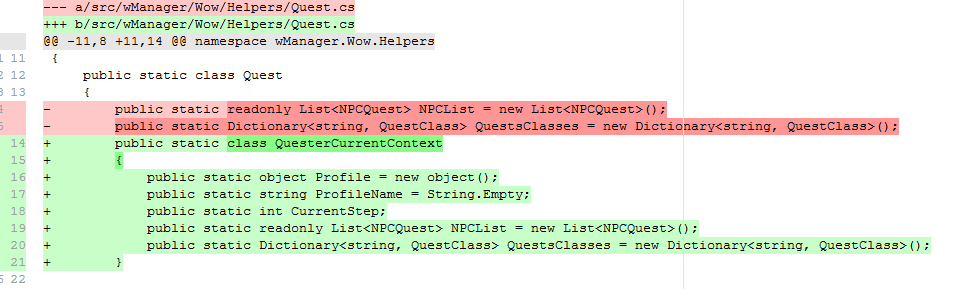
Hello, wath code do you run when you get this error? in last update I have changed Quest: : ("Quest.QuestsClasses" is now in "Quest.QuesterCurrentContext.QuestsClasses" ; "Quest.NPCList" is now in "Quest.QuesterCurrentContext.NPCList")
-
Hello, Can you share your log file please ( https://wrobot.eu/forums/topic/1779-how-to-post-your-log-file-with-your-topic/ ).
-
Hello, Can you share your log file please ( https://wrobot.eu/forums/topic/1779-how-to-post-your-log-file-with-your-topic/ ).
-
Hello, if you can tell me if you get same problem with new update
-
Si vous pouvez me dire si vous avez le meme problème avec la nouvel mise a jour
-
If you can wait next update and tell me if problem is resolved
-
Changed Status to Fixed
-
Hello, check if it no caused by your fightclass. And this can happen when last killed mob is not lootable (WRobot is more quick than wow objective update, you can resolved this if you increment min/max latency in advanced general settings, but you will lost time).
-
What is result when you run in cmd ping wrobot.eu -n 1 and ping wrobot.eu -n 1 (screenshot)
-
https://wrobot.eu/forums/topic/3633-getting-started-with-wrobot-video/
-
Hello, can you read this: https://wrobot.eu/forums/topic/1381-repairinstall-wrobot/#comment-966 If you problem is not resolved, can you share your log file please ( https://wrobot.eu/forums/topic/1779-how-to-post-your-log-file-with-your-topic/ ).
-
Hello, contact profile owner, this is profile problem
-
 You can share plugin or add this code in your fightclasses if you want, but I'll not add this code in WRobot.
- 3 comments
- 1 review
-
Hello, if you can wait next update and tell me if problem is resolved
-
Pouvez vous faire clique droite sur "WRobot.exe" > "Propriétés" > "Sécurité" et m'envoyer un capture d'écran de cette onglet
-
Avez vous le temps pour un session teamviewer, si oui si vous pouvez m'envoyer vos identifiant par message privée
-
Hello, when you use "NotRequiredInQuestLog" WRobot ignore "CanCondition". Check this in 'if' "quest order/step"
-
Hello, can you give me wowhead link of the quest
-
Vous avez désactiver "windows defender" et de re télécharger/réinstaller WRobot dans un dossier vide ? Parce que vous me partagez les meme fichier log
-
Partager votre fichier journal https://wrobot.eu/forums/topic/1779-how-to-post-your-log-file-with-your-topic/ Essayez également de désactiver "windows defender" et de re télécharger/réinstaller WRobot dans un dossier vide
-
Hello, Can you share your log file please ( https://wrobot.eu/forums/topic/1779-how-to-post-your-log-file-with-your-topic/ ).
-
Hello, you can try with log like (t.xml): robotManager.Events.LoggingEvents.OnAddLog += delegate(robotManager.Helpful.Logging.Log log) { // Logging.WriteDebug("[Quester] LoadProfile: " + Bot.Profile.QuestsSorted[i].NameClass); var logStartBy = "[Quester] LoadProfile: "; if (log != null && log.LogType == robotManager.Helpful.Logging.LogType.Debug && log.Text.StartsWith(logStartBy)) { var profile = log.Text.Remove(0, logStartBy.Length).Trim(); System.Windows.Forms.MessageBox.Show("Profile changed: " + profile); } }; (you can also write custom log from your profile and track it with "LoggingEvents.OnAddLog")
-
If you call "Radar3D.OnDrawEvent += () => ...", call this method (and all WRobot events) only one time. And use "Landmarks" like: // remove all landmarks by ID wManager.Wow.Forms.UserControlMiniMap.LandmarksMiniMap.Remove("MyCircleId"); // Add landmarks wManager.Wow.Forms.UserControlMiniMap.LandmarksMiniMap.Add(new MiniMapGenerator.LandmarkMiniMap(new Vector3(1, 2, 3), "MyCircleId", Color.Red)); wManager.Wow.Forms.UserControlMiniMap.LandmarksMiniMap.Add(new MiniMapGenerator.LandmarkMiniMap(new Vector3(1, 2, 3), "MyCircleId", Color.Red)); or var skyfire = ObjectManager.GetWoWGameObjectByEntry(241630).FirstOrDefault(); var fires = ObjectManager.GetWoWGameObjectByEntry(243244); wManager.Wow.Forms.UserControlMiniMap.LandmarksMiniMap.Remove("volatileflare"); foreach (var f in fires) { var g = new Vector3(f.Matrix.M41, f.Matrix.M42, f.Matrix.M43); // Good position Logging.Write(" FIRE: " + f.Name + " matrix=" + f.Matrix + " local=" + f.Position + " global=" + g + " dist=" + ObjectManager.Me.Position.DistanceTo(g) + " distZ=" + ObjectManager.Me.Position.DistanceZ(g)); wManager.Wow.Forms.UserControlMiniMap.LandmarksMiniMap.Add(g, "volatileflare", System.Drawing.Color.Chartreuse, 10, "", true); }
-
Hello, you can when you use "Relogger"
