




Droidz
Administrators
-
Joined
-
Last visited
Everything posted by Droidz
-
-
Hello, you need to exit your .bat with the wow process id in exitcode
-
I'am sorry, WRobot haven't this feature.
-
-
-
Hello, I am not sure to understand. But you can't run bot without game client. But you can use low graphics qualities options to reduce CPU, memory and GPU usage. You can also optimize bot with fightclass with big sleep time and a little spell number, and change various bot settings to decrease resource usage.
-
Hello, do you have installed required software (vc++, slimdx) ?
-
Hello, do you have an error in your log ? Do you have tried to copy items names/id from toolbox (in tab "Others" > "Dev... tools" > button "All bag... items"? Do you use Wow add-ons? If yes, try to disable all.
-
Hello, No, it's only for "Gatherer" product. But with "Grinder" profile editor, you can add several zones (change by character level). If you need more feature, you need to use "Quester".
-
Hello, Can yuo share your log file please ( https://wrobot.eu/forums/topic/1779-how-to-post-your-log-file-with-your-topic/ ).
-
Hello, your problem should be solved.
-
Hello, make gatherer profile with one location
-
Hello, if (wManager.Wow.ObjectManager.ObjectManager.Me.WowClass == wManager.Wow.Enums.WoWClass.Warrior) { wManager.wManagerSetting.CurrentSetting.RestingMana = false; }
-
Hello, It depends on the version of Wow, but in WOTLK by sample : using System.Runtime.InteropServices; using wManager.Wow.Patchables; namespace wManager.Wow.Helpers { /// <summary> /// Class WoWLock /// </summary> public class WoWLock { private readonly LockDbcRecord _lockDbcRecord0; private static DBC<LockDbcRecord> _lockDBC; private WoWLock(uint id) { if (_lockDBC == null) _lockDBC = new DBC<LockDbcRecord>(0x00AD40F4 - 0x400000); _lockDbcRecord0 = _lockDBC.GetRow((int) id); } /// <summary> /// By id. /// </summary> /// <param name="id">The id.</param> /// <returns>WoWLock.</returns> public static WoWLock FromId(uint id) { return new WoWLock(id); } /// <summary> /// Get record. /// </summary> /// <value>The record.</value> public LockDbcRecord Record { get { return _lockDbcRecord0; } } [StructLayout(LayoutKind.Sequential)] public struct LockDbcRecord { // 1 + 4*8 = 33 fields public uint Id; [MarshalAs(UnmanagedType.ByValArray, SizeConst = 8)] public uint[] KeyType; [MarshalAs(UnmanagedType.ByValArray, SizeConst = 8)] public uint[] LockType; [MarshalAs(UnmanagedType.ByValArray, SizeConst = 8)] public uint[] Skill; [MarshalAs(UnmanagedType.ByValArray, SizeConst = 8)] public uint[] Action; } } } Which DB do you want to read?
-
Hello. No, WRobot works and will work only on private servers. Current supported versions can be found here https://wrobot.eu/supported-wow-versions/
-
Hi, The bot uses unpack Lua function only to extract Lua events. When you catch LuaEvent does your code take time ? (maybe try to lock one thread to try to reproduce the problem, if it's the problem try to run the slow code in a new thread. In dungeons, he has probably more events that in open world). You can also try to put lower value at : wManager.wManagerSetting.CurrentSetting.EventsLuaWithArgsWaitTime wManager.Wow.Helpers.EventsLua.RefreshMs (~150 by default)
-
Hello,
-
Hello, try to download Wow client in another website (you need to use default and unmodified wow client)
-
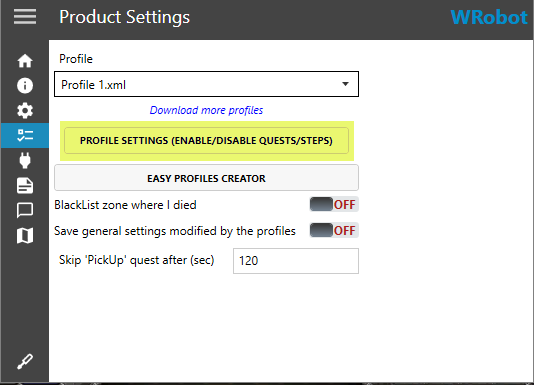
Hello, you can disable step in tab "Product settings" > button "Profile settings (enable/disable quests/steps)"
-
Hello, see https://wrobot.eu/forums/topic/5507-changing-botbase/
-
Hello, you play with good game version ? Do you have any error in your log ?
-
Hello, Disable all Wow addons, all WRobot plugins and share your log file please ( https://wrobot.eu/forums/topic/1779-how-to-post-your-log-file-with-your-topic/ ).
-
Disable all Wow add-ons, and install WRobot in a new folder (to reset all settings). Try with default settings, if it still doesn't work correctly, try to increment min/max latency (with values like 1000/1500)
-
Can you share your log file of session where you run fisher product please ( https://wrobot.eu/forums/topic/1779-how-to-post-your-log-file-with-your-topic/ ) .
-
in advanced general settings


