Bro
Members
-
Joined
-
Last visited
Everything posted by Bro
-
I am also curious. Droidz please explain to us.
-
-
Changes: What we need? -Change bait duration to 10 min. -New option (optional to use): Use Bladebone Hook 1h duration. http://www.wowhead.com/item=122742/bladebone-hook
-
Changes: What we need? -Change bait duration to 10 min. -New option (optional to use): Use Bladebone Hook 1h duration. http://www.wowhead.com/item=122742/bladebone-hook
-
mr burrito your macro works great. Tested few days. Droidz thanks for fast update. I start to test.
-
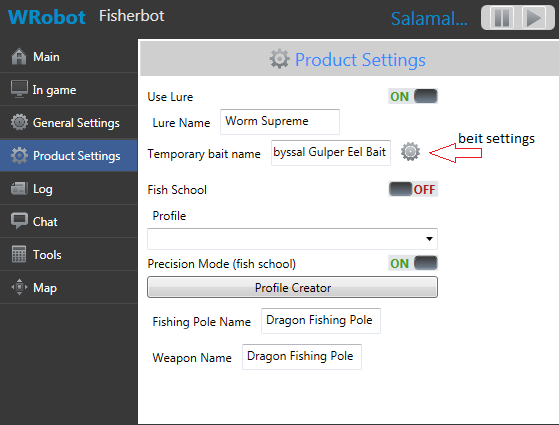
This is great idea. mr burrito how to use your macro? I need quick tutorial how use your macro in mmorobot. Or maybe Droidz create new option "temporary beit cycle", "temporary beit settings". We must have the possibility to prioritize beit in cycle.
-
I checked one bait, works fine, but i need some more time for check all. Anyway, If I find any bugs I write in this topic.
-
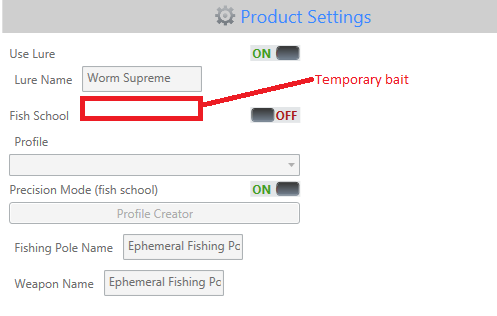
So far we have simple lure for all waters and all types fish, now in draenor we also have temporary (5 min) bait for different types of fish. Abyssal Gulper Eel Bait Blackwater Whiptail Bait Blind Lake Sturgeon Bait Fat Sleeper Bait Fire Ammonite Bait Jawless Skulker Bait Sea Scorpion Bait Any chance to improvement fisherbot? We need to use both lure and temporary bait.
-
-
It may be useful to someone. Without the program.