Dlarge
Members
-
Joined
-
Last visited
Everything posted by Dlarge
-
nene, Blizz behandelt alle separat aber wie schon erwähnt beim 2x erwischt 18 Monate danach Perma.
-
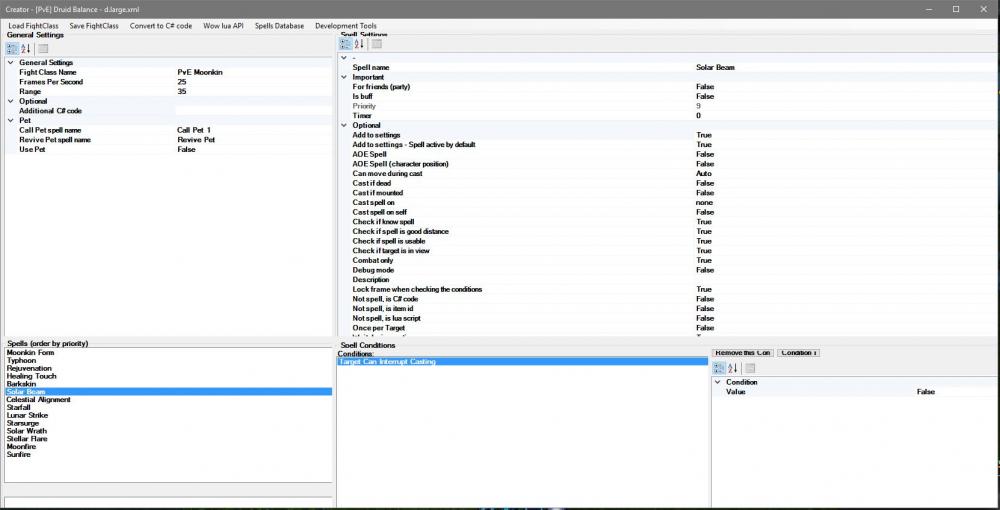
fight class editor is broken.
-
routine is old and this is my first routine.
-
european server works, thx Droidz
-
i will look.
-
the problem is, the Quest with the Insignia has no ID. Another Heap of Ethereals
-
-
Hi together, i have make a Quest Profile for "Grind Zaxxis Insignie" in BC Netherstorm. Bot Grind perfect and fly to the NPC Quest Giver and open the Quest but then does nothing more. When I click the quest manually he completed the quest, continues and opens them again ans stand still. I used as a template the Quest profiles of Droidz Grind for MeatGut Bones. why not use the bot to Quest Button? cheers D.large <?xml version="1.0" encoding="utf-16"?> <EasyQuestProfile xmlns:xsi="http://www.w3.org/2001/XMLSchema-instance" xmlns:xsd="http://www.w3.org/2001/XMLSchema"> <QuestsSorted> <QuestsSorted Action="Pulse" NameClass="DasKonsortiumRufFarmPULSE" /> <QuestsSorted Action="Pulse" NameClass="DasKonsortiumRufFarmTURNIN" /> <QuestsSorted Action="GoToStep" NameClass="0" /> </QuestsSorted> <NpcQuest /> <Npc> <Npc> <Position X="-1831.948" Y="5298.299" Z="-12.42778" Type="Flying" /> <Entry>18940</Entry> <Name>Briefkasten</Name> <GossipOption>-1</GossipOption> <Active>true</Active> <Faction>Neutral</Faction> <Type>Mailbox</Type> <ContinentId>Expansion01</ContinentId> </Npc> <Npc> <Position X="3073.644" Y="3656.375" Z="143.0913" Type="Flying" /> <Entry>19572</Entry> <Name>Gant</Name> <GossipOption>-1</GossipOption> <Active>true</Active> <Faction>Neutral</Faction> <Type>Vendor</Type> <ContinentId>Expansion01</ContinentId> </Npc> <Npc> <Position X="3078.104" Y="3602.156" Z="144.0669" Type="Flying" /> <Entry>18938</Entry> <Name>Krexcil</Name> <GossipOption>-1</GossipOption> <Active>true</Active> <Faction>Neutral</Faction> <Type>RidingTrainer</Type> <ContinentId>Expansion01</ContinentId> </Npc> </Npc> <Blackspots /> <BlackGuids /> <EasyQuests> <EasyQuest> <Name>Das Konsortium Ruf Farm PULSE</Name> <QuestId> <int>0</int> </QuestId> <QuestType>KillAndLoot</QuestType> <QuestClass xsi:type="KillAndLootEasyQuestClass"> <HotSpots> <Vector3 X="3070.801" Y="3672.309" Z="142.3847" /> <Vector3 X="2703.169" Y="3752.975" Z="142.1365" /> <Vector3 X="2668.54" Y="3744.273" Z="143.5777" /> <Vector3 X="2655.843" Y="3776.977" Z="143.9903" /> <Vector3 X="2625.133" Y="3726.244" Z="144.6726" /> <Vector3 X="2620.715" Y="3738.49" Z="144.8572" /> <Vector3 X="2621.286" Y="3767.191" Z="143.4945" /> <Vector3 X="2655.843" Y="3776.977" Z="143.9903" /> <Vector3 X="2612.78" Y="3820.764" Z="139.6754" /> <Vector3 X="2654.184" Y="3802.756" Z="140.021" /> <Vector3 X="2515.254" Y="3772.53" Z="132.2227" /> <Vector3 X="2523.675" Y="3782.006" Z="134.9667" /> <Vector3 X="2520.249" Y="3850.383" Z="134.6695" /> <Vector3 X="2485.305" Y="3848.259" Z="126.0001" /> <Vector3 X="2513.891" Y="3869.067" Z="133.6897" /> <Vector3 X="2497.712" Y="3907.362" Z="128.6237" /> </HotSpots> <EntryTarget> <int>18875</int> <int>19642</int> <int>19641</int> </EntryTarget> <IsGrinderNotQuest>false</IsGrinderNotQuest> </QuestClass> <ObjectiveCount1>0</ObjectiveCount1> <ObjectiveCount2>0</ObjectiveCount2> <ObjectiveCount3>0</ObjectiveCount3> <ObjectiveCount4>0</ObjectiveCount4> <ObjectiveCount5>0</ObjectiveCount5> <AutoDetectObjectiveCount1>false</AutoDetectObjectiveCount1> <AutoDetectObjectiveCount2>false</AutoDetectObjectiveCount2> <AutoDetectObjectiveCount3>false</AutoDetectObjectiveCount3> <AutoDetectObjectiveCount4>false</AutoDetectObjectiveCount4> <AutoDetectObjectiveCount5>false</AutoDetectObjectiveCount5> <CanCondition /> <IsCompleteCondition>return ItemsManager.GetItemCountById(29209) >= 250;</IsCompleteCondition> <RepeatableQuest>true</RepeatableQuest> <NotRequiredInQuestLog>true</NotRequiredInQuestLog> <PickUpQuestOnItem>false</PickUpQuestOnItem> <PickUpQuestOnItemID>0</PickUpQuestOnItemID> <Comment /> <GossipOptionRewardItem>1</GossipOptionRewardItem> <RequiredQuest>0</RequiredQuest> <MaxLevel>110</MaxLevel> <MinLevel>66</MinLevel> <WoWClass>None</WoWClass> </EasyQuest> <EasyQuest> <Name>Das Konsortium Ruf Farm TURNIN</Name> <QuestId> <int>0</int> </QuestId> <QuestType>OverridePulseCSharpCode</QuestType> <QuestClass xsi:type="OverridePulseCSharpCodeEasyQuestClass"> <Code>wManager.BlackListSerializable.AddBlackListToWRobotSession(); GoToTask.ToPositionAndIntecractWithNpc(new Vector3(3069.964f, 3674.858f, 142.3456f), 19880); Lua.LuaDoString("QuestFrameCompleteButton:Click(); QuestFrameCompleteQuestButton:Click();"); return true; </Code> </QuestClass> <ObjectiveCount1>0</ObjectiveCount1> <ObjectiveCount2>0</ObjectiveCount2> <ObjectiveCount3>0</ObjectiveCount3> <ObjectiveCount4>0</ObjectiveCount4> <ObjectiveCount5>0</ObjectiveCount5> <AutoDetectObjectiveCount1>false</AutoDetectObjectiveCount1> <AutoDetectObjectiveCount2>false</AutoDetectObjectiveCount2> <AutoDetectObjectiveCount3>false</AutoDetectObjectiveCount3> <AutoDetectObjectiveCount4>false</AutoDetectObjectiveCount4> <AutoDetectObjectiveCount5>false</AutoDetectObjectiveCount5> <CanCondition /> <IsCompleteCondition>return ItemsManager.GetItemCountById(29209) < 10;</IsCompleteCondition> <RepeatableQuest>true</RepeatableQuest> <NotRequiredInQuestLog>true</NotRequiredInQuestLog> <PickUpQuestOnItem>false</PickUpQuestOnItem> <PickUpQuestOnItemID>0</PickUpQuestOnItemID> <Comment /> <GossipOptionRewardItem>1</GossipOptionRewardItem> <RequiredQuest>0</RequiredQuest> <MaxLevel>110</MaxLevel> <MinLevel>66</MinLevel> <WoWClass>None</WoWClass> </EasyQuest> </EasyQuests> </EasyQuestProfile>
-
Taanandjungle Dailys i have the same Problem with dead npc`s.
-
I find it very unfortunate that now is possibility sell profiles and Fight Classes. this will bring more attention to this bot and thus be unsafe.
-
i have no probs, i will check this and optimizing this routine,thx.
-
Hi together, here is my first Combat Routine for the Insane Fire Mage in Legion. Pls test and give feedback. enjoy and have fun! Talents in Screenshot. cheers d.large
-
-
Balance Druide i have released yesterday and i worked on Feral and FireMage.
-
Hi together, here is my first Combat Routine for Balance Druid in Legion. For start, it's all right, I'll try to optimize the CR. Pls test. Talents in Screenshot. cheers d.large
-
please can you show me the settings. I have some trouble with it and i think this are mesh issues.
-
Hello, when I use a flying mount flying the bot only just above the ground. thereby hestucks on very many places and looks strong after using bot and the bot can not continue to work. the flying height should be changed urgently.
-
Hi Droidz, i worked in the ast days also with this nice Bot but i have the same Prob. The Bot fly not high enough. he fly little over the ground and if comes Mountains, he stuckt and hitting the Walls. The Way with the Grind Profile from Stormwind too West and Eastern Plaguelands are not good. it takes a lot longer than flying mount,.
-
Hi together, here is my newest Translation File for German Users. Have Fun d.large