



cn3588
Members
-
Joined
-
Last visited
Files posted by cn3588
-
What is this?
wrobot-freehold-autofarm is an automated, two-character power-leveling profile system designed for World of Warcraft 11.2.x and the WRobot botting platform in the Freehold (BFA) dungeon.
Pure C# Code: Zero external DLL dependencies; compiled and executed dynamically via WRobot's native runtime.
Roles (Verified in Live Tests):
Leader (Phper, Hunter Lv.80 - Tested & Verified): Enters the instance, leads along an 86-waypoint XML patrol path, unleashes 100% Beast Cleave AOE on the move, kills Boss #1, exits through the portal, and executes a fully verified instance reset.
Follower (Ashlandfa, Mage Lv.43 - Tested & Verified): Stays stationary at the entrance safe spot to leech EXP, auto-casts Ice Barrier when receiving damage, exits on signal, and re-enters once the new instance is confirmed. Any class (Lv.10+) can be power-leveled here.
Double Safety Lock: Guaranteed 100% safe instance reset by verifying both characters are outside, applying a 4-second server cooldown, and capturing the in-game system message (has been reset) before the leader re-enters first.
How to use?
Deploy Scripts:
Copy wrobot-freehold-leader.cs and wrobot-freehold-follower.cs into your WRobot directory under Profiles/Custom Profile/.
Set <ProfileName>wrobot-freehold-leader.cs</ProfileName> for the Leader, and <ProfileName>wrobot-freehold-follower.cs</ProfileName> for the Follower.
Start the Bot:
In both WRobot clients, select Product -> Custom Profile.
Click Start. The bots will automatically coordinate entry, mob clearing, safe leeching, exiting, resetting, and looping indefinitely without manual intervention.
- 5 Downloads
Submitted -
[ 中文说明 ] 挂机省电降载插件,单 DLL 放入 Plugins 即可使用。 挂机时把画面黑屏并压低帧率,显卡(GPU)占用直接降到接近 0%,多开不发热、风扇不转。
主要功能:
3D 渲染阻断:DirectX 11 底层清屏黑屏,不跑 3D 渲染,显卡占用近 0%。
状态联动:wRobot 点 Start 开始黑屏,点 Pause 或 Stop 瞬间恢复正常画面,方便随时查看。
窗口微缩:支持一键缩到 336x281(游戏物理极限最小尺寸),保持原屏幕位置不乱跑,不影响其他多开窗口。
CVar 降帧:自动锁前后台帧率(默认 20/10 FPS),支持一键游戏静音。
纯单 DLL:所有底层文件已内嵌,没有额外文件。
双语界面:设置面板自带中英文一键切换。
使用方法:
下载 PowerSaver.dll 放到 wRobot\Plugins\ 目录下;
打开 wRobot,在 General Settings -> Plugins 勾选 PowerSaver;
点击 Start 挂机即可(游戏会自动黑屏并降载,点 Pause/Stop 随时恢复画面)。 注:游戏图形接口请设置为 DirectX 11。
[ English ] An ultra-lightweight power & resource saver plugin for wRobot. Single DLL, drop and play. Turns the game screen black and caps FPS while botting, reducing GPU usage to near 0%.
Features:
3D Render Blocker: DX11 screen clearing, skips 3D rendering completely, GPU drops to ~0%.
Auto Resume: Blocks rendering on wRobot "Start", instantly resumes full 3D graphics on "Pause" or "Stop".
Window Resize: Resizes current window to 336x281 (minimum physical limit) without moving its screen position.
CVar Throttling: Caps foreground/background FPS (20/10) and mutes game audio.
Single DLL: Native 64-bit core is fully embedded. No extra files or setup.
Bilingual UI: Built-in English and Chinese language toggle.
How to Use:
Put PowerSaver.dll into your wRobot\Plugins\ folder.
In wRobot, go to General Settings -> Plugins and enable PowerSaver.
Click "Start" to bot. The game will shrink and turn black with ~0% GPU. Click "Pause" or "Stop" anytime to view the game. Note: Please run the game in DirectX 11 mode.
- 15 Downloads
- 1 Comments
Updated -
📝 Overview / 简介
This is a comprehensive, professionally polished, and high-quality Simplified Chinese (简体中文) translation language pack for WRobot.
本语言包针对 WRobot 进行了全量 579 个词条的精校与高质量本土化,彻底修复原版陈旧机翻。
---
✨ Key Features & Improvements / 主要改进
- Fixed Machine Translation Errors / 彻底修复严重错翻:
- none: Corrected from "位置" to "无"
- In progress: Corrected from "进入" to "进行中"
- Use this character: Corrected from "使用此游戏" to "使用此角色"
- XP/HR & Honor/HR: Corrected from "经验/共计" to "经验/小时" & "荣誉/小时"
- Smelting here: Corrected from "再次熔炼" to "在此处熔炼"
- Strand of the Ancients: Corrected from "古怪的" to official BG name "远古海滩"
- Official WoW Terminology / 严格对齐魔兽世界国服官方译名:
- All battlegrounds aligned (战歌峡谷, 阿拉希盆地, 奥特兰克山谷, 风暴之眼, 远古海滩, 征服之岛, 吉尔尼斯之战, 双子峰, 寇魔古寺, 深风峡谷).
- Accurate in-game terms (灵魂医者, 选矿, 研磨, 旅行者的苔原猛犸象, 随身邮箱 MOLL-E, 埃匹希斯水晶 等).
- 100% Coverage / 全面覆盖:
- Cleaned up untranslated lines, corrected typos ("登陆" -> "登录"), and preserved all original placeholders.
---
🛠 How to Install / 安装方法
1. Download Chinese.xml. (下载附件中的 Chinese.xml)
2. Place Chinese.xml into your WRobot folder: (将文件放入以下目录)
WRobot\Data\Lang\Chinese.xml
(If the Lang folder does not exist, create it / 若没有 Lang 文件夹请手动新建)
3. Open WRobot\Settings\lang.txt with Notepad and change its content to: (记事本打开 Settings\lang.txt,内容改为:)
Chinese.xml
4. (Optional) You can also copy Chinese.xml to WRobot\Data\Lang\Default.xml.
5. Restart WRobot.exe and enjoy! (重新打开 WRobot 即可显示中文)- 54 Downloads
Submitted -
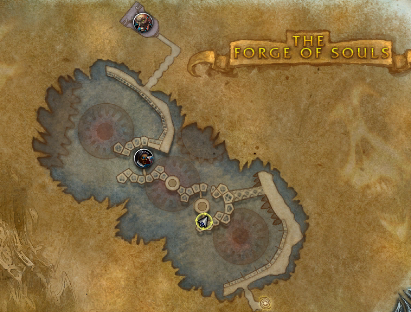
20 bag Drop about 30%
24 bag Drop not sure.
Run at Northrend
Not 100% AFK you need click to open the door. run about 3-4 times you will get 20 bag.
http://www.wowhead.com/zone=4809/the-forge-of-souls
Kill
http://www.wowhead.com/npc=36497/bronjahm
Drop
http://www.wowhead.com/item=50317/papas-new-bag 20 bag
http://www.wowhead.com/item=50316/papas-brand-new-bag 22bag- 110 Downloads
- 1 Comments
Updated -
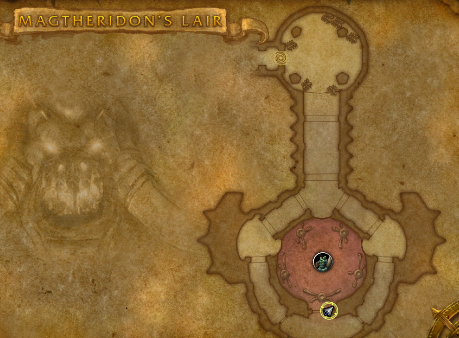
Need click to open the door
100% drop.
Run at Hellfire Peninsula
http://www.wowhead.com/zone=3836/magtheridons-lair
Kill
http://www.wowhead.com/npc=17257/magtheridon
Drop
http://www.wowhead.com/item=34845/pit-lords-satchel 20 bag- 46 Downloads
Updated -
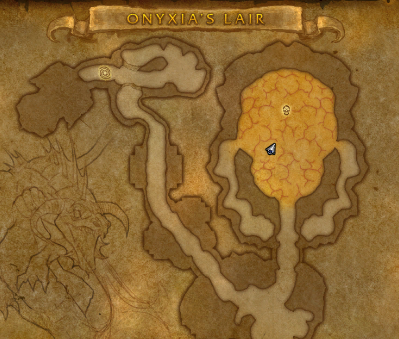
Range DPS Only or fast DPS skip the boss fly.
Run at Kalimdor or TP
http://www.wowhead.com/zone=2159
Kill
http://www.wowhead.com/npc=10184/onyxia
Drop 100% bag, low for mount
http://www.wowhead.com/item=49636/reins-of-the-onyxian-drake
http://www.wowhead.com/item=49295/enlarged-onyxia-hide-backpack- 164 Downloads
- 2 Comments
Updated -
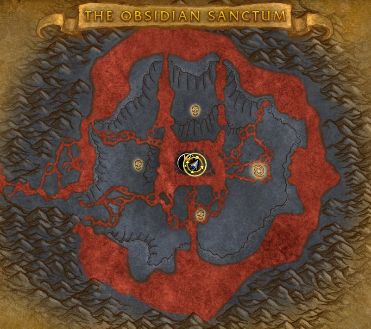
http://www.wowhead.com/zone=4493/the-obsidian-sanctum
100% drop
http://www.wowhead.com/item=43345/dragon-hide-bag
http://www.wowhead.com/item=43954/reins-of-the-twilight-drake
Run at Northrend or close dragonblight- 103 Downloads
Updated -
http://www.wowhead.com/achievement=9456/abyssal-gulper-eel-angler
In Spires of Arak
non-afk
about 2 hour for 100 with Server Hop
useful Item
http://www.wowhead.com/item=118391/worm-supreme
note: 7.0.3 Server Hop may not work.
2 Fish School in this location, 3-5 minutes reset
- 92 Downloads
- 1 Comments
Updated -
In Spires of Arak
non-afk
about 1 hour for 100 with Server Hop
AFK
about 3 hours for 100
useful Item
http://www.wowhead.com/item=118391/worm-supreme
- 106 Downloads
Updated