cn3588
Members
-
Joined
-
Last visited
-
What is this?wrobot-freehold-autofarm is an automated, two-character power-leveling profile system designed for World of Warcraft 11.2.x and the WRobot botting platform in the Freehold (BFA) dungeon. Pure C# Code: Zero external DLL dependencies; compiled and executed dynamically via WRobot's native runtime. Roles (Verified in Live Tests): Leader (Phper, Hunter Lv.80 - Tested & Verified): Enters the instance, leads along an 86-waypoint XML patrol path, unleashes 100% Beast Cleave AOE on the move, kills Boss #1, exits through the portal, and executes a fully verified instance reset. Follower (Ashlandfa, Mage Lv.43 - Tested & Verified): Stays stationary at the entrance safe spot to leech EXP, auto-casts Ice Barrier when receiving damage, exits on signal, and re-enters once the new instance is confirmed. Any class (Lv.10+) can be power-leveled here. Double Safety Lock: Guaranteed 100% safe instance reset by verifying both characters are outside, applying a 4-second server cooldown, and capturing the in-game system message (has been reset) before the leader re-enters first. How to use?Deploy Scripts: Copy wrobot-freehold-leader.cs and wrobot-freehold-follower.cs into your WRobot directory under Profiles/Custom Profile/. Set <ProfileName>wrobot-freehold-leader.cs</ProfileName> for the Leader, and <ProfileName>wrobot-freehold-follower.cs</ProfileName> for the Follower. Start the Bot: In both WRobot clients, select Product -> Custom Profile. Click Start. The bots will automatically coordinate entry, mob clearing, safe leeching, exiting, resetting, and looping indefinitely without manual intervention.
-
[ 中文说明 ] 挂机省电降载插件,单 DLL 放入 Plugins 即可使用。 挂机时把画面黑屏并压低帧率,显卡(GPU)占用直接降到接近 0%,多开不发热、风扇不转。 主要功能: 3D 渲染阻断:DirectX 11 底层清屏黑屏,不跑 3D 渲染,显卡占用近 0%。 状态联动:wRobot 点 Start 开始黑屏,点 Pause 或 Stop 瞬间恢复正常画面,方便随时查看。 窗口微缩:支持一键缩到 336x281(游戏物理极限最小尺寸),保持原屏幕位置不乱跑,不影响其他多开窗口。 CVar 降帧:自动锁前后台帧率(默认 20/10 FPS),支持一键游戏静音。 纯单 DLL:所有底层文件已内嵌,没有额外文件。 双语界面:设置面板自带中英文一键切换。 使用方法: 下载 PowerSaver.dll 放到 wRobot\Plugins\ 目录下; 打开 wRobot,在 General Settings -> Plugins 勾选 PowerSaver; 点击 Start 挂机即可(游戏会自动黑屏并降载,点 Pause/Stop 随时恢复画面)。 注:游戏图形接口请设置为 DirectX 11。 [ English ] An ultra-lightweight power & resource saver plugin for wRobot. Single DLL, drop and play. Turns the game screen black and caps FPS while botting, reducing GPU usage to near 0%. Features: 3D Render Blocker: DX11 screen clearing, skips 3D rendering completely, GPU drops to ~0%. Auto Resume: Blocks rendering on wRobot "Start", instantly resumes full 3D graphics on "Pause" or "Stop". Window Resize: Resizes current window to 336x281 (minimum physical limit) without moving its screen position. CVar Throttling: Caps foreground/background FPS (20/10) and mutes game audio. Single DLL: Native 64-bit core is fully embedded. No extra files or setup. Bilingual UI: Built-in English and Chinese language toggle. How to Use: Put PowerSaver.dll into your wRobot\Plugins\ folder. In wRobot, go to General Settings -> Plugins and enable PowerSaver. Click "Start" to bot. The game will shrink and turn black with ~0% GPU. Click "Pause" or "Stop" anytime to view the game. Note: Please run the game in DirectX 11 mode.
-
wow_auto.xmlwow_auto_melee.xml 英文: wow_auto.xml (ranged/BM) → Range 25; wow_auto_melee.xml (melee, new) → Range 5 (will charge into melee normally) 中文: wow_auto.xml(远程/BM)→ 距离 25;wow_auto_melee.xml(近战,新建)→ 距离 5(会正常冲进近战) 俄文: wow_auto.xml (дальний бой / BM) → Range 25; wow_auto_melee.xml (ближний бой, новый) → Range 5 (будет нормально бежать в ближний бой)
-
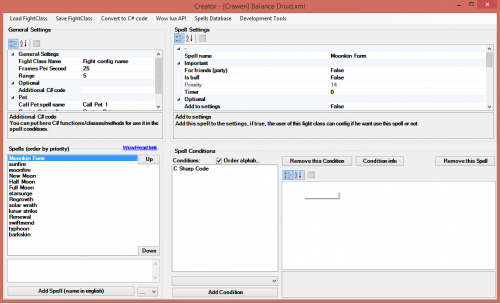
wow_auto.xml One-button fight class for all classes. Use: drag "Single-Button Assistant" to action bar slot 4 → save the code as wow_auto.xml into WRobot\FightClass\ → select it in WRobot and start. Effect: your whole rotation on one button, works on any client language, casters don't move while casting. Another slot? change the 4. 全职业通用的一键战斗配置。 用法:把「一键辅助」拖到动作条第 4 格 → 代码存成 wow_auto.xml 放进 WRobot\FightClass\ → 在 WRobot 里选中并启动。 效果:整套输出一个键搞定,任何语言客户端都能用,法师这类职业施法时不会乱跑。换格子就把 4 改掉。 Fight class на одну кнопку для всех классов. Как использовать: перетащи "Single-Button Assistant" в слот 4 панели → сохрани код как wow_auto.xml в WRobot\FightClass\ → выбери в WRobot и запусти. Эффект: вся ротация на одной кнопке, работает на любом языке клиента, кастеры не двигаются во время каста. Другой слот — поменяй 4. <?xml version="1.0" encoding="utf-8"?> <FightClass xmlns:xsd="http://www.w3.org/2001/XMLSchema" xmlns:xsi="http://www.w3.org/2001/XMLSchema-instance"> <FightClassGeneralSettings> <FightClassName>wow_auto_bm</FightClassName> </FightClassGeneralSettings> <FightClassSpells> <FightClassSpell> <FightClassConditions /> <SpellName>local _, class = UnitClass("player") if (class == "MAGE" or class == "PRIEST" or class == "WARLOCK" or class == "EVOKER") and (UnitCastingInfo("player") or UnitChannelInfo("player")) then StopMovingOrSizing() end if not IsCurrentAction(4) then UseAction(4) end</SpellName> <Priority>1</Priority> <NotSpellIsLuaScript>true</NotSpellIsLuaScript> </FightClassSpell> </FightClassSpells> </FightClass>
-
WRobot 不支持中文的魔兽窗口名?这个脚本可以只改窗口标题(窗体),不改游戏本体。 用法 双击 WoW-English.bat → 标题变英文 World of Warcraft 双击 WoW-Chinese.bat → 变回中文 后台自动守护,被改回也会再改成英文 运行另一个会自动关闭前一个 WoW-Chinese.bat WoW-English.bat WoW-Title-Chinese.ps1 WoW-Title-English.ps1
-
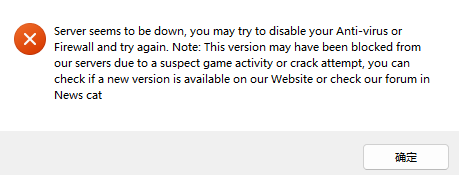
Hello Droidz and the WRobot Community, I registered my account back in 2015 and haven't touched WRobot in about 11 years. Pretty wild to be back after all this time. Right now I cannot even get the bot to launch. As soon as I run WRobot.exe, this error pops up, and the moment I click OK the program just closes itself: "Server seems to be down, you may try to disable your Anti-virus or Firewall and try again. Note: This version may have been blocked from our servers due to a suspect game activity or crack attempt, you can check if a new version is available on our Website or check our forum in News cat" It closes immediately, so I never even reach the main window or the login screen. I'm on Windows 11 Pro 64-bit, running WRobot 2.8.2 (23192) for wow client 11.2.765299. I already disabled Windows Defender and the firewall, added the folder to exclusions, and restarted, but it still dies right away. I've attached the error screenshot and my latest log file from the Logs folder. Is the auth server currently down, or is there something else blocking it on my end? Thanks for any help.
-
📝 Overview / 简介 This is a comprehensive, professionally polished, and high-quality Simplified Chinese (简体中文) translation language pack for WRobot. 本语言包针对 WRobot 进行了全量 579 个词条的精校与高质量本土化,彻底修复原版陈旧机翻。 --- ✨ Key Features & Improvements / 主要改进 - Fixed Machine Translation Errors / 彻底修复严重错翻: - none: Corrected from "位置" to "无" - In progress: Corrected from "进入" to "进行中" - Use this character: Corrected from "使用此游戏" to "使用此角色" - XP/HR & Honor/HR: Corrected from "经验/共计" to "经验/小时" & "荣誉/小时" - Smelting here: Corrected from "再次熔炼" to "在此处熔炼" - Strand of the Ancients: Corrected from "古怪的" to official BG name "远古海滩" - Official WoW Terminology / 严格对齐魔兽世界国服官方译名: - All battlegrounds aligned (战歌峡谷, 阿拉希盆地, 奥特兰克山谷, 风暴之眼, 远古海滩, 征服之岛, 吉尔尼斯之战, 双子峰, 寇魔古寺, 深风峡谷). - Accurate in-game terms (灵魂医者, 选矿, 研磨, 旅行者的苔原猛犸象, 随身邮箱 MOLL-E, 埃匹希斯水晶 等). - 100% Coverage / 全面覆盖: - Cleaned up untranslated lines, corrected typos ("登陆" -> "登录"), and preserved all original placeholders. --- 🛠 How to Install / 安装方法 1. Download Chinese.xml. (下载附件中的 Chinese.xml) 2. Place Chinese.xml into your WRobot folder: (将文件放入以下目录) WRobot\Data\Lang\Chinese.xml (If the Lang folder does not exist, create it / 若没有 Lang 文件夹请手动新建) 3. Open WRobot\Settings\lang.txt with Notepad and change its content to: (记事本打开 Settings\lang.txt,内容改为:) Chinese.xml 4. (Optional) You can also copy Chinese.xml to WRobot\Data\Lang\Default.xml. 5. Restart WRobot.exe and enjoy! (重新打开 WRobot 即可显示中文)
-
-
-
-
Hi Droidz, can you add remote load XML function on this bot? then we can use simple php system to sell some profile.
-
-
-
how to solve this issue ? just automatic closed
-
http://app-cdn.firestorm-servers.com/launcher/FirestormLauncherSetup.exe Hello I believe this is biggest 7.0.3 private server. would like to ask to add this support. right now only 22345 and 22810 The address information. Please modify the address and help some private server user to use it. http://www.ownedcore.com/forums/world-of-warcraft/world-of-warcraft-bots-programs/wow-memory-editing/578228-wow-7-0-3-22522-release-info-dump-thread.html Thank you
-
-
-
-
-
-
-
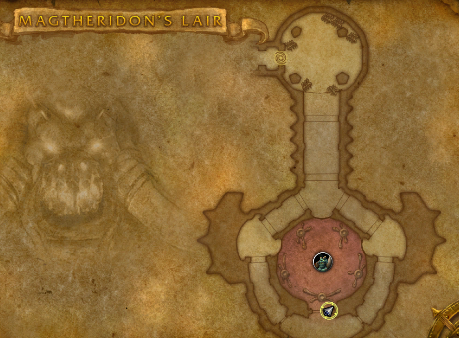 Need click to open the door 100% drop. Run at Hellfire Peninsula http://www.wowhead.com/zone=3836/magtheridons-lair Kill http://www.wowhead.com/npc=17257/magtheridon Drop http://www.wowhead.com/item=34845/pit-lords-satchel 20 bag
 -
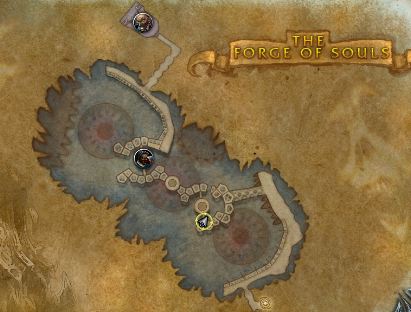 20 bag Drop about 30% 24 bag Drop not sure. Run at Northrend Not 100% AFK you need click to open the door. run about 3-4 times you will get 20 bag. http://www.wowhead.com/zone=4809/the-forge-of-souls Kill http://www.wowhead.com/npc=36497/bronjahm Drop http://www.wowhead.com/item=50317/papas-new-bag 20 bag http://www.wowhead.com/item=50316/papas-brand-new-bag 22bag