Skip to content
View in the app

A better way to browse. Learn more.

WRobot

A full-screen app on your home screen with push notifications, badges and more.

To install this app on iOS and iPadOS
  1. Tap the Share icon in Safari
  2. Scroll the menu and tap Add to Home Screen.
  3. Tap Add in the top-right corner.
To install this app on Android
  1. Tap the 3-dot menu (⋮) in the top-right corner of the browser.
  2. Tap Add to Home screen or Install app.
  3. Confirm by tapping Install.

Degix

Members
  • Joined

  • Last visited

Files posted by Degix

  1. ONLY FOR WoW 3.3.5a!  | or 3.3.5a+ before poisons get spells, but not tested yet! 
    Plugin to refresh Poisons after they expired.
    You can set your Poisons in the Plugin Settings.
    Installation: Extract the two files into the the plugins folder! Then start/restart WRobot and activate EasyPoison under the Plugins Tab.
    Setup your Poisons: Go into the plugin settings and fill the field's of the main/offhand poisons with your poison-name(case sensitive!) or poison-itemid of choice.
    NOTICE/SELF-HELP:
     
    • 546 Downloads
    • 8 Comments
    Updated
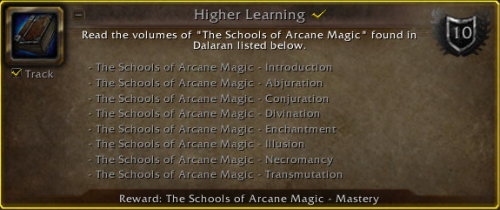
  2. This Profile uses a Custom-Path through Dalaran to achieve the "Higher Learning" Achievement. (WoWHead Link).
    Startpoint: In Dalaran where the blue triangle teleporter is. (The Violet Gate)
    • 248 Downloads
    Updated

Account

Navigation

Search

Search

Configure browser push notifications

Chrome (Android)
  1. Tap the lock icon next to the address bar.
  2. Tap Permissions → Notifications.
  3. Adjust your preference.
Chrome (Desktop)
  1. Click the padlock icon in the address bar.
  2. Select Site settings.
  3. Find Notifications and adjust your preference.