headcrab
Members
-
Joined
Files posted by headcrab
-
Wrobot has special routines for smelting/milling, but not the same for other professions. This plugin helps to upgrade your profession skills and keep free space in your bags.
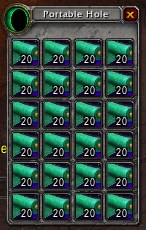
Open settings and type profession name and list of items your want to craft. Select "Sort by numSkillUps" if you want to make SkillUps items first. Or just type list of crafted matherials (for example, bolt of cloth) to save place in your bags. Will be usefull for tailors, leatherworkers and alchemists.
For Cooking bot will wait and cast Cooking Fire when it ready before craft recipe. You have to enter "Cooking Fire" or localized spell name as Required Spell. So, you can grind leather and cook meat at the same time (or catch and cook fish, etc); If you choose "DE green items" it will disenchant all green (uncommon) items in your bags; Plugin contains skinning bug workaround - now bot can skin beasts with the best latency settings (for me works 25-100); Open containers - useful for fisherbot, maybe useful for lockpicking too (not tested); Internationalization support - if you have localized WoW client, simply enter localized spell names for Disenchant and Skinning. Recipe crafting is binded to Looting state (so, bot will make recipes and disenchant after loot mobs).
I tested it in MOP, but it should work in other wow versions (added support for new tradeskill API for wow 7)- 930 Downloads
- 28 Comments
Updated -
This is developer's plugin.
Sometimes is usefull to see what Lua commands robot sends to WoW client. But for now all Lua strings in wrobot are encrypted. There are many ways to see this strings, but i found Harmony library with which the process became very simple. Also this library can be usefull to patch wrobot code on runtime.
copy 0Harmony.dll to Bin folder copy LuaSpy.dll to Plugins folder enable plugin and start any product In console window you will see Lua commands like this:
[D] 16:15:22 - [LuaSpy] Int32 GetSpellCooldownTimeLeft(System.String)
[D] 16:15:22 - [LuaSpy] local t = 0;
local start, duration, enabled = GetSpellCooldown('Snake Trap');
if enabled then
t = math.floor((start + duration - GetTime()) * 1000);
if t < 0 then
t = 0;
end
end
return t;
[F] 16:15:22 - [Spell] Cast Snake Trap (Snake Trap)
[D] 16:15:22 - [LuaSpy] Int32 get_LatencyReal()
[D] 16:15:22 - [LuaSpy] local _, _, lagHome, lagWorld = GetNetStats(); return lagHome + lagWorld;
[F] 16:15:23 - [FightClass] Launch C# code: /*castOnGround("Snake Trap",40)*/
There are always 2 sequental strings marked with [LuaSpy]
calling method signature called lua In settings you can also add filter tokens for calling method.
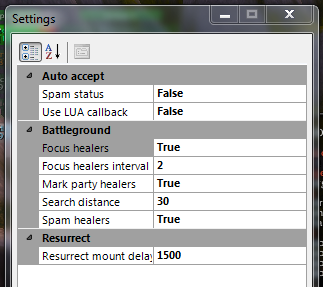
There are no screenshort, because in 2.x they all like this main picture:- 105 Downloads
Submitted -
Its true. Never rejoins BG, even on transport. Accepts BG using UPDATE_BATTLEFIELD_STATUS event callback and alternative method (button click). Usefull for some private servers where AcceptBattlefieldPort function is disabled (some servers also will require modified wManager.dll - i think v.2.2.0 can work without patching, if you select "disable AcceptBattlefieldPort call" - this code unsafe and removed).
Version 2.x:
Plugin uses battlefield statistics for determinig and auto focus enemy healers, check plugin settings (do not set Search distance much more than your fight class range). Also you can mark enemies usung Radar3D (just for fun, wow addons can do it better).
It can auto mark party healers when you party leader;
After resurrection it can wait N milliseconds before using ground mount to let your fightclass make all buffs (Resurrect BG workaround)
Dont forget to remove AutoBG plugin if you used version 1.x
- 415 Downloads
- 1 Comments
Updated