



Skip to content
View in the app

A better way to browse. Learn more.

WRobot

A full-screen app on your home screen with push notifications, badges and more.

To install this app on iOS and iPadOS
  1. Tap the Share icon in Safari
  2. Scroll the menu and tap Add to Home Screen.
  3. Tap Add in the top-right corner.
To install this app on Android
  1. Tap the 3-dot menu (⋮) in the top-right corner of the browser.
  2. Tap Add to Home screen or Install app.
  3. Confirm by tapping Install.

Axeholes_BMHunter 2.1.2

(3 reviews)

1 Screenshot

Ladies and Gentlemen,

This is an early release by request.  I am currently still working on this file.


-Axehole
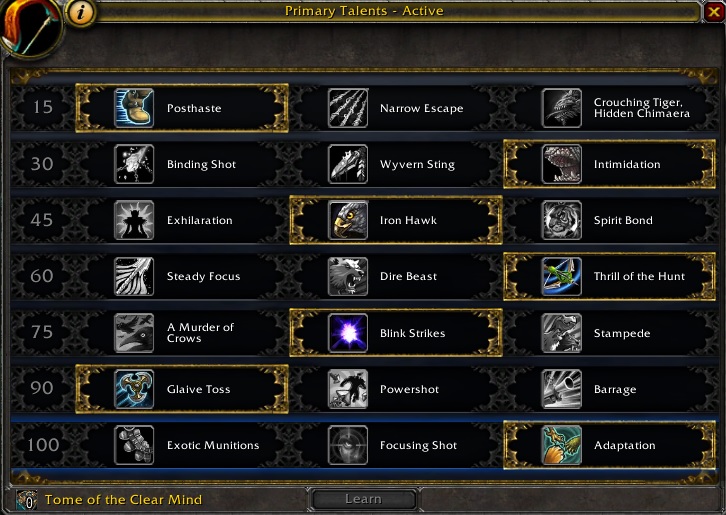
 

BmHunterTalents.jpg

What's New in Version 2.1.2

Released

Hey everyone,

This is big release compared to what was originally released.  This is more of a finished product for Grind and Dung.  Now I'll work on getting Barrage into this over Glaive but given this profiles extreme DPS output, I didn't deem it needed right away.

I hope you enjoy.

Below is that talent tree used for this fight class.

BmHunterTalents.jpg

User Feedback

You may only provide a review once you have downloaded the file.


Works great!


Great profile works really well would of got 5 stars but i don't see the profile using mend pet at all?

   1 of 1 member found this review helpful 1 / 1 member

Simple and really good profile for BM hunter

Account

Navigation

Search

Search

Configure browser push notifications

Chrome (Android)
  1. Tap the lock icon next to the address bar.
  2. Tap Permissions → Notifications.
  3. Adjust your preference.
Chrome (Desktop)
  1. Click the padlock icon in the address bar.
  2. Select Site settings.
  3. Find Notifications and adjust your preference.