



Skip to content
View in the app

A better way to browse. Learn more.

WRobot

A full-screen app on your home screen with push notifications, badges and more.

To install this app on iOS and iPadOS
  1. Tap the Share icon in Safari
  2. Scroll the menu and tap Add to Home Screen.
  3. Tap Add in the top-right corner.
To install this app on Android
  1. Tap the 3-dot menu (⋮) in the top-right corner of the browser.
  2. Tap Add to Home screen or Install app.
  3. Confirm by tapping Install.

Frost DK PVP 1.1

(1 review)

1 Screenshot

Hi All,

this time i've got my PVP frost DK Fight Class - can also be used for PVE content (doesn't fair to bad in raids either)

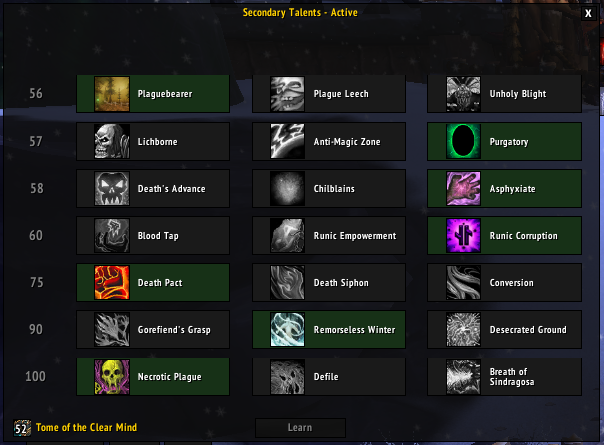
Talents are in the pic attached.

please leave a like, review or comment


Regards,

Ket

What's New in Version 1.1

Released

updated horn of winter so it doesn't spam it all the time during combat.

updated priority of some of the abilities to ensure the correct items proc when required.

User Feedback

You may only provide a review once you have downloaded the file.

   0 of 2 members found this review helpful 0 / 2 members

Premier phase de developpement OK pour du bot pvp c ok mais il manque quelque conditions :)


je suis ok pour co developer

Account

Navigation

Search

Search

Configure browser push notifications

Chrome (Android)
  1. Tap the lock icon next to the address bar.
  2. Tap Permissions → Notifications.
  3. Adjust your preference.
Chrome (Desktop)
  1. Click the padlock icon in the address bar.
  2. Select Site settings.
  3. Find Notifications and adjust your preference.