




Skip to content
View in the app

A better way to browse. Learn more.

WRobot

A full-screen app on your home screen with push notifications, badges and more.

To install this app on iOS and iPadOS
  1. Tap the Share icon in Safari
  2. Scroll the menu and tap Add to Home Screen.
  3. Tap Add in the top-right corner.
To install this app on Android
  1. Tap the 3-dot menu (⋮) in the top-right corner of the browser.
  2. Tap Add to Home screen or Install app.
  3. Confirm by tapping Install.

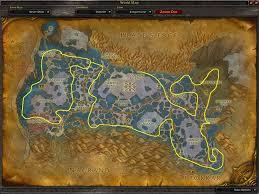
Zangarmarsh Herb/Mining farm 1.0.0

(1 review)

1 Screenshot

Finished it just now followed an old guide for path used do not have herber to test and it might do ok mining. 8/29 Yah i figured it might get stuck i flew low hopes it'd lower stucks also look into turning down search range I don't have time to tweak anything.

User Feedback

You may only provide a review once you have downloaded the file.

   2 of 2 members found this review helpful 2 / 2 members

so much mushroom stucks, disable M2 Regular whith hack is fixing the problem mailbox works fine aswell thank you @ colderpotato

Account

Navigation

Search

Search

Configure browser push notifications

Chrome (Android)
  1. Tap the lock icon next to the address bar.
  2. Tap Permissions → Notifications.
  3. Adjust your preference.
Chrome (Desktop)
  1. Click the padlock icon in the address bar.
  2. Select Site settings.
  3. Find Notifications and adjust your preference.

