



Skip to content
View in the app

A better way to browse. Learn more.

WRobot

A full-screen app on your home screen with push notifications, badges and more.

To install this app on iOS and iPadOS
  1. Tap the Share icon in Safari
  2. Scroll the menu and tap Add to Home Screen.
  3. Tap Add in the top-right corner.
To install this app on Android
  1. Tap the 3-dot menu (⋮) in the top-right corner of the browser.
  2. Tap Add to Home screen or Install app.
  3. Confirm by tapping Install.

AZSUNA - FELBLAZE INGURUS 1.0.0

(10 reviews)

This is a small profile for farming herbs and ores in Azsuna. It starts at the Felblaze Ingurus and I usually get about 80-120 an hour and never die. This is a very safe route.
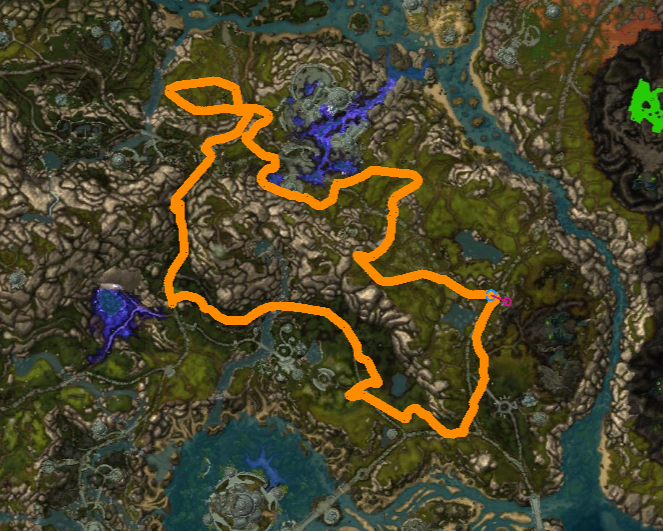


route.png.84270c9730f5e8984d06c653bbe0c768.png

User Feedback

You may only provide a review once you have downloaded the file.


Way great profile! ;) Make sure you have Reverse Pathing on or else you'll be sitting there for a while :)

Guest

Guest

   0 of 2 members found this review helpful 0 / 2 members

can do way better on pathing, install the gathermate2 data and you will see the path goes out of the way for no reason. also does not work with sky golem at all if something is attacking

   2 of 2 members found this review helpful 2 / 2 members

Works Perfectly...

No stucks or bugs.

 You did a good work tho.


works amazing!

10/10


Works great, on occasion it does pick up some mobs but handles them fine. Thanks!


Great profile, does as it says.


Great profile. Only thing is there's a ramp around 53.58, 14.00 that whenever it falls, it might get stuck.


Works fine!


Your profile does exactly what you say it does. Thanks alot

   3 of 3 members found this review helpful 3 / 3 members

Works perfectly - thanks!

Account

Navigation

Search

Search

Configure browser push notifications

Chrome (Android)
  1. Tap the lock icon next to the address bar.
  2. Tap Permissions → Notifications.
  3. Adjust your preference.
Chrome (Desktop)
  1. Click the padlock icon in the address bar.
  2. Select Site settings.
  3. Find Notifications and adjust your preference.
