




Droidz
Administrators
-
Joined
-
Last visited
Everything posted by Droidz
-
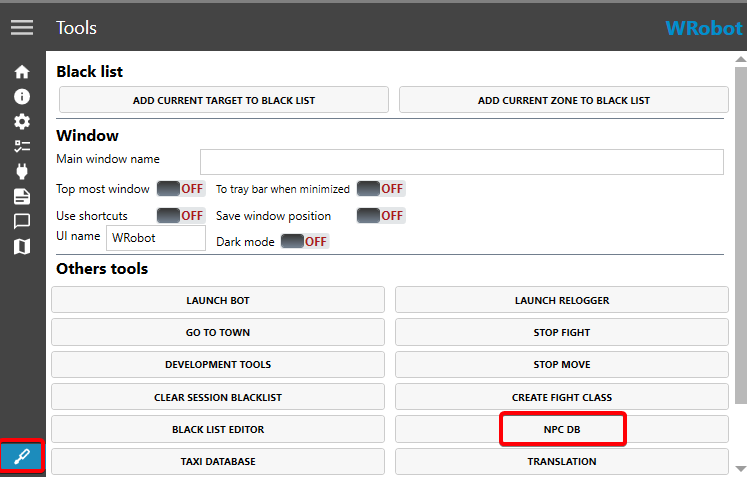
When I look your screenshot, most repairmen seem to be limited to the Alliance faction. Cleared all entries to start on a good base. Target a 'repair' type NPC in game, in 'NPC DB' for 'type' select 'Repair' and click the 'Add...' button (with 'Name' empty). Then go close to the mailbox, in 'NPC DB' for 'type' also select 'Mailbox', in 'Name' enter the name of the mailbox (usually 'Mailbox') and click on the 'Add... '. In the advanced settings of the bot you can activate the sending of mail and choose what to send to whom.
-
I'm sorry, I can't help you. Maybe try to contact him to find out if he agrees to share his code.
-
Good morning, To detect teleportation there is an option in the advanced settings of WRobot. To detect zones there is nothing by default, there are several ways to do it up, but you have to know how to program (c#).
-
Hello, It's this plugin https://wrobot.eu/files/file/1385-free-operator-multiboxing-multiboxing-assistance-plugin/ ?
-
You need to add npc vendor/repair and mailbox in NPC DB. You can find NPC here :
-
Hello, look https://wrobot.eu/files/file/414-multi-pull/ I added an option to be able to attack mobs already in combat : using System; using System.ComponentModel; using System.Configuration; using System.Collections.Generic; using System.IO; using System.Linq; using robotManager.Helpful; using wManager; using wManager.Plugin; using wManager.Wow.Helpers; using wManager.Wow.ObjectManager; public class Main : IPlugin { private bool _isLaunched; public void Initialize() { _isLaunched = true; MultiPullSettings.Load(); wManager.Events.FightEvents.OnFightLoop += FightEventsOnOnFightLoop; Logging.Write("[MultiPull2] Started."); } public void Dispose() { try { wManager.Events.FightEvents.OnFightLoop -= FightEventsOnOnFightLoop; } catch {} _isLaunched = false; Logging.Write("[MultiPull2] Stoped."); } public void Settings() { MultiPullSettings.Load(); MultiPullSettings.CurrentSetting.ToForm(); MultiPullSettings.CurrentSetting.Save(); Logging.Write("[MultiPull2] Settings saved."); } private void FightEventsOnOnFightLoop(WoWUnit woWUnit, CancelEventArgs cancelable) { if (_isLaunched && Conditions.InGameAndConnectedAndAliveAndProductStartedNotInPause && Fight.InFight && ObjectManager.Target.IsValid && ObjectManager.Target.IsTargetingMeOrMyPetOrPartyMember && ObjectManager.Me.HealthPercent >= MultiPullSettings.CurrentSetting.MinHealth && ObjectManager.GetNumberAttackPlayer() < MultiPullSettings.CurrentSetting.MobMax) { var mobs = new List<WoWUnit>(); if (MultiPullSettings.CurrentSetting.AllFactions) { mobs.AddRange(ObjectManager.GetWoWUnitAttackables(MultiPullSettings.CurrentSetting.PullRange)); } else { mobs.AddRange(ObjectManager.GetWoWUnitByEntry(MultiPullSettings.CurrentSetting.MobsList)); } var listGuidUnitAttackPlayer = ObjectManager.GetUnitAttackPlayer().Select(m => m.Guid).ToArray(); for (int i = mobs.Count - 1; i >= 0; i--) { if (!mobs[i].IsValid || !mobs[i].IsAlive || ((MultiPullSettings.CurrentSetting.CanAttackMobInCombat && mobs[i].IsTargetingMeOrMyPet) || (!MultiPullSettings.CurrentSetting.CanAttackMobInCombat && mobs[i].Target.IsNotZero())) || listGuidUnitAttackPlayer.Contains(mobs[i].Guid) || mobs[i].Guid == ObjectManager.Pet.Guid || MultiPullSettings.CurrentSetting.BListMobs.Contains(mobs[i].Entry) || mobs[i].GetDistance > MultiPullSettings.CurrentSetting.PullRange || wManagerSetting.IsBlackListedAllConditions(mobs[i]) || mobs[i].Level < MultiPullSettings.CurrentSetting.MinTargetLevel || mobs[i].Level > MultiPullSettings.CurrentSetting.MaxTargetLevel ) { mobs.RemoveAt(i); } } var unit = ObjectManager.GetNearestWoWUnit(mobs); if (unit.IsValid) { Logging.WriteDebug(string.Format("[MultiPull2] Pull {0} (distance: {1}).", unit.Name, unit.GetDistance)); if (ObjectManager.Target.IsValid) Lua.LuaDoString("ClearTarget();"); cancelable.Cancel = true; var m = Fight.StartFight(unit.Guid, false); //if (m.IsNotZero()) wManagerSetting.AddBlackList(m, 1000 * 50); } } } } public class MultiPullSettings : Settings { public MultiPullSettings() { MobMax = 3; PullRange = 35; MinHealth = 65; MinTargetLevel = 2; MaxTargetLevel = 110; AllFactions = true; MobsList = new List<int>(); BListMobs = new List<int>(); } public static MultiPullSettings CurrentSetting { get; set; } public bool Save() { try { return Save(AdviserFilePathAndName("MultiPull", ObjectManager.Me.Name + "." + Usefuls.RealmName)); } catch (Exception e) { Logging.WriteError("MultiPullSettings > Save(): " + e); return false; } } public static bool Load() { try { if (File.Exists(AdviserFilePathAndName("MultiPull", ObjectManager.Me.Name + "." + Usefuls.RealmName))) { CurrentSetting = Load<MultiPullSettings>(AdviserFilePathAndName("MultiPull", ObjectManager.Me.Name + "." + Usefuls.RealmName)); return true; } CurrentSetting = new MultiPullSettings(); } catch (Exception e) { Logging.WriteError("MultiPullSettings > Load(): " + e); } return false; } [Setting] [Category("Settings")] [DisplayName("Max Mobs")] [Description("Max number of mobs to fight at the same Time")] public int MobMax { get; set; } [Setting] [Category("Settings")] [DisplayName("Range")] [Description("Range for Pull")] public int PullRange { get; set; } [Setting] [Category("Settings")] [DisplayName("Min health")] [Description("Stop pulling if health smaller than %")] public int MinHealth { get; set; } [Setting] [Category("Settings")] [DisplayName("Min target level")] [Description("Minimum target level")] public int MinTargetLevel { get; set; } [Setting] [Category("Settings")] [DisplayName("Max target level")] [Description("Maximum target level")] public int MaxTargetLevel { get; set; } [Setting] [Category("Settings")] [DisplayName("Pulls all mobs")] [Description("Pulls all mobs type")] public bool AllFactions { get; set; } [Setting] [Category("Settings")] [DisplayName("Mobs list")] [Description("List of mobs at pull (to use this list don't forget to deactivate option 'Pulls all mobs') (you can found entry id of mobs in tab 'Tools' with 'Dev tools')")] public List<int> MobsList { get; set; } [Setting] [Category("Settings")] [DisplayName("Blacklist mobs")] [Description("List of mobs at ignore (you can found entry id of mobs in tab 'Tools' with 'Dev tools')")] public List<int> BListMobs { get; set; } [Setting] [Category("Settings")] [DisplayName("Can attack mob already in combat")] [Description("Can attack mob already in combat")] public bool CanAttackMobInCombat { get; set; } = true; } (no tested)
-
Hello, Can you share your log file please ( https://wrobot.eu/forums/topic/1779-how-to-post-your-log-file-with-your-topic/ ). Do you have added NPC in your "NPC DB" (tab Tools) ?
-
I think I found it, you have activated the FoodIsSpell option
-
Hello, You must use the .cs file (or compile your .cs file into a dll file, renaming it is not enough).
-
Hi, try to use this plugin : public class Main : wManager.Plugin.IPlugin { public void Initialize() { wManager.Wow.Helpers.Usefuls.ForceIsFlyableArea = true; } public void Dispose() { } public void Settings() { } } (and leaves in land mount the name of the flying mount)
-
Hello, Disable all Wow addons, all WRobot plugins and share your log file please ( https://wrobot.eu/forums/topic/1779-how-to-post-your-log-file-with-your-topic/ ).
-
I replied to your private message.
-
Hello, https://wrobot.eu/forums/topic/15107-64-bit-client-change-to-32-bit/?do=findComment&comment=67894&_rid=1
-
Hello, try to download game client in another website
-
Hello, no, it's the list of supported versions : https://wrobot.eu/supported-wow-versions/
-
Hello, In "playerName" argument you should pass arguments like "player", "target", "focus", "party1", "raid1" (if you pass real player/unit name that will no work). Your code should look like that if you want to use playerName (not tested) : public bool CanPurify(string playerName) { var units = ObjectManager.GetObjectWoWUnit(); units.AddRange(ObjectManager.GetObjectWoWPlayer()); var unitsByName = ObjectManager.GetWoWUnitByName(units, playerName); return CanPurify(unitsByName.FirstOrDefault()); } public bool CanPurify(WoWUnit wowUnit) { if (wowUnit == null || !wowUnit.IsValid) return false; string unit; long currentFocus; if (wowUnit.IsLocalPlayer) unit = "player"; else if (wowUnit.IsMyTarget) unit = "target"; else { currentFocus = ObjectManager.Me.FocusGuid; ObjectManager.Me.FocusGuid = wowUnit.Guid; unit = "focus"; } var lua = $@" canPurify = false for i = 1, 40 do local name, _, _, debuffAuraType, _, _, _, _, _ = UnitDebuff(""{unit}"", i); if (name and debuffAuraType) and (debuffAuraType == 'Magic' or debuffAuraType == 'Disease' or debuffAuraType == 'Poison') then canPurify = true break end end return canPurify "; if (unit == "focus") ObjectManager.Me.FocusGuid = currentFocus; Logging.Write($"Checking if {wowUnit} can be purified..."); bool result = Lua.LuaDoString<bool>(lua); Logging.Write($"Result: {result}"); return result; }
-
Have you tried another food (to be sure it's not a problem with this food specifically, some item and spell names may cause problems in some languages). Wow addons too, try to disable all.
-
Hello, Disable all Wow addons, all WRobot plugins and share your log file please ( https://wrobot.eu/forums/topic/1779-how-to-post-your-log-file-with-your-topic/ ).
-
I created and used this profile for the test : t.xml (Grinder profile), and it works fine (tested again just now)
-
Download client on another website (this site seems safe : https://wowdl.net/fichiers/clients )
-
I added support to pathfinder server
-
Hello, in advanced general settings, try to activate the option "Use lua to move" (or desactivate this option if enabled).
-
Hello, What executables do you have in the game folder? Normally, you rename (or delete) the executable file of the 64 bit version and you launch the Wow.exe file (Wow.exe is 32bit version)
-
Hi, the correct code is : public static string GetTextFixed(string commandline) { uint FrameScript_GetText = 0x0819d40; var commandByte = System.Text.Encoding.UTF8.GetBytes(commandline + "\0"); var luaGetLocalizedTextSpace = wManager.Wow.Memory.WowMemory.AllocData.Get(commandByte.Length); var rCodecave = wManager.Wow.Memory.WowMemory.AllocData.Get(IntPtr.Size); if (luaGetLocalizedTextSpace <= 0) return ""; wManager.Wow.Memory.WowMemory.Memory.WriteBytes(luaGetLocalizedTextSpace, commandByte); wManager.Wow.Memory.WowMemory.Memory.WritePtr(rCodecave, 0); var asm = new[] { wManager.Wow.Memory.WowMemory.CallWrapperCodeRebaseEsp(FrameScript_GetText, 0x0C, luaGetLocalizedTextSpace, -1, 0), "mov ecx, " + rCodecave, "mov [ecx], eax", wManager.Wow.Memory.WowMemory.RetnToHookCode }; wManager.Wow.Memory.WowMemory.InjectAndExecute(asm); var sResult = string.Empty; var a = wManager.Wow.Memory.WowMemory.Memory.ReadPtr(rCodecave); if (a > 0) sResult = wManager.Wow.Memory.WowMemory.Memory.ReadStringUTF8(a); if (string.IsNullOrEmpty(sResult)) sResult = string.Empty; wManager.Wow.Memory.WowMemory.AllocData.Free(luaGetLocalizedTextSpace); wManager.Wow.Memory.WowMemory.AllocData.Free(rCodecave); return sResult; }
-
thanks, I'll add it soon to pathfinder, you know in what game versions these elevators are?

