Droidz
Administrators
-
Joined
-
Last visited
Everything posted by Droidz
-
-
Changed Status to Confirmed Changed Version to All
-
Hello, I'll not add this feature, but you can do that with plugin
-
Hello, in "can conditions" use c# code like: return wManager.Wow.Helpers.Party.IsInGroup();
-
Hello, you play in official servers?
-
Hello, try to remove your folder "\WRobot\bin\Debug\Data\Meshes"
-
Hello, This NPC has added by WRobot to your NPC DB or by you? In NPC DB he have good faction setup?
-
Hello, are your sure about your item id?
-
Hello, try to disable your antivirus and https://www.microsoft.com/en-us/download/details.aspx?id=30135
-
Hello, try to add wait step before to pickup next step. I'll check and fix, I comeback here when is resolved
-
Hello, can you read this: https://wrobot.eu/forums/topic/1381-repairinstall-wrobot/#comment-966 (install slimdx )
-
Hello, run this c# code: wManager.wManagerSetting.CurrentSetting.GroundMountName = "Mount Name";
-
Hello, Can you share your log file please ( https://wrobot.eu/forums/topic/1779-how-to-post-your-log-file-with-your-topic/ ).
-
Hello, What product (bot) do you use? Do you use good fightclass?
-
Do you use custom wow interface? This vendor have custom menu?
-
Bonjour, http://wow.gamepedia.com/API_UnitGetTotalAbsorbs ?
-
Hello, I comeback here when problem is resovled
-
Hello, Can you share your log file please ( https://wrobot.eu/forums/topic/1779-how-to-post-your-log-file-with-your-topic/ ). I cannot reproduct
-
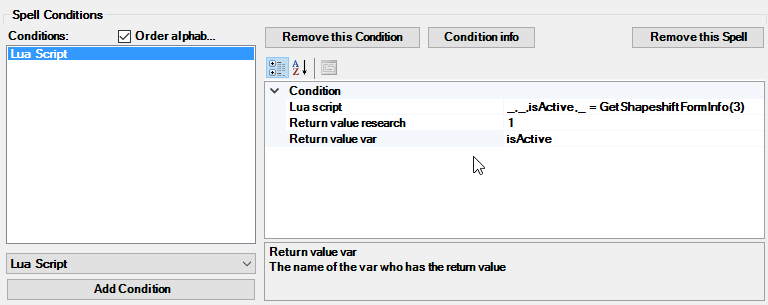
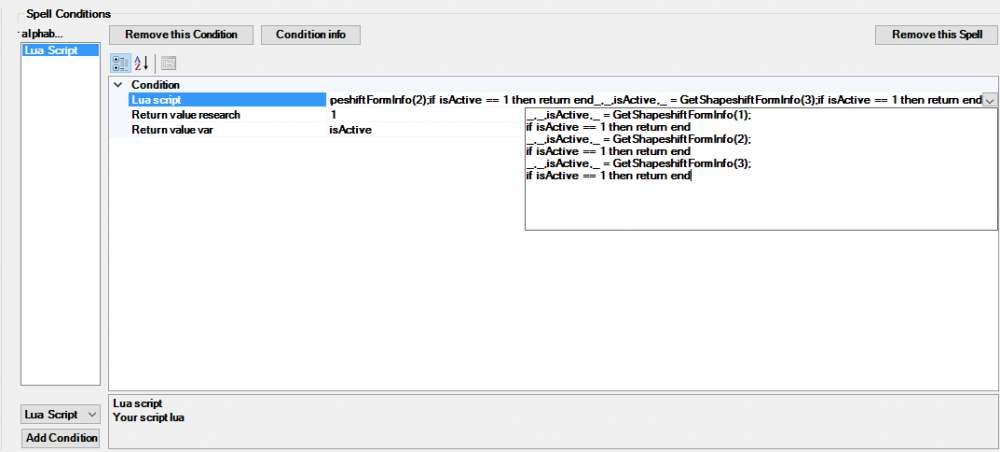
Hello, like : (to check form by form) or (to check if any form active)
-
Hello, can you read this: https://wrobot.eu/forums/topic/1381-repairinstall-wrobot/#comment-966 If you problem is not resolved, can you share your log file please ( https://wrobot.eu/forums/topic/1779-how-to-post-your-log-file-with-your-topic/ ).
-
Hello, line 39 and 48 replace autoInteract by autoLootDefault
-
Hello, do you have activate option to sell items when bag is full? (or you can also active option to stop bot when bag is full in advanced general settings to avoid this problem)
-
Hello, sorry you cannot, but you can use "relogger" or product "Schedule" for that
-
-
Hello, add item in your fightclass