Droidz
Administrators
-
Joined
-
Last visited
Everything posted by Droidz
-
Changed Status to Not a Bug Changed Version to All
-
Hello, http://wrobot.eu/forums/topic/1381-repairinstall-wrobot/?do=findComment&comment=966 step 4, 6, 7, if your problem is not resolved please share your log file
-
Hello, http://wrobot.eu/forums/topic/1381-repairinstall-wrobot/?do=findComment&comment=966 step 4, 6, 7, if your problem is not resolved please share your log file
-
Changed Status to Awaiting Feedback Changed Version to All
-
Hello, can you try http://wrobot.eu/forums/topic/2811-bg-join/?do=findComment&comment=12996
-
Hello, http://wrobot.eu/forums/topic/2482-shadow-priest-void-tendrils-help/?do=findComment&comment=11419
-
-
hello,
-
Changed Status to Awaiting Feedback
-
If you can tell me if problem is resolved with new update.
-
Hello, use this plugin: Whisper Screenshot for private server.cs
-
Hello, http://wrobot.eu/forums/topic/2972-beta-download-wrobot-for-tbc/?do=findComment&comment=13702
-
http://wrobot.eu/bugtracker/wrobot-for-tbc-gatherer-bug-r413/
-
Changed Status to Duplicate Changed Version to All
-
Hello, try to disable your antivirus
-
-
-
Bonjour, WRobot n'a jamais était touché par une banwave (vous pouvez trouver les rapports de ban ici: http://wrobot.eu/forums/forum/29-security-ban-reports/ )
-
Bonjour, Pouvez vous me donner la position de l'entrée (de votre partie intérieur)
-
Ok, turnin quest manually, add quest type "InteractWithNpc", in "Macro when interact..." add lua code like: RunMacroText("/click GossipTitleButton1"); CompleteQuest(); RunMacroText("/click QuestFrameCloseButton"); RunMacroText("/click QuestFrameGreetingGoodbyeButton"); (replace GossipTitleButton1 by npc button name, to get button name use this script: http://wrobot.eu/forums/topic/1689-useful-scripts/?do=findComment&comment=8447 )
-
-
-
Sorry, I can't find anything to solve this problem and I won't add this feature to WRobot.
-
J'ai pris note du problème, je reviens vers vous quand le problème est résolu ou que j'ai une solution.
-
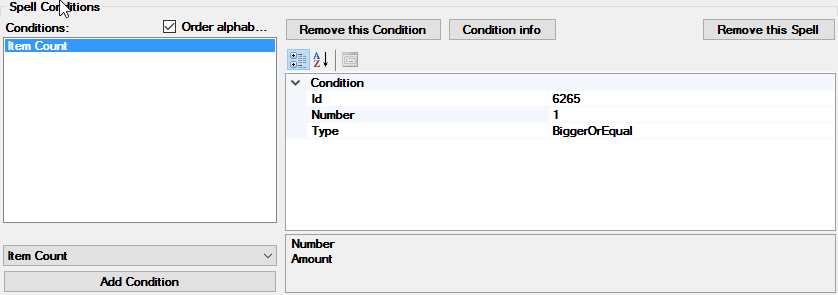
You can also use condition "Item Count":