Droidz
Administrators
-
Joined
-
Last visited
Everything posted by Droidz
-
Hello, yes but it is not easy, normally WRobot use Flightmaster automaticly (You can reduce the minimum distance for use Flightmaster in advanced settings tab taxi).
-
Hello, To lure some mobs you can look this probile: http://wrobot.eu/forums/topic/2445-trouble-with-profle-creator-for-entrance-to-a-dungeon/ (mount > follow path > Dismount > Attack > ...)
-
Please wait next update and tell me if problem is resolved please.
-
Ok, if you can wait next update and tell me if problem is resolved please.
-
-
Hello, can you give me screenshot of npc window (where you get this problem) and the name/position (or the quest id).
-
Hello, please share your log file: http://wrobot.eu/forums/topic/1779-how-to-post-your-log-file-with-your-topic/
-
reply here: http://wrobot.eu/forums/topic/2615-flying-mout-dosent-work-in-outland/?do=findComment&comment=11894
-
hello, in your spells book do you have this spell http://wotlk.openwow.com/spell=34093 or this spell http://wotlk.openwow.com/spell=34092 ?
-
-
Frequently asked
-
Hello, Do you? - Launch "WRobot\WRobot.exe". - Click on button "Launch Bot". - An window appear, you need to replace text "TRIAL" by your license key (you can click on "+" button to save key). - Click on "Login" bouton. If problem is not resolved, please read this guide: http://wrobot.eu/forums/topic/1381-repairinstall-wrobot/#comment-966
-
Hello, if you can stop bot just after getting this problem and send me the log of the session please http://wrobot.eu/forums/topic/1779-how-to-post-your-log-file-with-your-topic/
-
Hello, He has others wow database that wowhead for wow 3.3.5 ( http://wotlk.openwow.com/spells ) And the spell list is here to help you, but you can add spell name manually. How said sumodima, you need to restart wow if you have learn spell after wrobot start.
-
He did not write documentation, but you can found all classes/methods of WRobot when you add in the references of your visual studio project "wManager.dll" and "robotManager.dll".
- 24 comments
- 4 reviews
-
-

- 1
-
-
-
-
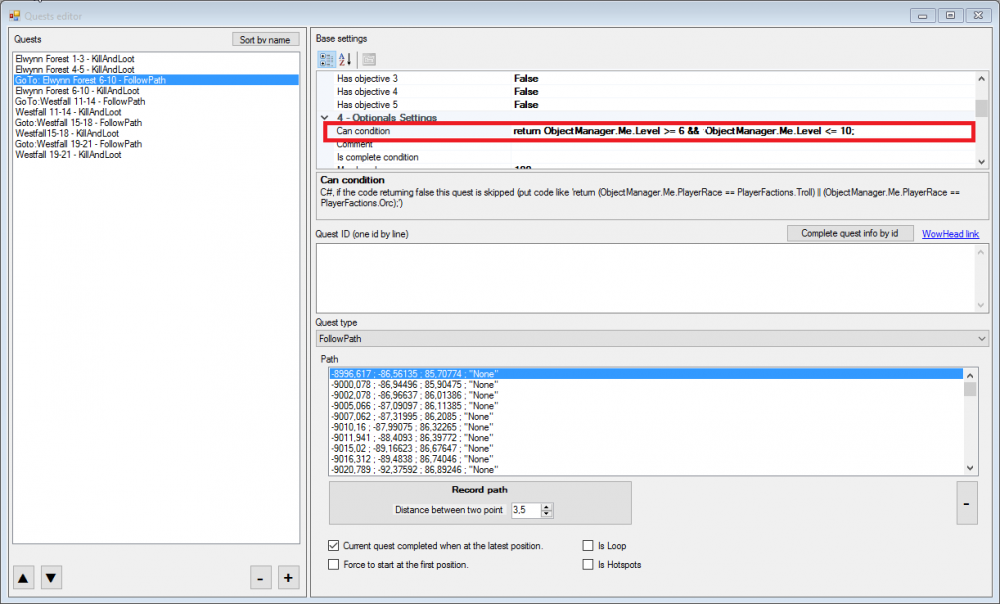
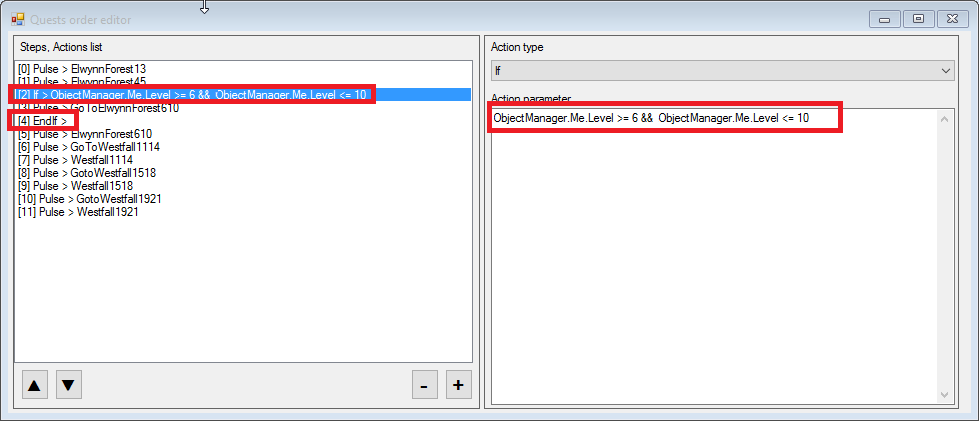
Hello, You have two choise: Like this: Or like this: ObjectManager.Me.Level >= 6 && ObjectManager.Me.Level <= 10
-
-
I post message here when is added
-
Not now, but I planned to do a program that manages several sessions of WRobot (product change, profile change, restart) and Wow (launch, restart, relog,...)
-
Hello, to disable regen you can put "1" at % (in advanced general settings tab "Food/Drink". I'll look how to imprive this feature, I comeback here after.
-
Hello, edit downloaded file with notepad and replace all text "Int128" by "ulong" (don't forget to save).
- 24 comments
- 4 reviews
-
-
- 1
-
-
Hello, thank you. Repair feature seem works, can you give me screenshot of vendor/repair window (window where wrobot wait) and give me your log file please.
-
Hello, suggestion noted, I comeback here when this problem is fixed.