




idntcare
Members
-
Joined
-
Last visited
Everything posted by idntcare
-
 Hm it sucks forme insant at these Crystalthings on the walls. it tries climbing up there. dont even know why
 -
Hey Peeps, i started a few weeks ago with this nice 'little' Bot and farmed Tons of Mats on my Main account without thinking of a ban. LUL to me. So i now have bought kinda Cheap 5 Legion Keys and now trying to get them the fastest way i could to 110 without playing myself. I realized how much money you can make with just these Bot and some selfmade profiles. I just got one Question, do u guys Level ur Botting Accounts to max or start ur botting business just out of Suramar for mor Profit in less time. Using right now some Grinder/Skinning/Leveling Profiles to generate Gold and some decent XP/H. Would u do the same or start rightaway with Herbs and Ores?
-
-
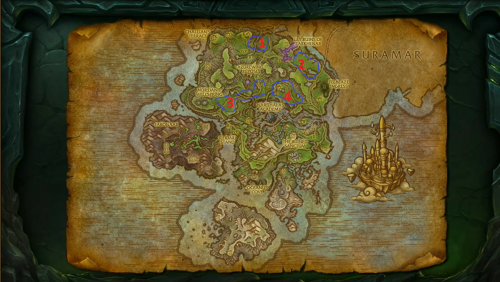 using this right now with felblaze, only getting 30k xp/h.. any ideas why this is so low? anyway awesome profile !
- 19 comments
- 8 reviews
-
-

- 1
-