Skip to content
View in the app

A better way to browse. Learn more.

WRobot

A full-screen app on your home screen with push notifications, badges and more.

To install this app on iOS and iPadOS
  1. Tap the Share icon in Safari
  2. Scroll the menu and tap Add to Home Screen.
  3. Tap Add in the top-right corner.
To install this app on Android
  1. Tap the 3-dot menu (⋮) in the top-right corner of the browser.
  2. Tap Add to Home screen or Install app.
  3. Confirm by tapping Install.

gentice

Members
  • Joined

  • Last visited

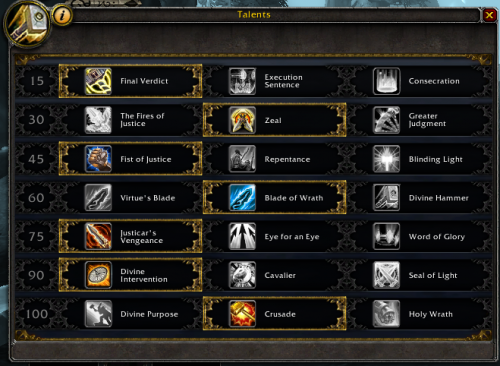
  1. Ok yeah, I had crusader at first because of another profile didn't know i'd have to restart everything to fix it, but that worked! thanks for the help :)
  2. the log is a few mobs in a row where i turned it on and ran it with no zeal, essentially when the few spells are on cd and zeal isn't it just auto attacks Legion Ret Paladin by Eeny.xml 19 Oct 2016 23H48.log.html

Account

Navigation

Search

Search

Configure browser push notifications

Chrome (Android)
  1. Tap the lock icon next to the address bar.
  2. Tap Permissions → Notifications.
  3. Adjust your preference.
Chrome (Desktop)
  1. Click the padlock icon in the address bar.
  2. Select Site settings.
  3. Find Notifications and adjust your preference.