Skip to content
View in the app

A better way to browse. Learn more.

WRobot

A full-screen app on your home screen with push notifications, badges and more.

To install this app on iOS and iPadOS
  1. Tap the Share icon in Safari
  2. Scroll the menu and tap Add to Home Screen.
  3. Tap Add in the top-right corner.
To install this app on Android
  1. Tap the 3-dot menu (⋮) in the top-right corner of the browser.
  2. Tap Add to Home screen or Install app.
  3. Confirm by tapping Install.

SpOokiie

Members
  • Joined

  • Last visited

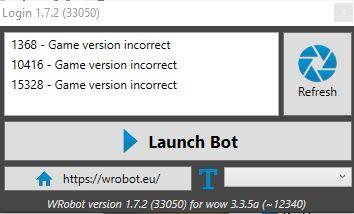
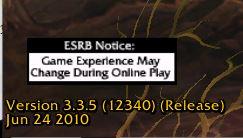
  1. Been trying to make Wrobot work on Ascension server, am currently using this version of Wrobot on the left and the game server version on the right. Have run all as admin as well as change the wow name to World of Warcraft but it still shows game version incorrect.
  2. it works for me sometimes, its like bugged?
  3. following this topic, i am trying to find something similiar too
  4. depend on which server you are playing on, it works on some server, i have tried on Wowcircle it works
  5. 好像不能用在官方
  6. hi, how did you managed to get pass the game incorrect version? i am using wrobot 1.7.2 for 3.3.5a
  7. are you guys able to use wrobot for Ascension? now i tried it says incorrect game version.
  8. hi Angus313, are you still using Wrobot for this? did you get banned?

Account

Navigation

Search

Search

Configure browser push notifications

Chrome (Android)
  1. Tap the lock icon next to the address bar.
  2. Tap Permissions → Notifications.
  3. Adjust your preference.
Chrome (Desktop)
  1. Click the padlock icon in the address bar.
  2. Select Site settings.
  3. Find Notifications and adjust your preference.