Xxseekxx
Members
-
Joined
-
Last visited
-
Yup, wrotation mode. Just like enyo or lazyraider.
-
I am also new to this bot but I was able to set it up and write my own fight classes within the first 1-2 hours of using this. What are you trying to do? I used this getting started video to understand all the different screens on the bot. I used this to figure out the basics of how to write your own fight class. For running a simple grinder or quester profile, you simply download, put the file in the designated folder and then run the corresponding bot-mode. If you are receiving errors from this, it is likely not the bot but the profile. i.e. Starting in the wrong zone, not meeting requirements etc.
-
What does it do? What are we testing?
-
 Xxseekxx reacted to a comment on a file:
FISHERMAN'S FRIEND - tinfoil hat and some utility on the side
Xxseekxx reacted to a comment on a file:
FISHERMAN'S FRIEND - tinfoil hat and some utility on the side
-
-
 Thanks, it's working great!
 -
Is there any setup required in the Fishbot settings to work with this plugin or is it fine to just turn this on and then start Fisherbot?
-
Thanks, that fixed it. I didn't have to re-install anything but just disabling .Net + restart, enabling + restart fixed it. :)
-
Log has nothing before actually launching bot. I will note, this only happens once per restart of computer. If I close bot, and re-open, there is no error.
-
-
Yes, I have done the entire Repair/Install list. And the servers yesterday would give a bad login error but that is fixed today. Looks like null01 is in the same boat?
-
-
Windows 10, have all updates.
-
Tried doing it on hard drive and not flash drive, same error with fresh install.
-
How do I add trinkets to a fight class? Specifically Kil'Jaeden's Burning Wish? I tried using the Wowhead link spellid but it just pops up saying No spell id.
-
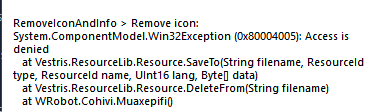
I am receiving this error when launching wrobot as well as when launching other dialogues. This will occasionally cause me to crash. I have done .net Framework repair and made sure I have the newest C++ redistributable. Any suggestions?
-