




Skip to content
View in the app

A better way to browse. Learn more.

WRobot

A full-screen app on your home screen with push notifications, badges and more.

To install this app on iOS and iPadOS
  1. Tap the Share icon in Safari
  2. Scroll the menu and tap Add to Home Screen.
  3. Tap Add in the top-right corner.
To install this app on Android
  1. Tap the 3-dot menu (⋮) in the top-right corner of the browser.
  2. Tap Add to Home screen or Install app.
  3. Confirm by tapping Install.

battlebit

Members
  • Joined

  • Last visited

  1. How to detect is player running or walking switched by ToggleRun();
  2. battlebit changed their profile photo
  3. I'm not against obfuscation, to be honest, it doesn't stop me. Main modules like authManager, robotManager, wManager can be obfuscated but products like battlegrounder and documentation can be open, but still compiled and delivered from WRobot team. @Droidz what do you think about that?
  4. Primarily question to the bot developers, are you going to share public API documentation to end-users? I think it would be great to share it on Github and share product sources like Battlegrounder, Party etc. to improve their quality and flexibility. Don't get me wrong but I'm tired fighting with your obfuscator every time once WRobot updated to fix some issues with this modules...
  5. cache removing didn't help but it's working after PC restart...
    • 296 downloads
    • Version 0.1.0
    It's a simple plugin is trying to roll a group loot item, otherwise, it is trying to disenchant if possible and otherwise, it is trying to greed this item.
  6. battlebit commented on battlebit's bug report in Bug Tracker
    It also displays
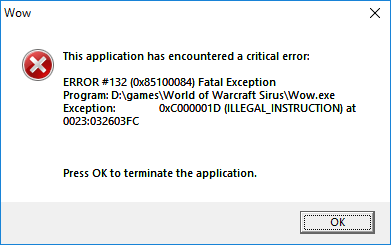
  7. After update to 1.9 Wow client started crashes every time once I launch Wrobot It also displays following errors
  8. battlebit posted a bug report in Bug Tracker
    After the latest update, the program crashes the client all the time. No way to use.
  9. I used the only wrobot. Seems like their warden checks flag of protected lua functions usage.
  10. It's shame to be banned on private servers. I just click Start to Fishing =(

Account

Navigation

Search

Search

Configure browser push notifications

Chrome (Android)
  1. Tap the lock icon next to the address bar.
  2. Tap Permissions → Notifications.
  3. Adjust your preference.
Chrome (Desktop)
  1. Click the padlock icon in the address bar.
  2. Select Site settings.
  3. Find Notifications and adjust your preference.