




mikehamz123
Members
-
Joined
-
Last visited
Everything posted by mikehamz123
-
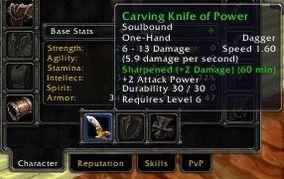 This is really good for poisons until it runs out of poisons to apply, then it somehow finds a way to delete my offhand weapon ? has deleted 2 blues already
 -
works better than paid scripts good shit
-
christ this is bad. Download the addons droidz linked for now so you guys don't get banned for this shit
-
when I try to use a fight class it doesn't look at the mob half the time and is just spamming abilities. Does it have to do with my video settings not being right or something