



All Activity
Today
-
corman20 joined the community
-
iflieh joined the community
-
bim-hmc joined the community
Yesterday
-
Storofell joined the community
-
Hi all, related question, I am on a server that does not require to actually mine/gather (click). it is automatically picked when flying/running over it, no need to pause either. Is there a way to avoid doing the mining / gathering action and just go from waypoint to waypoint without dismountting ? Thanks in advance
-
WilliamRon joined the community
-
theneokfr joined the community
-
addictivian joined the community
-
cartox2021 joined the community
-
CSao joined the community
-
ns123 joined the community
Last week
-
Is there a setting for fisherbot to set the cast key? If so, where? The logs say it repeatedly casts fishing, but never does. If I manually cast everything works perfectly. Getting fisherbot to cast the line is my only problem.
-
-
-
 Sehr gut mit der anleitung das einzige was mich ein wenig nervt ist das nicht alle pets gelevelt werden sondern nur der main slot und das nicht bei 5% hp zum beispiel das Pet geswitcht wird weil es sonst durch den tod nichtmal mehr ein wenig exp bekommt. ansonsten super profil. und läuft smooth
- 20 comments
- 5 reviews
-
Logs don't show much but also attaching a small snip video to illustrate whats happening. Ive tried a clean download and installation with as well and it still happens but it maybe seems related to the WoTLK build of the bot. Tried a clean install on another laptop as well and same result, sometimes it opens and sometimes it just crashes several times in a row. Recording 2026-08-03 152825.mp4 3 Aug 2026 15H27 - Gngw.log.html 3 Aug 2026 15H27 - lKmVWqN.log.html 3 Aug 2026 15H27 - xdRctp.log.html 3 Aug 2026 15H27 - fSKTJ.log.html 3 Aug 2026 15H27 - NkGeM.log.html 3 Aug 2026 15H27 - JrmbWTt.log.html 3 Aug 2026 15H27 - aDWBLoG.log.html 3 Aug 2026 15H27.log.html
-
Any option in 2026?
-
Вообще, сделать это сложно, в ручную. Ты можешь попробовать попросить нейросеть, условно Claude Code с этим помочь, но если у тебя нету подписки и ты никогда этим не занимался, то будет сложно и затратно все сделать сразу(Чтобы Claude работал, нужно минимум подписка от 100$). Поэтому, лучше, что ты можешь сделать. Найти неработающие части в профилях и заменить/удалить/восстановить их. Так будет лучше всего и быстрее. Раз ты сказал, что там всего 1-2 неработающих квестов.
-
 added u on dc
 -
Всем привет, хотелось бы узнать, есть ли возможность объединения 2-3 Questing профилей в 1. Для примера, есть публичные маршруты The barrens (12-20), далее идёт Stonetalon Montains (20-25), затем AshenAndThousand (25-30). В каждом из этих маршрутов есть 1-2 неработающих на моём сервере квестов. Для того, чтобы не включать каждый раз новый маршрут в ручную, я бы хотел объединить их в 1 профиль, если это возможно, либо сделать пошаговый запуск этих профилей + удалить из них неработающие квесты. Может кто-то помочь?
Earlier
-
Hello, Could you please share the full log file of the session where you encountered the issue? You can find instructions on how to post your log file here: https://wrobot.eu/forums/topic/1779-how-to-post-your-log-file-with-your-topic/
-
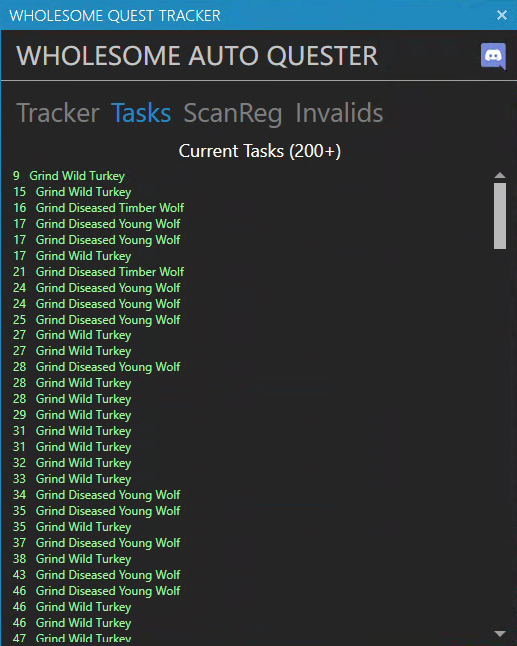
Getting this issue on multiple machines and also on a fresh new download of wrobot as well. If I click on the exe to launch it just flashes the windows quick and closes but if I keep clicking it eventually it will stay open sometimes 7 or 8 times. I've gone through the troubleshooting/repair posts and have all my redistributable installed, slim dx, regular dx. I'm not quite sure what the issue is but if you let me know what logs I can provide will do.I figured out what was causing the problem. The following file contained 1,447 location entries for Wild Turkey: .\WRobot\Data\AQ.jsonBecause of this, WRobot was attempting to visit every recorded Wild Turkey location. Since the NPC was not actually available, the bot would travel to each location, blacklist it, and then move on to the next one. To fix the issue, I found the entry for Wild Turkey, NPC ID 32820, and replaced its Creatures list with an empty array: { "entry": 32820, "name": "Wild Turkey", "faction": 7, "maxLevel": 1, "minLevel": 1, "unit_flags2": 2048, "Creatures": [] }This removed a large number of lines from the AQ.json file. After saving the file and restarting WRobot, the bot stopped searching for the elusive Wild Turkey. I recommend making a backup of AQ.json before editing it.Ive been trying to launch it with a 32-bit client but its not working. version 26972 the errors are either the cas system was unable to initialize client handler initialization error failed fetching the CDN configuration file (i found a modified wow.exe file) or an updated version of World of Warcraft is available. Please launch the Battle.net app to download the update when trying to launch it with normal wow.exeascension COA fight class Ranger.https://wrobot.eu/files/file/2079-paidmake-wrobot-work-on-ascension-live-and-epoch-wow-httpsascensiongg/Couldn't we just update the bot to work with the modified client? The changes can't be that significant, can they?Все зависит от место. Входы/выходы offmesh помогает в них, остальное по ситуации.Ну вот большинство фонарей я как раз-таки и пофиксил( Но некоторые места прям беда, как-будто тут больше уже логика бота работает и сломать её слишком сложно. Но вдруг кто-то нашел реально работающую ручку...Ну, как вариант, тебе стоит попробовать добавить offmesh входы-выходы, где это регулярно происходит. Но это не решит все проблемы, рано или поздно, ты упрешься в то, что он будет в какие-то мелкие объекты врезаться (типа фонарей или указателей), тогда тут только смиритьсяКто-нибудь знает, как решить проблему с тем, что бот регулярно врезается в одни и те же места? У меня настроены квесты в Тернистой долине. Бот бежит брать квест в Бухту, а затем идет его выполнять. После того как он выезжает на маунте из Бухты, происходит одно из двух: либо он застревает около входа в Зубах, либо бежит прямо в гору и не может на нее подняться. После этого он слезает с маунта, прыгает, разворачивается и только потом продолжает бежать нормально. Таких мест на карте очень много, и это ужасно бесит. Больше половины подобных проблем удается решить с помощью настройки зоны ЧС: подходишь к нужному месту, добавляешь радиус ЧС, и бот начинает обходить эту область, после чего все работает нормально. Но на некоторые места это вообще никак не влияет. Хоть поставь радиус 100 метров - он все равно продолжает бежать именно туда. ---------- Does anyone know how to solve the issue where the bot keeps getting stuck in the exact same places? I have quests configured in Stranglethorn Vale. The bot goes to Booty Bay to pick up a quest, then heads out to complete it. As soon as it leaves Booty Bay on a mount, one of two things happens: it either gets stuck near the tunnel entrance, or it runs straight into a mountain and can't climb it. After that, it dismounts, jumps around, turns around, and only then continues on its way normally. There are a lot of places like this on the map, and it's really frustrating. More than half of these problem spots can be fixed by configuring a blacklist zone: I go to the problematic location, add a blacklist radius, and from then on the bot avoids that area and everything works fine. However, there are some places where this has absolutely no effect. Even if I set the blacklist radius to 100 meters, the bot still insists on running into the exact same spot.Hi everyone, Can I also use the bot to queue for random battlegrounds as a group? THANKSI'm running into an issue where my bot gets stuck trying to complete "Grind Wild Turkey" tasks in Elwynn Forest. The bot just runs around the zone endlessly searching for Wild Turkeys that don't appear to exist. Eventually it gains enough experience from killing other nearby mobs that it levels up a few times and moves on to the next area, but until then it spends a lot of time wandering around. When I look at the Tasks list, it's filled with multiple "Grind Wild Turkey" entries. Things I've already tried: Blacklisting Wild Turkeys, Spawning Wild Turkeys, Restarting WRobot, Switching profiles and Deleting the NPC from the database Unfortunately, none of these have resolved the issue. Even with the mob blacklisted, the bot continues searching for them. Has anyone experienced this before or know how to remove these grind tasks or prevent WRobot from generating them? I'm using Wholesome Auto Quester with an AzerothCore server. 16 Jul 2026 22H51.log.html


.thumb.png.8577cded3d499cefaf4f0b8be4185232.png)








