Skip to content
View in the app

A better way to browse. Learn more.

WRobot

A full-screen app on your home screen with push notifications, badges and more.

To install this app on iOS and iPadOS
  1. Tap the Share icon in Safari
  2. Scroll the menu and tap Add to Home Screen.
  3. Tap Add in the top-right corner.
To install this app on Android
  1. Tap the 3-dot menu (⋮) in the top-right corner of the browser.
  2. Tap Add to Home screen or Install app.
  3. Confirm by tapping Install.

AvoidIt 1.0.1

(0 reviews)

What is it?

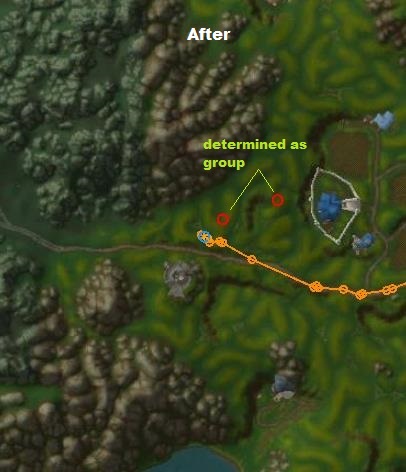
A plugin to avoid groups of hostile npcs during traveling (currently).

How it works?

By reporting the dangerous area & regenerate path.
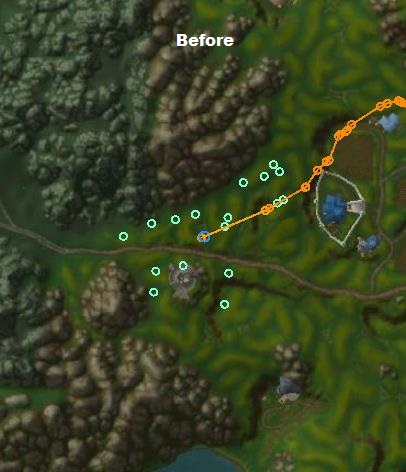
 

before2.jpg.55b8a327c4bb57f8b3299d31aa675af1.jpgafter2.jpg.26cc8e854834426e94872c7b08e0568c.jpg


Some more information:

-Currently tested it with grinder on a 3.3.5a client, but it should also work with other clients & path generating products too

-only supports the travelling path for now(not the grinder/gatherer hotspots itself)

-if the desired goal is not achieved, try to change the settings

-initial release = some errors can occur


Future features:

-implent custom resurrection

-avoid fighting while travelling


Ideas, suggestions or problems?

Please leave your feedback here.


What's New in Version 1.0.1

Released

-a more dynamic report system was implented

-it no longer mark hostile npc groups if they target the player (was a problem if walking through single npcs)

User Feedback

You may only provide a review once you have downloaded the file.

There are no reviews to display.

Account

Navigation

Search

Search

Configure browser push notifications

Chrome (Android)
  1. Tap the lock icon next to the address bar.
  2. Tap Permissions → Notifications.
  3. Adjust your preference.
Chrome (Desktop)
  1. Click the padlock icon in the address bar.
  2. Select Site settings.
  3. Find Notifications and adjust your preference.