





Skip to content
View in the app

A better way to browse. Learn more.

WRobot

A full-screen app on your home screen with push notifications, badges and more.

To install this app on iOS and iPadOS
  1. Tap the Share icon in Safari
  2. Scroll the menu and tap Add to Home Screen.
  3. Tap Add in the top-right corner.
To install this app on Android
  1. Tap the 3-dot menu (⋮) in the top-right corner of the browser.
  2. Tap Add to Home screen or Install app.
  3. Confirm by tapping Install.

PauseSafely Plugin 0.2.3

(0 reviews)

3 Screenshots

*** Plugin may require English client ***

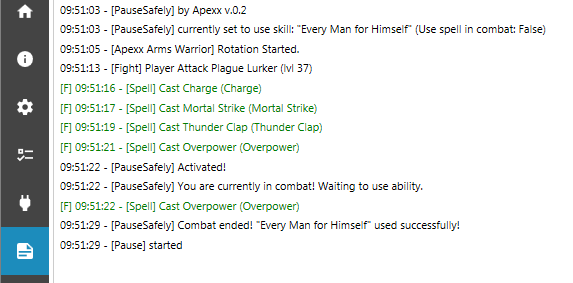
I have seen a few forum posts looking to enhance the bot safety and added features like being able to use a skill when the user pauses the bot. This plugin uses the robotManager.FiniteStateMachine.State API in order to perform a skill before the actual pause is initiated.

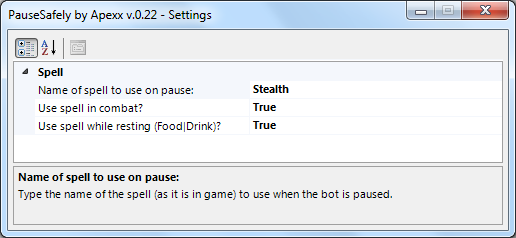
Be sure to type the name of the spell in the Settings window exactly as you see it in game. I have tested this some, but it may require some tweaking.

  • If you pause the bot manually during combat and the settings to allow the spell to be used in combat is set to false, it will catch the input, wait until the fight is over, and then use the spell.
  • If you set the use spell during combat to true (ie: Vanish), and manually pause the bot, it will cast the ability before pausing the bot.

Another great feature is if you have the bot's advance settings to pause the bot when a player is within the default search radius of 1000, it will pause the bot, again changing the bot state and activating this plugin. Needs more testing! The servers I have tried this on were not very populated and it was tough to check if players were nearby.

What's New in Version 0.2.3

Released

No changelog available for this version.

User Feedback

Recommended Comments

tonycali

Members

Can the bot recognize the difference between a kobold hitting you and  player pvping you?.  a plugin that vanishes backpeddals 15 feet or so and logs out for 4min or so would be real cool for security especially if u could detect a pvper 60 feet away or something and vanish out.

Apexx

Elite user

It's easy to write an opposite player faction check and a generic wowunit NPC detection. I actually commented out my own code to detect players of opposite faction because it seems to work just fine with the WRobot built in feature "Enter advanced settings..." --> "Stop game / bot / Security" --> "Pause bot if Nearby Player" enabled which then activates PauseSafely. I might continue expanding the features.

Classicwow

Members

Stealth while resting?

Apexx

Elite user

8 hours ago, Classicwow said:

Stealth while resting?

Added

Classicwow

Members

Cant get it to work with resting

Apexx

Elite user

On 10/4/2018 at 4:40 AM, Classicwow said:

Cant get it to work with resting

Updated to 0.2.3.

Classicwow

Members

Going to test it, can u please put version on the download file?

maukor

WRobot user

Looks like it doesnt work, just checked with my 2 chars, added Prowl as a spell, not using spell on pause. 2.4.3 @Apexx Or it doesnt work on tbc?

Apexx

Elite user

@maukor I have never tested this for tbc. I may rework this plug-in in the near future. 

TheSmokie

Banned

Is the source code available?

w8plz

WRobot user

Some news on Stealth after combat and before pause?

Create an account or sign in to comment

Account

Navigation

Search

Search

Configure browser push notifications

Chrome (Android)
  1. Tap the lock icon next to the address bar.
  2. Tap Permissions → Notifications.
  3. Adjust your preference.
Chrome (Desktop)
  1. Click the padlock icon in the address bar.
  2. Select Site settings.
  3. Find Notifications and adjust your preference.