
Skip to content
View in the app

A better way to browse. Learn more.

WRobot

A full-screen app on your home screen with push notifications, badges and more.

To install this app on iOS and iPadOS
  1. Tap the Share icon in Safari
  2. Scroll the menu and tap Add to Home Screen.
  3. Tap Add in the top-right corner.
To install this app on Android
  1. Tap the 3-dot menu (⋮) in the top-right corner of the browser.
  2. Tap Add to Home screen or Install app.
  3. Confirm by tapping Install.

WRobot - Official

1 Screenshot

WRobotsiteLogoCONTOUR.png

More info: here

Change Log:  here

We support all Windows versions, from Win Vista to Win 11.

You can found list of supported game versions here: https://wrobot.eu/supported-wow-versions/

You can check the status of WRobot on your server here: https://wrobot.eu/byme/CompatibilityReporting/

Install notes:

Quote

Installation:

  • Download and Unzip (extract) "WRobot.zip" on your computer.
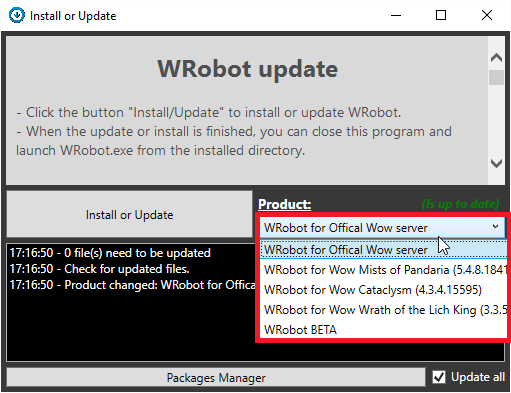
  • Launch program "Updater" (in "WRobot" folder).
  • Select version in "Product".
  • Click the button "Install/Update" to install or update WRobot.
  • When the update or install is finished, you can close this program and launch WRobot.exe from the installed directory.
Quote

Required programs on your computer for running WRobot:

WRobot don't works? go here to repair it.

Don't forget to select your WRobot version in "Update" window.

You can download old version here.

What's New in Version 09/28/21 02:12 PM

Released

No changelog available for this version.

User Feedback

Recommended Comments

Cunts

Members

please, 7 day keys or something?

qsefdqwfw

Members

How you cant write in the forum post that you have to be registered to download the file srsly, its to hard to announce it anywhere  here right?

xdreia22

Members

7 days Keys , please 

abyss041

Members

Is there a possibility that I can request a longer free trial? I would like to use it for a long time and I would like to know how it works if it remains inactive for several hours.

randomguyx

Members

hi does this work for MoP patch 5.4.8 ? 

zhouhang

Members

微信图片_20230209225122.png

zyyysxd

Members

very good choice

dimaneznayu

Members

Just now, dimaneznayu said:

Скриншот_2.png

Чо делать подскажите плиз

359584783

Members

第一次使用 很期待

Neartzim

Members

The bot is really good but there is a way to learn how to use quester or maybe there is alrdy some files did by people somewhere on the site ?

faby68

Members

Hola donde comprar rutinas pvp 3.3.5, dk profano, pala retri, warr, druida resto

Warmane 

lraotp

Members

Need some help to get started.

Knee264

Members

Link doesn't work? Just says it doesn't provide a secure connection.

NetoLins

Members

you could say somewhere this shit is payed so I do not waste my time downloading it. 

dwasd

Members

Can I buy it using cryptocurrency?

Create an account or sign in to comment

Account

Navigation

Search

Search

Configure browser push notifications

Chrome (Android)
  1. Tap the lock icon next to the address bar.
  2. Tap Permissions → Notifications.
  3. Adjust your preference.
Chrome (Desktop)
  1. Click the padlock icon in the address bar.
  2. Select Site settings.
  3. Find Notifications and adjust your preference.