Skip to content
View in the app

A better way to browse. Learn more.

WRobot

A full-screen app on your home screen with push notifications, badges and more.

To install this app on iOS and iPadOS
  1. Tap the Share icon in Safari
  2. Scroll the menu and tap Add to Home Screen.
  3. Tap Add in the top-right corner.
To install this app on Android
  1. Tap the 3-dot menu (⋮) in the top-right corner of the browser.
  2. Tap Add to Home screen or Install app.
  3. Confirm by tapping Install.

[Beardedrasta] Enhancement Shaman Wotlk 1.0.3

(0 reviews)

1 Screenshot

1091866493_ShamanHealingLogo.png.a511adf34a4cd90c4647e4ff8ee4d80e.png

Beardedrasta's Simplified Enhancement Shaman ©


An Enhancement Shaman PVE Damage routine for Wrath of the Lich King 3.3.5!

        This is a custom fight class created for use with WRotation!

                   (Leveling Profile current level support 1 - 40)


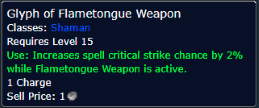
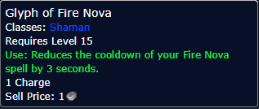
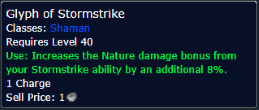
*Best Glyph Options*
Spoiler

STORMSTRIKE.png.9e2a496d59e3419e6c23fd1b0924602e.png   FLAMETONGUE.png.251f5471cbe4457dfb005c9fe227604e.png   nova.png.c2d1dbda5a1c2491079642cf3e121858.png

                                                 **Please use these Glyphs for optimal endgame performance**

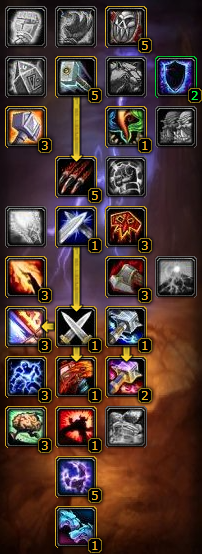
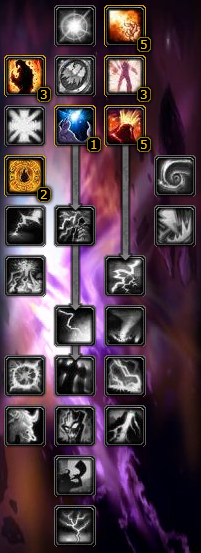
*Best Talent Options*
Spoiler

                                  ELEMENTAL.png.c74d75e0edfc4aeb669ae492df927463.png           ENHANCE2.png.08d4a6c60788dcb19014b33eda0223d2.png

                                    **Please use these talents for optimal endgame performance**


*F e a t u r e s*

  • Feral Spirit on Boss
  • Refresh Magma totem refresh
    • (No auto Call of Elements option, This is bad in group scenario.
  • Slow Fleeing enemies
  • Auto Heal OOC
  • Shamanistic Rage for in combat mana regen
  • Lightning Bolt -> Chain Lightning @ 5 stacks of Maelstrom


If you really really enjoyed the build and want to help a fellow player achieve happiness then

consider donating to 2 growing boys. Food doesn't grow on trees afterall..... wait a minute.   
cash.app/$beardedrastaman


                                         2054669165_RastaLogo.jpg.f97d21b4e270d4406c2eaabb1f7bf89b.jpg

What's New in Version 1.0.3

Released

Updated leveling profile to handle level 1-40

User Feedback

You may only provide a review once you have downloaded the file.

There are no reviews to display.

Account

Navigation

Search

Search

Configure browser push notifications

Chrome (Android)
  1. Tap the lock icon next to the address bar.
  2. Tap Permissions → Notifications.
  3. Adjust your preference.
Chrome (Desktop)
  1. Click the padlock icon in the address bar.
  2. Select Site settings.
  3. Find Notifications and adjust your preference.