




Droidz
Administrators
-
Joined
-
Last visited
Everything posted by Droidz
-
I'll fix it in next update
-
Hello, Use "csharp" conditon ObjectManager.Me.InsanityPercentage >= 10 (replace 10 by insanity required) In the next WRobot update, use conditon "Insanity" (for the moment this conditon is bugged).
-
Bonjour, il faut déplacer les fightclasses télécharger dans le dossier "WRobot\FightClass\".
-
In CastSpellByNameOn you need to put Lua Unit ID (http://wow.gamepedia.com/UnitId ) SpellManager.CastSpellByNameOn(spellName, luaUnitId)
-
Hello, Try to run wow, apply your settings and exit wow by normal way (game menu > exit game). Normally now wow settings is saved when you relaunch wow. ("reloger" kill wow process, and wow seem save settings when you click on game menu > exit game)
-
Other same (not tested): public enum GroupRoles { NONE, TANK, HEALER, DAMAGER } public static List<WoWPlayer> GetMembersByRoles(GroupRoles role) { var r = new List<WoWPlayer>(); var lua = @"local retMembers = ''; for groupindex = 1,GetNumGroupMembers() do if IsInRaid() then local role = UnitGroupRolesAssigned('raid' .. groupindex); if role == '"+ role + @"' then local guid = UnitGUID('raid' .. groupindex); retMembers = retMembers .. guid .. ';'; end elseif IsInGroup() then local role = UnitGroupRolesAssigned('party' .. groupindex) if role == '" + role + @"' then local guid = UnitGUID('party' .. groupindex); retMembers = retMembers .. guid .. ';'; end end end return retMembers; "; var val = Lua.LuaDoString<string>(lua); if (string.IsNullOrWhiteSpace(val)) return r; // no tank var membersGUID = val.Split(new[] { ';' }, StringSplitOptions.RemoveEmptyEntries); if (membersGUID.Length <= 0) return r; foreach (var p in Party.GetPartyHomeAndInstance()) { if (!p.IsValid) continue; foreach (var guid in membersGUID) { if (string.IsNullOrWhiteSpace(guid)) continue; if (p.Guid128.ToString().ToLower() == guid.Trim().ToLower()) r.Add(new WoWPlayer(p.GetBaseAddress)); } } return r; }
-
I have added WowUnit.Guid128 , you can compare it with http://wow.gamepedia.com/API_UnitGUID. Sample (not tested) (work in wrobot for wod and legion): public static List<WoWPlayer> GetTanks() { var r = new List<WoWPlayer>(); var lua = @"local partyTanks = ''; for groupindex = 1,GetNumGroupMembers() do if IsInRaid() then local role = UnitGroupRolesAssigned('raid' .. groupindex); if role == 'TANK' then local guid = UnitGUID('raid' .. groupindex); partyTanks = partyTanks .. guid .. ';'; end elseif IsInGroup() then local role = UnitGroupRolesAssigned('party' .. groupindex) if role == 'TANK' then local guid = UnitGUID('party' .. groupindex); partyTanks = partyTanks .. guid .. ';'; end end end return partyTanks; "; var val = Lua.LuaDoString<string>(lua); if (string.IsNullOrWhiteSpace(val)) return r; // no tank var tanksGUID = val.Split(new[] { ';' }, StringSplitOptions.RemoveEmptyEntries); if (tanksGUID.Length <= 0) return r; foreach (var p in Party.GetPartyHomeAndInstance()) { if (!p.IsValid) continue; foreach (var guid in tanksGUID) { if (string.IsNullOrWhiteSpace(guid)) continue; if (p.Guid128.ToString().ToLower() == guid.Trim().ToLower()) r.Add(new WoWPlayer(p.GetBaseAddress)); } } return r; }
-
-
Wrobot is now updated :)
-
WRobot support now wow 7.0.3.22289 (launch WRobot and accept update)
-
It is very small update, WRobot was updated itself. Try to use spell id: http://wrobot.eu/bugtracker/feral-casting-healing-touch-even-when-predatory-swiftness-is-not-present-r468/#comment-3141
-
Try to close TeamViewer (process and service), and try to change directx version in game (don't forget to restart wow).
-
Hello, do you keep wrobot window in background (or foreground, but not minimized)? Do you get this problem without fightclass?
-
 Hello, only on WRobot for private server, not trial version for WRobot for official wow server.
- 120 comments
- 6 reviews
-
-

- 1
-
-
Hello, for gatherer and grinder profiles, I cannot make more easy to use creator. For create the quests and fightclasses, if you don't like creator you can use c# or vb.net ps: I recommand also to use radar3d (tab "Map")
-
-
-
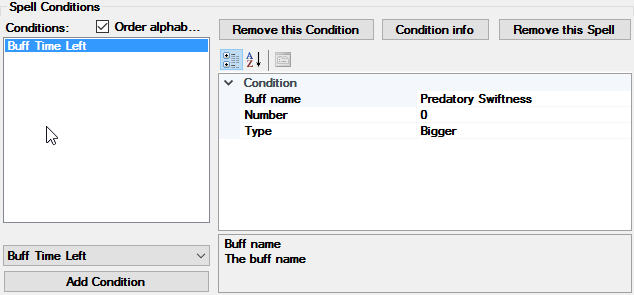
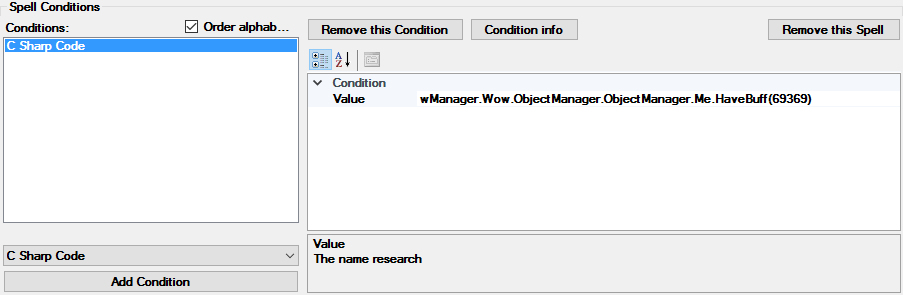
WRobot seem detect this passive buff http://www.wowhead.com/spell=16974/predatory-swiftness, but you want check this spell: http://www.wowhead.com/spell=69369/predatory-swiftness Try this condition: If this don't works, try to add "C Sharp Code" condition with value: wManager.Wow.ObjectManager.ObjectManager.Me.HaveBuff(69369)
-
Hello, are you sure that this problem is not caused by wow update (classes change)?
-
Hello, thank you. Problem resolved, if you can wait next update.
-
Hello, I'll update WRobot for the wow hotfix. EDIT: Build 22267 is now supported by WRobot (launch WRobot and accept update).
-
Hello, http://wrobot.eu/articles/news/wrobot-for-wow-legion-pre-expansion-patch-available-r102/
-
Hello, WRobot support now Wow Legion pre-expansion patch (7.0.3.22248). To get more info about Wow Legion pre-patch: Go here To get more info about WRobot update: Go here You can reports bug here. If you play on european server, wait tomorrow to update WRobot (if you have updated WRobot, you can comeback to WRobot for WoD, for this launch "Updater.exe" (in your WRobot folder), in "Product" select "WRobot for ... Warlords of Draenor" and click on "Install or Upgrade") (if you cannot found WoD product, download again WRobot). Best regards, Droidz.
-
Hello, Reports here all hot bugs appear with WRobot for Wow 7.0.3 (for others bugs/suggestion please use bug tracker). (Don't forget to share log file here) More info about update here.
-
