




Droidz
Administrators
-
Joined
-
Last visited
Everything posted by Droidz
-
Bonjour, sur ce compte (BONNOIS), vous avez uniquement est abonnement mensuel (à 5.99€) qui est terminé depuis le 12/01/2016.
-
Hello, can you give me your log file and the bg where you get this problem please.
-
Sorry, I wanted to release quickly wrobot for 3.3.5a and I have not had time to test all the features before... If you can wait next update and tell me if problem is resolved.
-
When you use "Automaton" bot, if he haven't mob at kill and node at farm in area your character don't fly?Or if you use "Gatherer" product with a flying profile, you character fly? Do you have try to activate option in general settings "Use lua to move"?
-
Hello, Problem noted, I'll not fix it immediatly but I come back here when is fixed.
-
Hello, you cannot black list zones to avoid this (you can black list zone in tab "Tools" or in the profile creator)? It is very hard for me to fix this.
-
Hello, problem fixed, wait next update.
-
Hello, Thank you for your suggestions, I have noted, I come back here when added.
-
In "Grinder" profile you can change zone only by level (when you record zone you need to setting min/max level). If you want more option you need to use "Quester" or "Custom Profile" profile.
-
Hello, Can you share your log file please: http://wrobot.eu/forums/topic/1779-how-to-post-your-log-file-with-your-topic/. If you use product "Automaton" do you have activate option "Use Flying Mount" in product settings and in General Settings?
-
Hello, Sorry, with grinder profile you cannot make custom path to change zone. PS: You can separate it into multiple profiles so that users understand that they must manually change area.
-
Bonjour, 3- Utilise ce plugin: http://wrobot.eu/files/file/414-multi-pull/ (déplace le fichier téléchargé dans le dossier "WRobot\Plugins\", et active le dans l'onglet "Plugins" de WRobot).
-
Salut, Le problème est surtout que ton code LUA te dit si la "cible actuelle" est attaquable, mais tu ne sélectionnes pas de cible. Pour que ça fonctionne, il faudrait un code du style: List<WoWPlayer> allPlayers = ObjectManager.GetObjectWoWPlayer(); foreach (var player in allPlayers) { if (player.IsAlive) { wManager.Wow.Helpers.Interact.InteractGameObject(player.GetBaseAddress); if (Lua.LuaDoString<bool>("return UnitCanAttack('player', 'target')")) Adversaires.Add(player); } } Mais ce n’est pas pratique (ça va changer de cible souvent, et si c'est appelé fréquemment ce sera injouable). Utiliser beaucoup de code lua n'a pas d'importance (temps que ça ne ralentit pas le bot et le jeu, et que la fonction lua ne fait pas appel au serveur de wow (qu'elle reste en local))
-
Hello, if you add manually the spell name this don't works?
-
Sorry, wait next update again to resolve it.
-
Ok, I have added search by process name also to avoid this problem. WRobot works with VPN, if you get problem contact me.
-
Hello, I am not sure to understand your question, but you need to restart WRobot if you change character, and you can use one character by WRobot session (you need to launch several WRobot to bot on several chatacters).
-
Try this profile, it is more easy to use: http://wrobot.eu/files/file/486-garrison-farm-minesherbs/
-
Hello, In your WRobot folder, since last updates, I have added some shortcut. Can you try to launch WRobot with shortcut "WRobot No DX". If your problem is not resolved, can you launch WRobot with shortcut "WRobot No Lock Frame". If you can tell me if this resolved your problem.
-
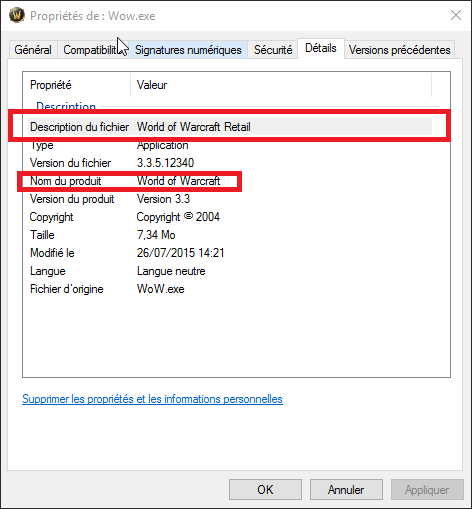
Hello, do you get this information (when you right click on Wow.exe > Property: Can you try to download and extact Wow.zip in you Wow folder and launch wow with it (and test if WRobot found it). Do you have read this guide: http://wrobot.eu/forums/topic/1381-repairinstall-wrobot/#comment-966 ? Please share your log file if your problem is not resolved.
-
Merci, si vous pouvez attendre la prochaine mise à jour et me dire si le problème est résolu.
-
Hello, strange. Can you give me memory info when you get the problem please (go to tab "Tools" > click on button "Development Tools" > Click on button "Memory informations" and copy/past here (or send me by private message, the text contain your username) all text of thetextbox please).
-
Download profiles and fight classes for Wotlk
-
Download profiles and fight classes for Cata
-
Download profiles and fight classes for MoP

