




Droidz
Administrators
-
Joined
-
Last visited
Everything posted by Droidz
-
Le problème est cette erreur: "System.ComponentModel.Win32Exception (0x80004005): Handle de fenêtre non valide" je pense que le bot n'arrive pas à accéder à ton clavier (ce qui explique pourquoi tu es afk). Je viens de répondre ici: à la même erreur que toi. Si tu peux me donner les mêmes informations que je lui ai demandé (ça m'aidera à trouvé d’ou vient le problème): Réinstaller/réparer les programmes: Framework 4.0, DirectX 9, DirectX 11, Redistributable Visual C + + 2010 (X86) et SlimDX (4.0 X86). Activer l'option "Use lua to move" dans WRobot onglet "General Settings" bouton "advanced...". Si le problème n'est pas résolu: m'envoyer la liste des programmes lancés sur votre ordinateur (pour obtenir la liste, ouvrir le cmd (en mode administrateur) et utiliser la commande: tasklist ).
-
Hello, Can you send me your log file please (of bugged WRobot session, you can found it in "Logs" folder). Make steps of this post please: problem seem similary)
-
Hello, Generally this problem is cause by TeamViewer program (this program disable the keyboard access), if it is running on you computer, close it before launch WRobot (don't forget to close also teamviewer service). Try also to disable your antivirus. Make sure that you run WRobot in a Windows admin account. Reinstall/repair this programs: Framework 4.0, DirectX 9, DirectX 11, Redistributable Visual C + + 2010 (X86) and SlimDX (4.0 X86). Activate "Use lua to move" option in WRobot tab "General Settings" button "advaced...". Make all this steps, tell me when is done and if your problem has been resolved. If problem is not resolved can you send me your log file (of an bugged WRobot session), and your process list (to get list of process, open cmd (in admin mode) and use command: tasklist).
-
Hello, try to disable your anti virus
-
Bonjour, Vous avez beaucoup d'erreurs dans votre fichier journal. Avez vous le logiciel TeamViewer de lancer sur votre ordinateur? (ce logiciel bloque l’accès au clavier), avez vous essayé de désactiver votre antivirus? Vous avez ce problème à chaque utilisation du bot bg?
-
Hello, I have credited your mmorobot account of the amount of your old subscription. You can use this credit to buy new subscription.
-
Hello, Merge all in one profile will probably cause bugs (you need to make loop in your profile, and the first position need to be near than last). But I have added a new feature: with it, you are able to change automaticly profile after selected time. If you cannot make this profile send me the name of used profiles, I'll make it for you.
-
Hello, I have added a new feature at gatherer bot. I haven't added a "profile creator" (you need to create profile manually :(, but it is easy :)). This feature make bot able to change profile after x minutes, or after x herbalism/mining level. Sample (file "[1-230] Herbalism [Horde].xml"): <?xml version="1.0" encoding="utf-16"?> <GathererProfileAdvanced xmlns:xsi="http://www.w3.org/2001/XMLSchema-instance" xmlns:xsd="http://www.w3.org/2001/XMLSchema"> <StopBotWhenFinish>false</StopBotWhenFinish> <Tasks> <GathererProfileAdvancedTask ProfilePath="Alliance\Herbs\[1-75] Mulgore [No City].xml" MaxTime="-1" MaxMiningLevel="-1" MaxHerbalismLevel="75" /> <GathererProfileAdvancedTask ProfilePath="Alliance\Herbs\[75-125] Hillsbrad Foothills [No City].xml" MaxTime="-1" MaxMiningLevel="-1" MaxHerbalismLevel="125" /> <GathererProfileAdvancedTask ProfilePath="Alliance\Herbs\[125-205] Stranglethorn [No City].xml" MaxTime="-1" MaxMiningLevel="-1" MaxHerbalismLevel="205" /> <GathererProfileAdvancedTask ProfilePath="Alliance\Herbs\[205-230] Tanaris [No City].xml" MaxTime="-1" MaxMiningLevel="-1" MaxHerbalismLevel="230" /> </Tasks> </GathererProfileAdvanced> Explications: In line: <StopBotWhenFinish>false</StopBotWhenFinish>: Replace false by true if you want stop bot when tasks list has completed. In line (task): <GathererProfileAdvancedTask ProfilePath="MyProfile.xml" MaxTime="-1" MaxMiningLevel="-1" MaxHerbalismLevel="-1" />: ProfilePath="MyProfile.xml": Replace MyProfile.xml by your profile (use path like is appear in gatherer product settings). MaxTime="-1": Maximum running time (in minutes) for the current profile (-1 if you want ignore this option, otherwise replace -1 by the running time in minutes). MaxMiningLevel="-1": Maximum mining level for the current profile (-1 if you want ignore this option, otherwise replace -1 by the maximum level of this profile, if character has bigger level he load next profile). MaxHerbalismLevel="-1": Maximum herbalism level for the current profile (-1 if you want ignore this option, otherwise replace -1 by the maximum level of this profile, if character has bigger level he load next profile). You need to use minimum one condition, otherwise current profile is ignored. You can add/remove as you want tasks, add the tasks between <Tasks> and </Tasks>. Save file in xml format in folder "WRobot\Profiles\Gatherer\".
-
-
This button works same if not vendors near your character? It is the code used in your addon: local c = 0 for b=0,4 do for s=1,GetContainerNumSlots(b) do local l = GetContainerItemLink(b, s) if l and select(11, GetItemInfo(l)) then local p = select(11, GetItemInfo(l))*select(2, GetContainerItemInfo(b, s)) if select(3, GetItemInfo(l))==0 and p>0 then UseContainerItem(b, s) PickupMerchantItem() print(GetItemInfo(l)); c = c+p end end end end But this does not works for me if not vendor near.
-
Your fightclass works? If you can try with the new wrobot update and tell me if you have again this problem.
-
Bonjour, Je n'arrive pas à trouver ce qui peut causer ce problème, chez moi tout fonctionne. J'ai donc rajouté la possibilité d'utiliser l'id de l'item dans la liste. Remplace la liste de noms d'items que tu as dans "Liling list..." par: 13463 22789 22785 36901 36903 36906 37921 52984 (pour info tu peux trouver l'id de l'item dans l'url wowhead). ps: La possibilité d'utiliser l'id sera dispo dans la prochaine mise à jour (qui sera dans la journée).
-
Hello, Wait next update and tell me if problem is resolved. Thank you.
-
Hello, You character is in combat in game? The mob causing damages at your character?
-
Checking time left on buffs (on target) LuaScript: local name = GetSpellInfo(1079); _, _, _, _, _, _, expirationTime = UnitDebuff("target", name); timeRemaining = expirationTime - GetTime(); if (timeRemaining <= 7) then retV = "1"; else retV = "0"; end Research: 1 Var: retV Replace 1079 by your spell id and "timeRemaining <= 7" by your condition (timeRemaining contain time left). ps: to get buff/aura spell id you can use this script:
-
Hello, Look this code: In you case (for spell http://wod.wowhead.com/spell=1079 (id:1079)), to check in your target if remaining time has less than 7 secondes add this lua condition: LuaScript: local name = GetSpellInfo(1079); _, _, _, _, _, _, expirationTime = UnitDebuff("target", name); timeRemaining = expirationTime - GetTime(); if (timeRemaining <= 7) then retV = "1"; else retV = "0"; end Research: 1 Var: result
-
Hello, Sorry but I don't found this option in game. How do you sell items directly from your bag? Thank you.
-
Hello, WRobot support now World of Warcraft 6.0.3 (19102). You need only to accept WRobot update. More info about WRobot update: here More info about Wow 6.0.3: here ps: If you play on European server, don't update today WRobot, wait tomorrow, if you have update WRobot today you can download WRobot for wow 6.0.2 here.
-
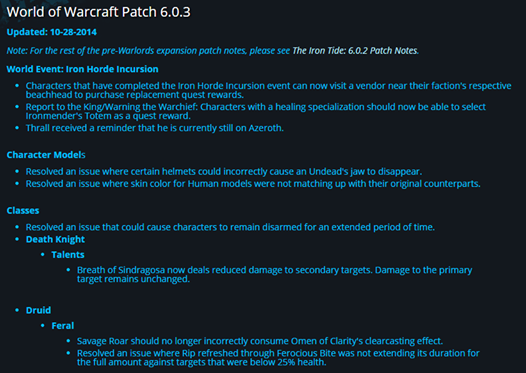 Hello, WRobot support now World of Warcraft 6.0.3 (19102). You need only to accept WRobot update. More info about WRobot update: here More info about Wow 6.0.3: here ps: If you play on European server, don't update today WRobot, wait tomorrow, if you have update WRobot today you can download WRobot for wow 6.0.2 here.
 -
Hello, Can you share log file of an bugged WRobot session (you can found it in folder "Logs").
-
@Seumas: Thank you. @flisin: I have fixed problem thank you.
-
Hello, Can you send me log file of bugged WRobot session (you can found it in "Logs" folder).
-
Hello, add object entry id in: Tab "General settings" Advanced general settings... Tab "Looting and Farming options" Add entry id in textbox "Harvest object (one id by line)" If you want id you can use wowhead or "dev tools" (tab "Tools"). If you need help to found id, give me complete object name.
-
Wait next wrobot update (coming in few minutes) and if you can tell me if reloger works. Thank you.
-
Bonjour, Vous devez mettre le nom dans la langue de votre client wow (donc en français si vous jouez en français). Pour que ça fonctionne, il faut faire attention aux majuscules/minuscules et accents (le mieux est de faire un copier/coller de wowhead). Pouvez-vous copier ici la liste d'objets que je vérifie ? Merci.

