Droidz
Administrators
-
Joined
-
Last visited
Everything posted by Droidz
-
Hello, If you can send me your profile (here or by PM).
-
If you want ignore some veins and harvest a lot of veins types, the best way is to blacklist it (method explain before). If you have a lot of veins at ignores for some veins types at harvest, the best way is to add id of veins in "Harvest object (one id by line)" option (and deactivate option "Harvest Minerals" and "Harvest Herbs").
-
Hello, The best way is to make quest profile for it. You can also try to make CustomProfile (but it is more complex). Look this: this profile and look how works quest "Aid for the Wounded")
-
Hello, Can you share your log file please (you can found it in "Logs" folder).
-
Hello, You are sure to use the good weapon name (case sensitive)? You can try to clear this option and relanche WRobot for complete auto this option.
-
Hello, Go to tab "General Settings", button advanced..., in new window go to tab "Looting and farming options" and add id of veins at ignore in textbox "Don’t harvest object (one id by line)". You can get id of object in wowhead URL, in this URL (Copper Vein): http://www.wowhead.com/object=1731/copper-vein you can find "object=1731", the Id is 1731 and it is an object (you need to put objects in this list, if url contain "item=1234" it is item id and this not works on "don't harvest object"). If you need help to get objects id tell me name of veins.
-
Hello, You fightclass seem corrupted, try to download again the fightclass.
-
Hello, Sorry for the down time, the update of mmorobot server has took longer than expected, everything works fine now. Do not hesitate to follow MmoRobot on Facebook and Twitter to get informations even when website has problems.
-
Hello, Sorry for the down time, the update of mmorobot server has took longer than expected, everything works fine now. Do not hesitate to follow MmoRobot on Facebook and Twitter to get informations even when website has problems.
-
The problem is due to Windows account privilege, you need to launch WRobot in administrator mode (to get access at the wow process memory), for this, you need to use administrator Windows session.
-
Hello, I have check and no wow update. Do you play on official wow server? Do you have administrator Windows session? WRobot has already works on your computer? (if never read this ). Can you send me your log file of bugged session please (you can found it in "Logs" folder)
-
Hello, If you use C# code you can use code like this: (replace Mighty Bash in "_mightyBash = new Spell("Mighty Bash");" by your spell name (in english)). If you use FightClass editor you can use spell condi like this: InterruptsTest.xml ps: I haven't tested this code/fightclass, if this don't work tell me. ps2: More result here: https://www.google.com/search?q=site%3Awrobot.eu+Interrupt
-
Hello, No sorry, you cannot use lua profile (you can convert it manually if you have know base in xml/lua). And new update, you need to download again beta.
-
Hello, I have try and WRobot don't seem detected by McAfee on virustotal: https://www.virustotal.com/fr/file/c67148163c99ef79911c130d9cfdef52482c3dac32fc75222576ced31da55dce/analysis/1408781311/ (but you can get problem with heuristic analysis). I have contacted McAfee support for their request to add to the whitelist WRobot. I comeback here when I have reply. Best regards, Droidz.
-
New update:
-
Hello, I have try to fix problem, if you can download again the wrobot beta. Thank you for report.
-
Hello, Thank you Trinigon.
-
Ok thanks, it is normal for update request (WRobot try to update to normal version, but I have removed update application to don't update). I have added in game radar (you can activate this option in tab "Map"), you need to download again WRobot beta.
-
Hello, Try it: ShaiMutilateRogue-avoidelite.xml I have added code in "General Settings" > "Additional C#".
-
Vous pouvez également jouer avec la distance de recherche des PNJ/Objets à tuer/ramasser ("General Settings" > "Advanced" > Tab "Others options" option "Npc/Mailbox Search Radius"). Sans voir la zone et le profil, c'est compliqué de vous aider.
-
-
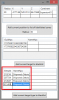
Hello, Go to tab "Tools", click on button "Black list editor". I have found this objects (id at end of url): http://www.wowhead.com/object=210216 http://www.wowhead.com/object=207724 http://www.wowhead.com/object=214547 http://www.wowhead.com/object=211423 In window add manually in 'blacklist by type' this ids:
-
Can you donwload and try again please. I have try to fix problem. Thanks
-
Bonjour, List<WoWUnit> unitTargetMe = new List<WoWUnit>(); var tempsList = ObjectManager.GetObjectWoWUnit(); for (int i = 0; i < tempsList.Count; i++) { if (tempsList[i].IsValid && tempsList[i].IsAlive && tempsList[i].IsTargetingMe && tempsList[i].CreatedBy <= 0 && tempsList[i].SummonedBy <= 0 // Is Pet? ) unitTargetMe.Add(tempsList[i]); } La liste des monstres/joueurs qui te cible sont dans la liste "unitTargetMe".
-
Hello, It is possible than zone has changed since that profile has been created. I have found this profiles for your level: - - And this profile for your zone (but it is skinning profile, try if this works for leveling): - If this profles don't works you can create your own profile (look in tuto forum) or use bot "Automaton" (works without profile).