




Mikko76
Members
-
Joined
-
Last visited
Everything posted by Mikko76
-
Hey. Been testing this one and it seems pretty good. Would it be possible to make one with out that movement? I was attacked by silly rogue in tanaan and then, just before he died some monk healed him back up. I tried to switch to monk and see if I could kill them both. But bot kept chasing that running rogue. Had stop Wrobot manually until I could attack that annoying monk. :P Thanks :-)
- 2 comments
- 1 review
-
 Hey. Haven't used this in a while but im back. Testing it on garrison target dummy, it only does about 24k dps, un-buffed 703 ilvl. :D Dunno if its my settings or whats wrong, I remember it used to do better. Edit; Never mind this post. I just sold all my gear, gave all golds I had to random lowbies and deleted every toon I had. I think 10 years is enough WoW'ing. :D Good luck & have fun! :-)
- 7 comments
- 2 reviews
-
-
Never mind. Stupid me :D
-
Hello! Havent been using wrobot in a while. Was wondering if its possible to use wrobot as "rotation bot" only?
-
-
-
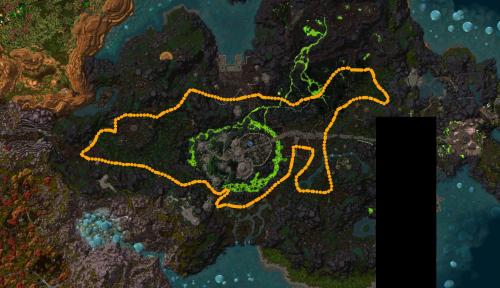 The entrance is at Tanaan Jungle 38.44 where it flies inside the Ironmonger's Hold. Inside 37.45 there are two big boxes where it gets stuck.
- 14 comments
- 2 reviews
-
Hey. It gets stuck behind the boxes every time it goes to tunnels in Ironmonger's Hold. How can I make skip that place? Other than that, looks good! :)
- 14 comments
- 2 reviews
-
-

- 1
-