




kazurengan
Members
-
Joined
-
Last visited
Everything posted by kazurengan
-
It's not risky, you will not give me your account details, you'll have your own windows server user and you'll set up your accounts there, i'll just provide you the windows server. And if you get banned you can just tell blizzard that your account got hacked, thats how i got my main account back, since they saw a connection from a different IP than my country. PS: Also you can edit relogger to wait some time to farm again What? i'm not trying to sell any VPS, I'm looking for a partner who can share his profits since i am paying for this server monthly i think it's fair
-
i mean a windows server that is running 24/7 world of warcraft bots not a private wow server
-
like i said, bots keep running 24/7 farming
-
No, he doesnt give me his account, he uses my server to farm with his bot accounts 24/7 and then we split profit
-
what do you mean?
-
all i need is my partner to have some wow accounts, so we can use them to farm on my server 24/7 since i cannot afford for wow accounts now
-
bumping
-
it worked, thank you
-
hi i am having this issue where i start relogger and wrobot windows keep popping up without stopping, unless i stop relogger they keep opening 1 by 1. how can i fix this?
-
I'm actually starting on RMT recently, i just hope this won't die soon
-
Hello, i'm looking for a partner that has many wow accounts, i have a server running 24/7 and we can bot there. hit me up if you're interested PM me or skype: robert.snow76
-
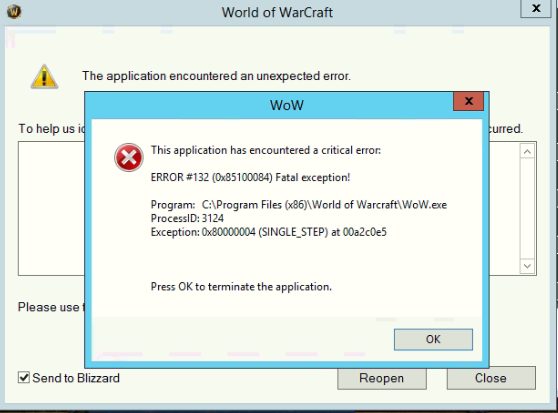
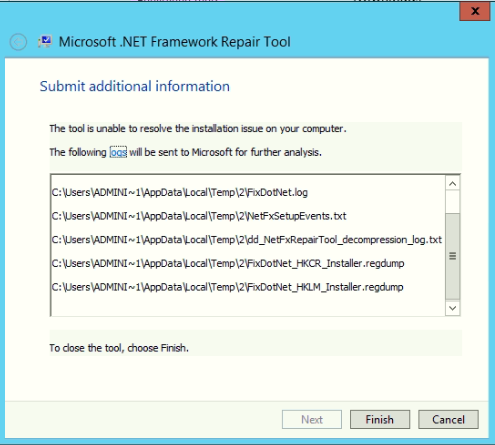
sometimes when i stop relogger.exe it shows the error from the first picture and just tried to run netframework fix and i get this, is this normal? relogger still isn't working :/
-
[E] 19:35:10 - ReloggerProfile > KillWRobotProcess(): System.ComponentModel.Win32Exception (0x80004005): Access is denied at System.Diagnostics.Process.Kill() at Relogger.Classes.ReloggerProfile.KillWRobotProcess()
-
yes i just installed it and did nothing, wow keeps freezing and opening again and sometimes it opens lots of wrobots as well. i'm not using any antivirus, tried to disable firewall as well but did nothing
-
relogger log 15 May 2017 23H58.log.html
-
this is so annoying, if i try to start wrobot through relogger the game gets to the loading screen and after a few seconds it will crash and re-open the wow client again. But it works fine if i open it through WRobot. i've tried to install net framework, directX disable blizzard streaming run pre-installed wrobot change operating system but none of them worked. how can i fix this?
-
today i tried to change my operating system windows 7 to 10 but didn't work as well. i don't get it why am i the only one relogger isn't working for lol
-
isnt there any other way to fix this?
-
tried to install directX repair net framework, disabled blizzard streaming, tried to download pre-installed wrobot none of them worked :/ also my relogger doesn't show any error logs for some reason
-
it keeps freezing and reconnecting, its so annoying
-
i did increase the wait after launch but didn't help also which tasks do you mean?
-
please still needing help with this
-
11 mai 2017 13H05 - GaNDU.log.html
-
ok so i have a relogger running on my old PC without any problems, but on my new PC it crashes when i run the relogger, it logs into the game and then crashes immediately. why is this happening? i have everything updated..
-